Joomla Language Overrides: Change Any Text Without Touching Core Files (and How WordPress Compares)

Sooner or later every site owner wants to change a piece of text they didn't write: a "Read more" button, a login label, a form message from an extension. In Joomla you do that from the administrator with Language Overrides, a core feature that needs no plugin and survives every update. This tutorial walks through it on Joomla 6.2, then compares it with the ways WordPress 7.1 handles the same job.
What a language override is
Joomla never prints interface text directly. Every label, button and message is a language constant that points to a value in an INI file. For example, the button under a blog article's intro text comes from this line in language/en-GB/joomla.ini:
JGLOBAL_READ_MORE_TITLE="Read more: %s"An override is a second line with the same constant and your own value. Joomla stores it in a separate file and reads it after the original, so your version wins:
; language/overrides/en-GB.override.ini
JGLOBAL_READ_MORE_TITLE="Continue reading: %s"
Three things follow from that design:
- Updates don't touch it. Joomla and extension updates replace the files in
language/en-GB/, but they leavelanguage/overrides/alone. - It works for extensions too. Any component, module, plugin or template that uses Joomla's language system can be overridden the same way, without editing its files.
- Front end and administrator are separate. Site overrides live in
language/overrides/, administrator overrides inadministrator/language/overrides/, one file per installed language.
You never have to edit these files by hand. The admin screen writes them for you.
When you need a language override
Any text that comes from Joomla or an extension, rather than from content you typed yourself, can be changed with an override. These are the situations where people reach for it most:
- Your site has its own vocabulary. A school has "students", a club has "members", a shop has "customers". Joomla's generic "Username" or "Create an account" can say what your visitors actually call things.
- Brand voice. "Read more …" and "Thank you for your email." are fine but bland. Overrides let buttons and messages sound like the rest of your site.
- A translation is wrong or awkward. Language packs are written by volunteers, and sometimes a string is too literal, too formal, or just a mistake. Fix that one string for your language without forking the pack or waiting for the next release.
- Regional spelling and wording. Joomla's default English is British. If your audience is American, an override turns "Use Dark colour scheme" in the user profile into "color".
- An extension's wording doesn't fit your use. A booking extension says "Add to cart" when you want "Book now". A form extension's success message doesn't mention your reply time. You don't need to wait for the developer or edit their files.
- Clearer messages and instructions. Login errors, form validation messages and empty-state text are written for every site at once. You can make them specific to yours, which cuts down on support emails.
- Simpler wording for clients in the administrator. Agencies often rename confusing back-end labels so the people editing the site understand them, with no effect on the front end.
- One language on a multilingual site. Change the French wording without touching the English or German, because each language has its own override file.
It's the wrong tool in a few cases:
- Text you wrote yourself. Article text, menu item titles, module titles and custom fields are content. Edit them where you created them.
- Layout or HTML changes. Moving a button, adding an icon or removing an element is a job for a template override.
- Hard-coded text. If an extension prints text directly instead of using a language constant, there's nothing for an override to replace. The Debug Language check below shows you which case you're in.
Step by step: your first override
We'll change the blog's "Read more: …" button to "Continue reading: …". The screenshots are from a clean Joomla 6.2 install with the Blog sample data and the default Cassiopeia template. If you're still on 6.1, the screens are the same. Our Joomla 6.2 "Mwezi" overview covers what else changed in that release.
1. Open Language Overrides
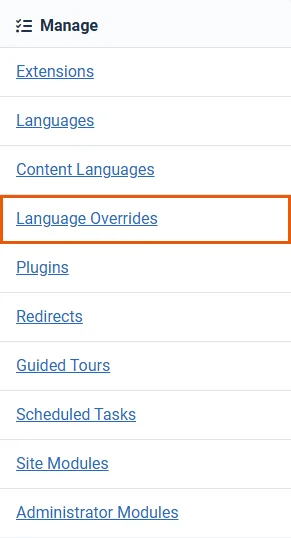
Go to System and find Language Overrides in the Manage panel.
2. Choose the language and location
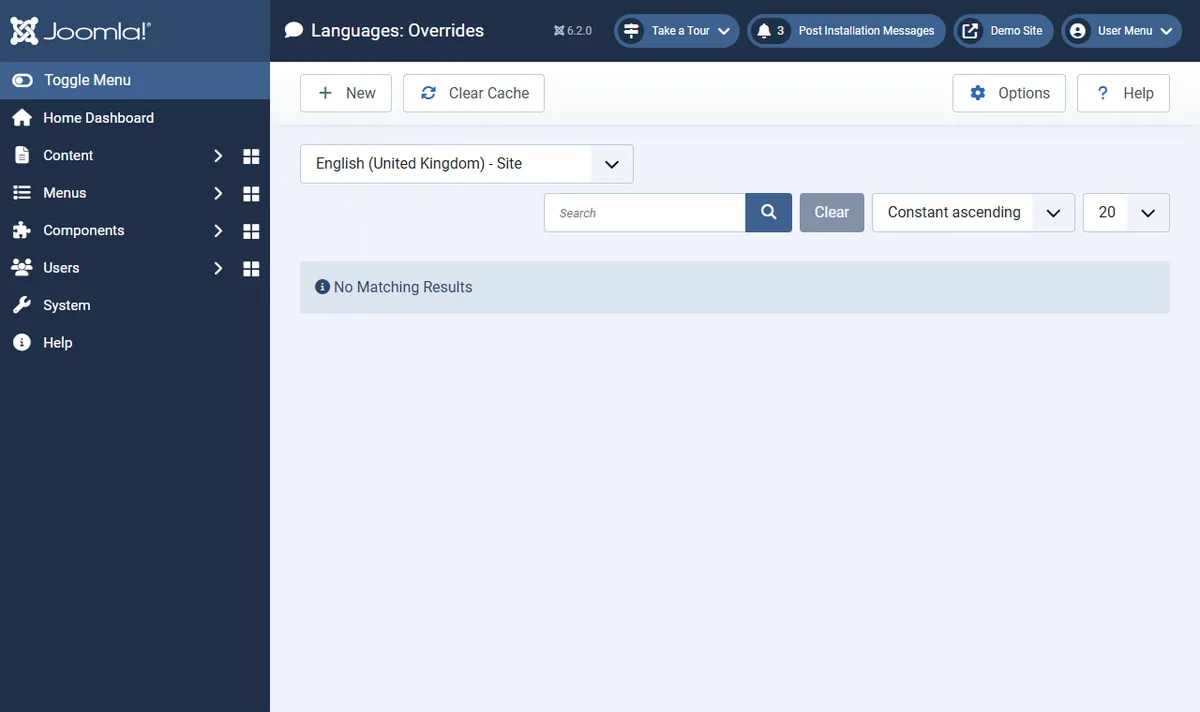
The dropdown at the top lists every installed language twice, once for Site (the front end) and once for Administrator. The "Read more" button is on the front end, so pick English (United Kingdom) - Site. A new install has no overrides yet, so the list is empty.
3. Search for the text you want to change
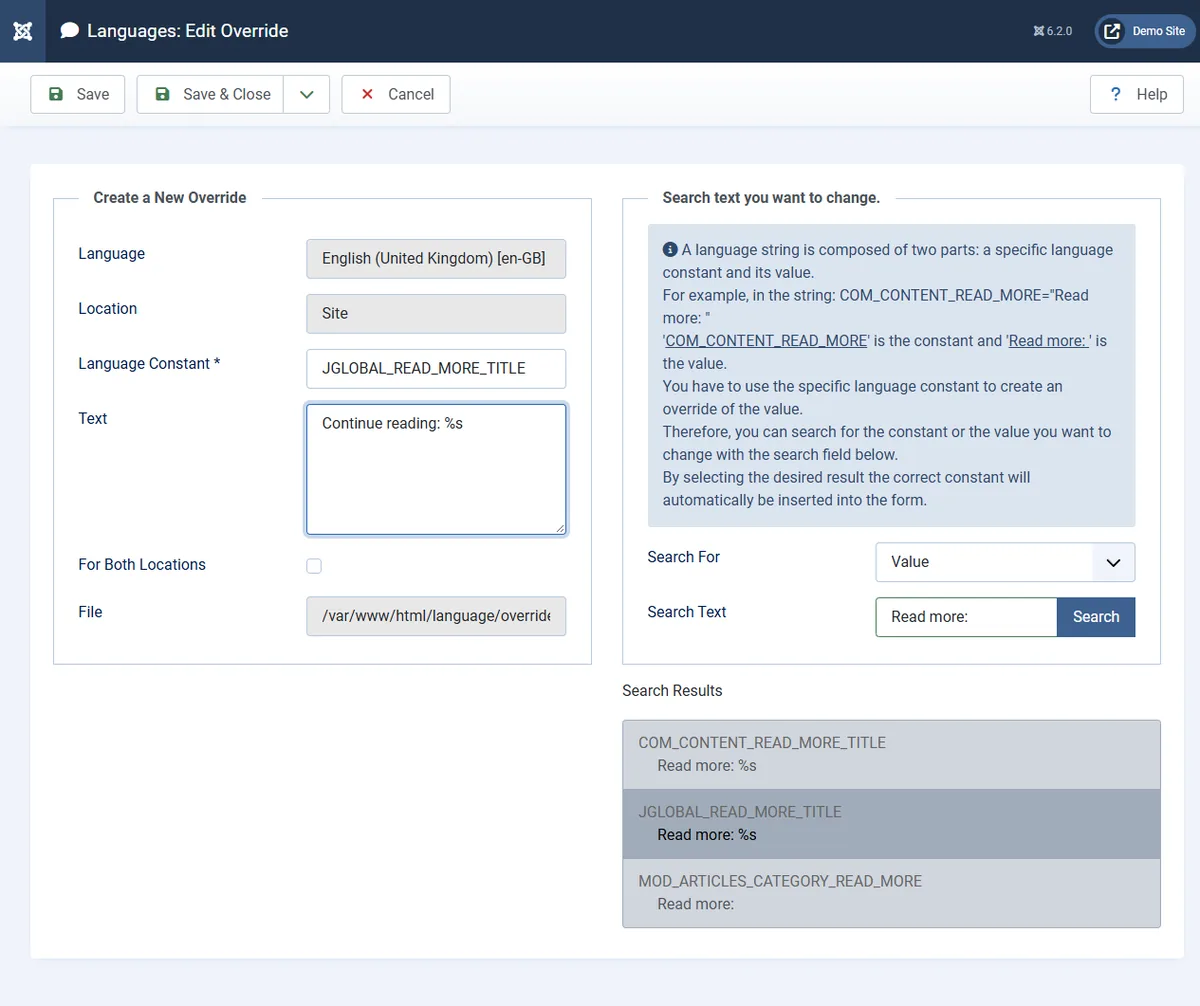
Click New. The right-hand panel searches every language string Joomla knows about. Leave Search For on Value, type the text as you see it on the page (Read more:) and press Search.
You'll often get more than one result. Here there are three: COM_CONTENT_READ_MORE_TITLE, JGLOBAL_READ_MORE_TITLE and MOD_ARTICLES_CATEGORY_READ_MORE. They hold the same words but are used in different places. The blog layout in Joomla 6 uses JGLOBAL_READ_MORE_TITLE. If you aren't sure which one a page uses, the Debug Language trick further down tells you.
4. Pick the constant and write your text
Click the result you want. Joomla copies the constant into Language Constant and the current value into Text. Change the text to Continue reading: %s and keep the %s: that's where Joomla inserts the article title. Then click Save & Close.
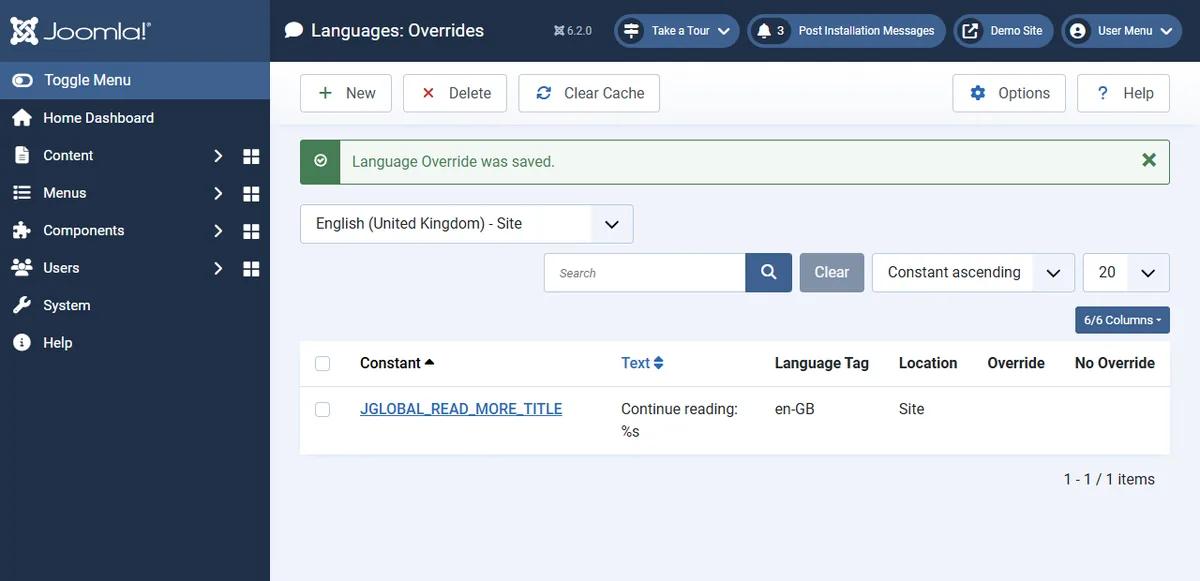
The new override appears in the list, where you can edit or delete it later.
language/overrides/en-GB.override.ini.5. Check the front end
Reload the home page. Every button that uses that constant has changed, including the ones in modules.
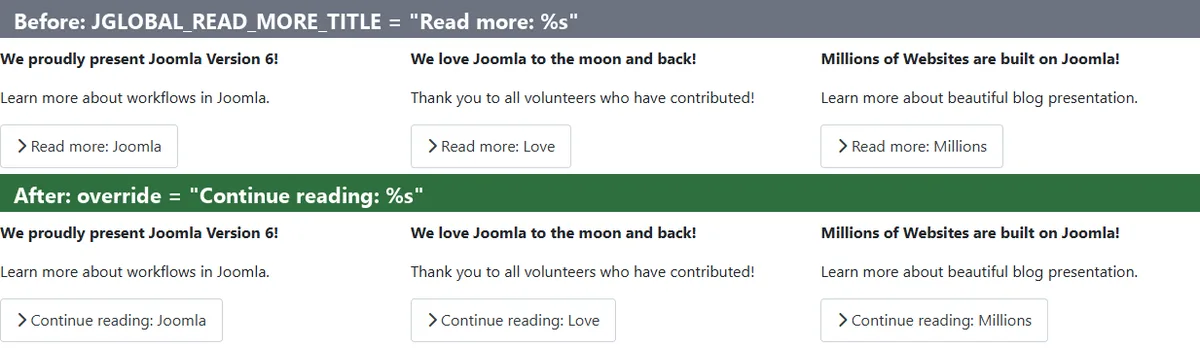
Three overrides worth making on most sites
- Read more buttons.
JGLOBAL_READ_MORE_TITLE(with the title) andJGLOBAL_READ_MORE(without it). Wording like "Continue reading" or "Full story" fits your voice better. Joomla also usesJGLOBAL_READ_MORE_TITLEfor the button'saria-label, so screen-reader users hear your wording too. - Login module labels.
MOD_LOGIN_VALUE_USERNAME("Username") andMOD_LOGIN_REGISTER("Create an account"). If your members know their login as a "member number" or "customer ID", say so on the form. - Contact form confirmation.
COM_CONTACT_EMAIL_THANKS("Thank you for your email.") is a good place to tell people when to expect a reply.
The same approach works for extension strings. If a component's button label or email subject doesn't fit your site, search for the text, override it, done. When you choose extensions, it's worth checking that they ship proper language files. An extension that hard-codes its text can't be changed this way. If you're shopping for one, our Joomla extensions catalogue is a good place to start.
Finding the constant when search isn't enough
Searching by value works until the same words appear in a dozen constants, or the text on the page has been shortened or styled. Joomla has a built-in way to see which constant produced each string: Debug Language.
- Open System → Global Configuration → System.
- Set Debug Language to Yes and Language Display to Constant, then save.
- Reload the page you want to change.
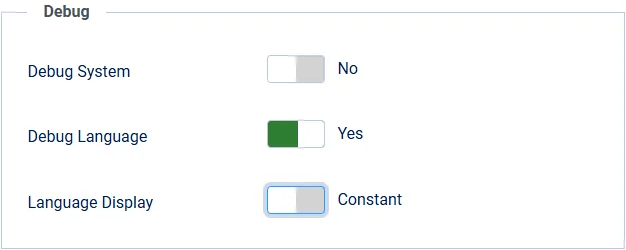
Every translated string is now shown as its constant, wrapped in **. A string wrapped in ?? has no translation loaded. Text with no markers at all is hard-coded, which means an override can't reach it and you'll need a template override instead.

Turn Debug Language off again when you're done. Visitors see the markers too.
How WordPress handles the same job
WordPress has no screen for this in core. Its text also runs through translation functions (__(), _e() and friends) with a text domain such as default for core or woocommerce for that plugin, but changing the English text means picking one of the following.
Option 1: a gettext filter in code
The developer route is a filter in your child theme's functions.php or in a small custom plugin. Since WordPress 5.5 you can target one text domain with gettext_{$domain}, which is lighter than the catch-all gettext filter:
add_filter( 'gettext_default', function ( $translation, $text ) {
    if ( 'Lost your password?' === $text ) {
        return 'Forgot your password?';
    }
    return $translation;
}, 10, 2 );
It works, and it can do things Joomla overrides can't, such as changing a string only on one post type. The downsides: you need to know the exact original string and its text domain, plural strings (_n()) and strings with context (_x()) need their own filters, and the WordPress reference itself warns that gettext callbacks run for every translated string on the page. If you put the snippet in a parent theme's functions.php, the next theme update deletes it.
Option 2: edit the translation files
You can create your own .po/.mo files, but files in wp-content/languages/ are replaced whenever WordPress installs a language-pack update. Since WordPress 6.5, language packs also ship a .l10n.php file, and WordPress loads that instead of the .mo when both exist. So an edited .mo can be silently ignored even before the next update overwrites it.
Option 3: Loco Translate
Loco Translate (over a million active installs) adds a translation editor to the dashboard. It scans source files for strings and lets you save your edits in a protected languages/loco/ folder that updates don't overwrite. That folder is the important part: pick the System location shown below and the next language update erases your work.
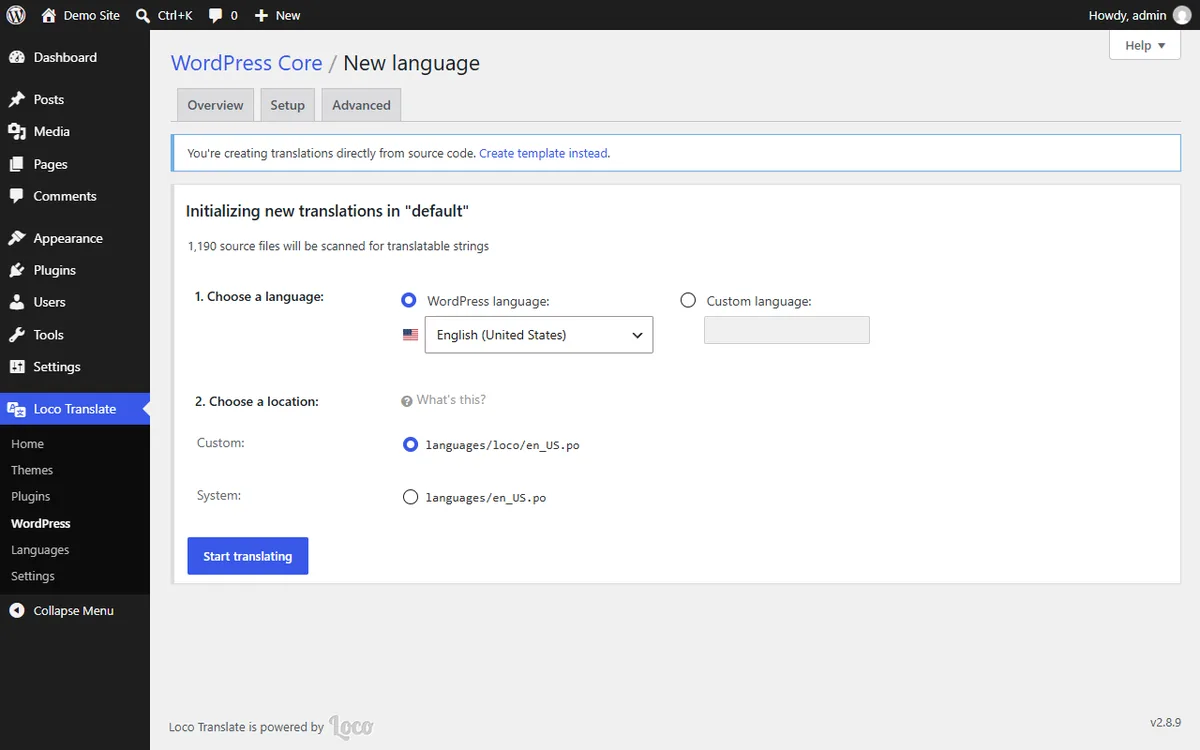
It's a capable tool, but it's a full translation editor built for translating sites into other languages. Changing one English label means creating an English "translation" of the whole text domain, and on a fresh English install Loco first warns that there's no template file and suggests you create one.
Option 4: Say What?
Say What? is the closest thing to Joomla's screen: a list of replacements under Tools → Text changes. You enter the original string, its text domain and the replacement, and it's stored in the database, safe from updates.
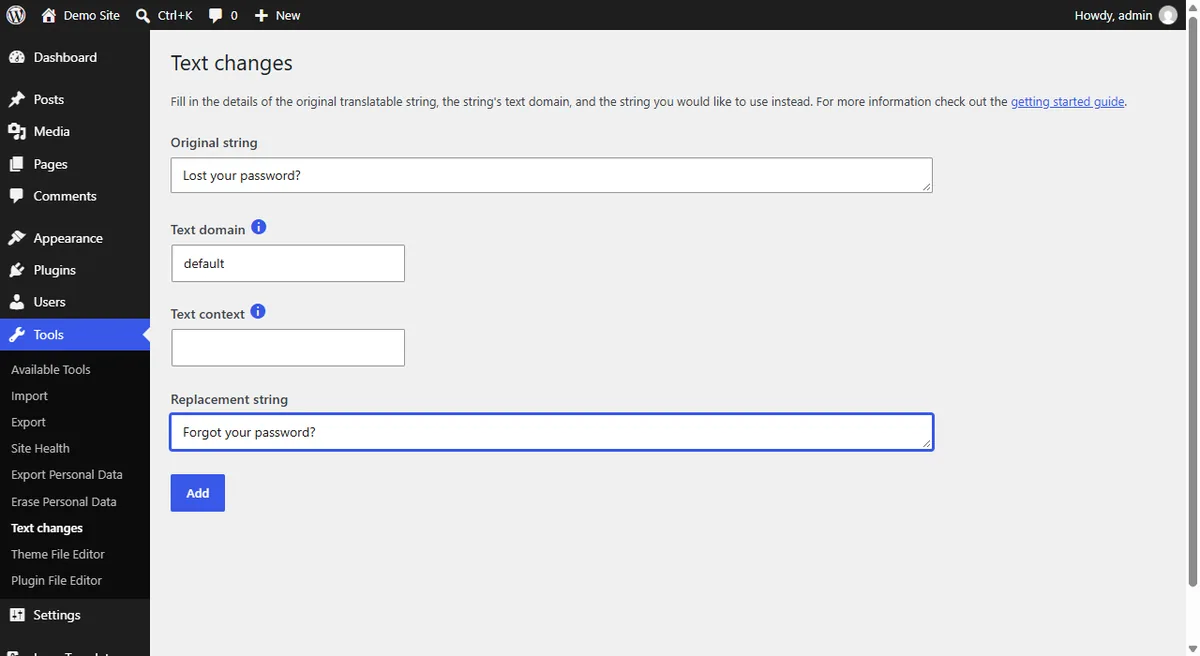
What it doesn't do in the free version is help you find the string. There's no search across installed strings. You type the original exactly, or you look it up in the source code. String discovery is part of the paid Pro version.
Side by side
| Joomla 6 Language Overrides | WordPress 7.1 | |
|---|---|---|
| In core | Yes, System → Language Overrides | No. Code snippet or plugin |
| Find the string from the admin | Search all strings by text or constant | Loco scans files; Say What? free needs the exact string |
| See which string is on the page | Debug Language shows constants in place | No core equivalent |
| Survives core and extension updates | Yes, separate override files | Only if stored in the right place (child theme, languages/loco/, plugin database) |
| Front end and admin separately | Yes, Site and Administrator are separate | Only by text domain, or with conditions in code |
| Per language on multilingual sites | Yes, one override file per installed language | Per locale with Loco; in code you add the checks yourself |
| Conditional changes (one page, one post type) | No, overrides apply site-wide per language | Yes, with a gettext filter |
| Skills needed | Admin access | PHP, or a plugin and its settings |
Why Joomla's approach holds up better
WordPress can change almost any string. The difference is who can do it, how they find the string, and whether the change is still there next month.
- It's part of the product. Every Joomla site has the same screen in the same place. There's no plugin to choose, update, or replace when it's abandoned, and no snippet that only the developer who wrote it understands.
- You can find the string without reading code. Search by visible text, or turn on Debug Language and read the constant off the page. On WordPress, finding the original string and text domain is often the hardest part.
- Updates are a non-event. Overrides sit in their own files that Joomla's updater doesn't touch. On WordPress, whether a change survives depends on where you put it, and the wrong choice fails silently.
- It respects the structure of the site. Front end and administrator, and each installed language, have their own overrides, which matters for agencies running multilingual client sites.
Where WordPress is ahead is conditional logic. A developer can change a string only on the checkout page, and Joomla overrides can't do that. For the everyday job of making a site say what its owner wants it to say, Joomla's built-in tool is faster and safer, and you can hand it to a non-developer.
Troubleshooting: the override doesn't show
- Wrong location. A Site override doesn't affect the administrator, and the other way round. Check the dropdown, or tick For Both Locations.
- Wrong language. On a multilingual site, add the override to each language that needs it.
- Wrong constant. If search returned several constants with the same text, you may have overridden one the page doesn't use. Confirm with Debug Language.
- Cached pages. If page caching is on, clear it under System → Clear Cache, along with any CDN or server cache.
- A new extension's strings don't appear in search. The search uses its own index. Click Clear Cache in the Overrides toolbar to rebuild it.
- Placeholders went missing. If the original contains
%sor%d, keep them in your text. Joomla fills them with titles, names or numbers. - The text is hard-coded. If Debug Language shows no markers around it, the template or extension prints it directly. Use a template override, or ask the developer to move the text into a language file.