Next Inventory 6.1.1: smoother Check Out, no more list limits, and much faster

Next Inventory 6.1.1 is a free update for everyone on 6.1. It fixes the Check Out window, removes the 100-entry limit from every drop-down list, and makes the busiest screens many times faster when your inventory grows large. Nothing changes in how you work, and nothing needs setting up again.
Check Out works smoothly again
On some websites, clicking Check Out on an item showed an error ("E.map is not a function") instead of the Check Out window, and the whole Items page went blank with it. Thank you to the customer who reported it. The cause is fixed, and Next Inventory now copes calmly with the kind of unexpected server answer that set it off, so the same thing cannot take a page down again.
Typing a brand-new recipient name in Check Out also behaves as you would expect now: the name is kept as you type it, without having to press Enter first.
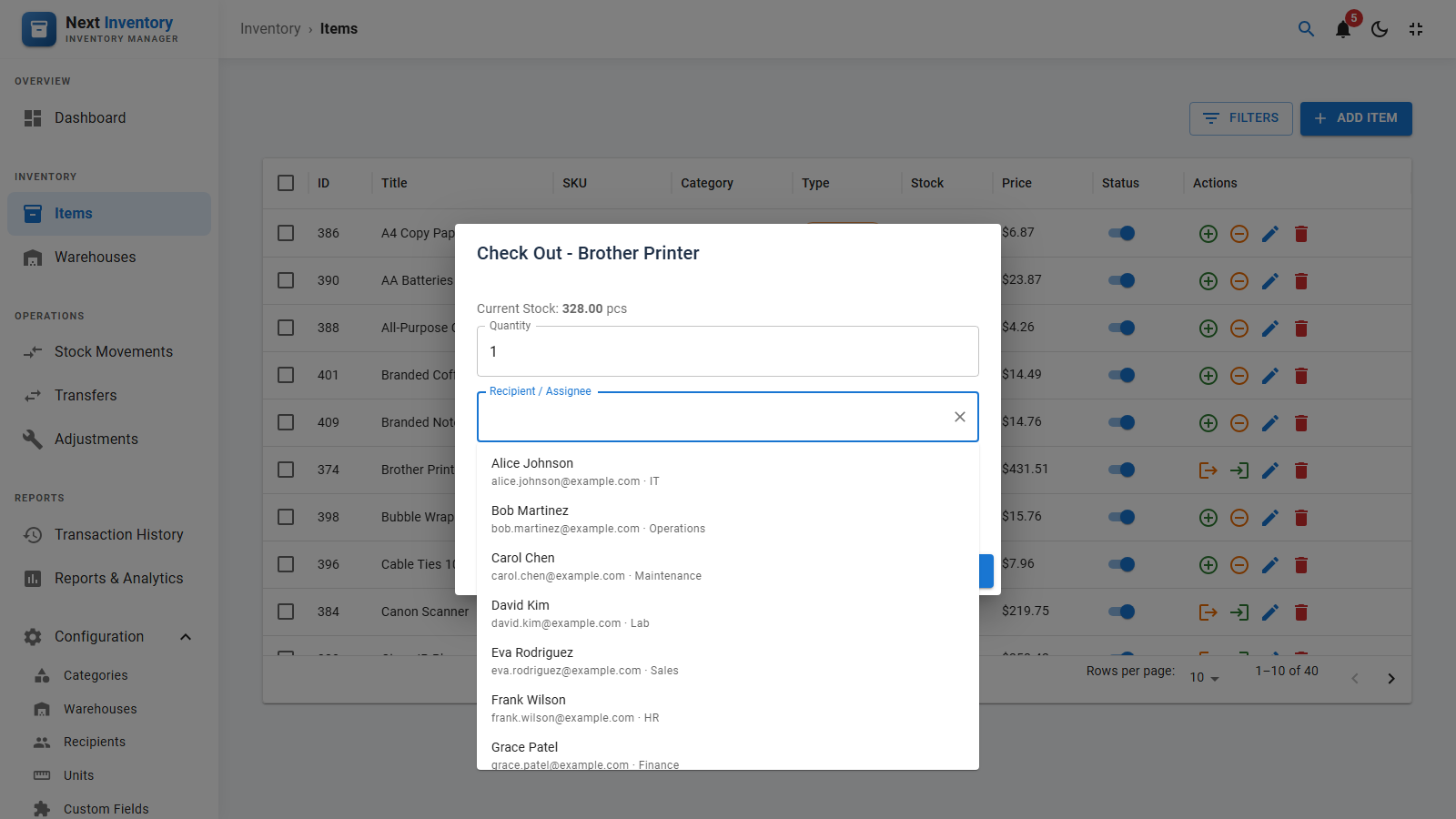
Find any recipient, however long your list
The recipient list in Check Out only ever showed the first 100 names in alphabetical order, so anyone further down simply could not be picked. That limit is gone, and not just for recipients: it also applied to the category, warehouse, unit and field group lists.
Every one of these lists now works the same way:
- Type to search. Start typing a name, email or department and the matches appear straight away.
- Scroll for more. Without typing anything, scroll down and more entries load as you reach the bottom, whether you have 50 or 50,000.
- Tell look-alikes apart. Recipients show their email and department underneath, and warehouses show their address.
- Your saved choices always show. Opening a record whose recipient or category sits far down the list now shows it properly, instead of an empty field.
Much faster with large inventories
We tested Next Inventory with a deliberately huge inventory: 50,000 items and 500,000 transactions. The screens that slowed down the most are now fast again.
| What you open | Before (6.1.0) | Now (6.1.1) |
|---|---|---|
| Transaction History | 4.4 seconds | 0.2 seconds |
| Dashboard: recent activity | 2.7 seconds | 0.2 seconds |
| Transaction History, filtered by type | 1.7 seconds | 0.2 seconds |
| Background notification check (slowest case) | 9 seconds | 0.3 seconds |
| Items list | 0.5 seconds | 0.25 seconds |
| Inventory Aging report (data downloaded) | 14.9 MB | 16 KB |
| Typing in a search box | Short pause after each key | No pause |
Smaller inventories benefit too, just less visibly. The notification check that runs once a minute in the background no longer re-reads your whole inventory every time, which also takes load off your server.
Small fixes that add up
- Custom field filters work. Filtering the Custom Fields list by type, area or field group now actually filters it.
- Push notifications can be switched on. Turning on browser notifications no longer fails without telling you why.
- Signed out? Just sign back in. If your session runs out while a screen is open, Next Inventory now asks you to sign in again and then carries on where you were.
- Problems stay contained. If something goes wrong inside a pop-up window, the message now appears in that window with Try again and Close, instead of replacing the whole page.
- Easier support. The error message has a Copy diagnostics button that copies everything our support team needs, including your version number, so you can paste it straight into a ticket.
- No more repeated rows. Paging through a long list no longer shows the same row twice or skips one when two entries share a name.
Tested on every setup we support
Before release, 6.1.1 was installed and upgraded from 6.1.0 on twelve different combinations, each one checked end to end, from installing to removing again:
| Joomla | MySQL 8.0 | MySQL 8.4 | MariaDB 10.6 | MariaDB 11.4 |
|---|---|---|---|---|
| Joomla 4.4 | Passed | Passed | Passed | Passed |
| Joomla 5.4 | Passed | Passed | Passed | Passed |
| Joomla 6.2 | Passed | Passed | Passed | Passed |
What this means for you
Update from the Joomla updater as usual (System → Update → Extensions) with your download key. The update keeps all your data and settings, makes no changes to your database, and needs nothing switched on afterwards. Next Inventory 6.1.1 runs on Joomla 4, 5 and 6 with PHP 8.1 or newer.