Next DB
A Joomla-native, phpMyAdmin-style database administration tool — multi-database editing, fine-grained access control and a full audit trail, all inside the Joomla admin panel without leaving your site.
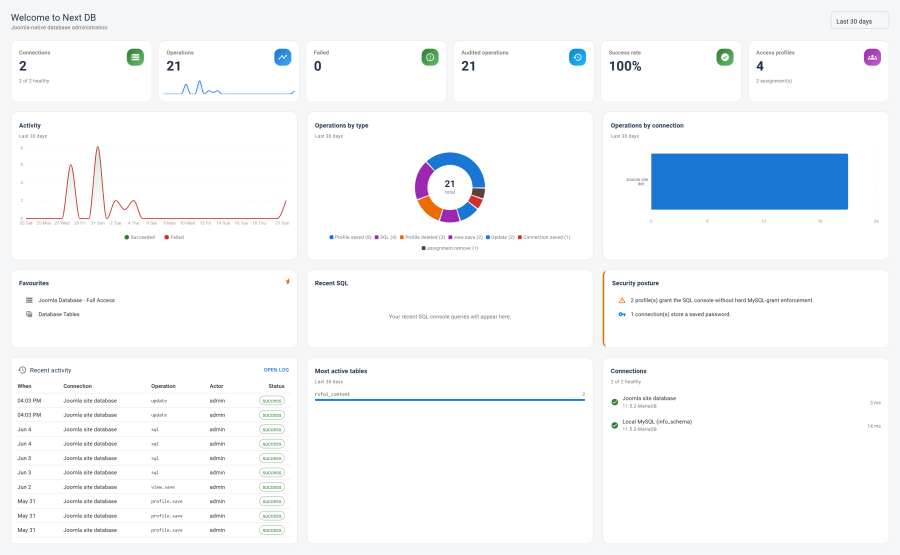
What It Does
Site operators often need direct database access — inspecting tables, running ad-hoc queries, fixing data, exporting backups — but handing out phpMyAdmin credentials grants far too much power. Next DB solves this by bringing the full database administration workflow into the Joomla admin as a single-page application, then wrapping it in the same user-and-group access model you already manage in Joomla.
Operators open Components → Next DB → Dashboard and work with the Joomla site database immediately; additional MySQL/MariaDB, PostgreSQL or SQLite servers can be attached as named connections. Every browse, edit, structure change, SQL query and export is checked against your access-control profiles and recorded in the audit trail — meaning you can grant a developer read-only access to one table, or give a database administrator full rights on a staging connection, without touching Joomla's global Super User grants.
Core Joomla tables (authentication, permissions, extensions and database system tables) are always write-protected, Super Users included, so Next DB cannot accidentally be used to lock you out of your own site.
Key Concepts
| Term | Meaning |
|---|---|
| Connection | A stored target database (driver, host, credentials, options). The Joomla site database is always present and is displayed as "Joomla site database". |
| Profile | A named permission set that controls which connections, tables and operations a user or group may use. |
| Assignment | A link from one profile to a Joomla user or user-group. Direct-user assignments take precedence over group assignments. |
| Operation | A specific action a profile may permit per connection: browse, insert, update, delete, structure, export, import. SQL-console access is a separate switch. |
| SQL console | The query editor. Runs one statement at a time; multi-statement scripts are handled via Import. Keeps 50 entries of history per browser. |
| Core-table protection | Blocks all changes (row edits and structure changes) to Joomla core tables and the database's internal system tables. Always active on the Joomla site database; configurable per connection. |
| Audit policy | Per-profile (and global-default) rules governing which operations are recorded, whether failures are logged, and how long records are retained before automatic pruning. |
| Data View | A saved SELECT query exposed as a read-only front-end page for site users, without giving them access to the admin panel. |
| Delegated management | A profile setting that lets non-Super-User Joomla admins manage connections, profiles, data views or audit — scoped to exactly the actions granted, and enforced on the server. |
Key Features
- Multi-database editor — browse, insert, edit and delete rows across MySQL/MariaDB, PostgreSQL and SQLite from a unified interface. See Editor.
- SQL console — a query editor with syntax highlighting, one-statement execution and 50-entry browser history. See SQL Console.
- Structure editor — add, modify or drop columns, indexes and foreign keys, previewing the exact changes before they're applied. See Structure Editor.
- Export & import — SQL dumps (engine-correct quoting, full database or per-table) and CSV, with multi-statement script import. See Export & Import.
- Connections manager — attach external databases with encrypted stored passwords and per-engine options. See Connections.
- Profiles & ACL — Joomla-native profiles scoping connections, tables and operations to users or groups. See Profiles & ACL.
- Delegated management — non-Super-User admins can manage specific areas (connections, profiles, data views, audit) as granted by their profile. See Delegated Management.
- Audit trail — before/after row snapshots, per-profile policy, configurable retention, scheduled automatic pruning and a filtered log viewer. See Audit Trail.
- Data Views — saved SELECT queries surfaced as read-only front-end pages for site visitors. See Data Views.
- Security settings — SQLite path allow-list, sensitive-column redaction in audit snapshots, core-table protection configuration. See Security.
Requirements
| Requirement | Detail |
|---|---|
| Joomla | 4.x, 5.x, or 6.x |
| PHP | 8.1 or higher |
| MySQL / MariaDB | Hardened and recommended for production |
| PostgreSQL | Supported and tested |
| SQLite | Supported and hardened |
| MS SQL Server / Oracle / DB2 | May connect but not yet hardened — use at your own risk |
| HTTPS | Strongly recommended (credentials transit every request) |
Support
- Website: nextsoftware.dev
- Email: [email protected]
- Licence: GNU General Public License v2 or later