Getting started with the REST API
The Next Exams REST API lets another program work with your exams without a browser: keep the question bank in step with another system, pull attempts and results into a gradebook or a data warehouse, publish exams on a schedule.
It is served by Joomla's own Web Services application, so every address has the same shape:
https://your-site.example/api/index.php/v1/nextexams/…If Joomla is installed in a subfolder, the subfolder comes before /api — for example https://example.com/exams/api/index.php/v1/nextexams/exams.
Every endpoint is described field by field in the API Reference section of this documentation, generated from the same OpenAPI document your site serves at /media/com_nextexams/openapi.yaml.
What you can do with it
| Resource | Read | Write |
|---|---|---|
| Subjects | List, get | Create, update, publish, delete |
| Tags | List, get | Create, update, publish, delete |
| Questions | List, get, version history, question types | Create, replace, publish, delete |
| Exams | List, get (settings and structure) | Publish, delete |
| Attempts | List, get (with every response) | — |
| Reports | Overview, item analysis, per student | — |
Attempts and reports are read-only by design. An attempt is a record of what a person did, so no API scope lets a program create or alter one.
An exam's structure (its sections, questions and random-draw rules) is read here and built in the Exam Studio.
Enabling it
The API needs two things:
- The API Tokens app is on. Go to Next Exams → App Manager. It is on by default. Switching it off refuses every API request at once, which makes it the emergency stop if you think a token has leaked and cannot tell which one.
- The Web Services plugin is enabled. System → Plugins → Web Services - Next Exams. Installing Next Exams enables it. If it is disabled, every address above answers 404.
Joomla's own API switch (Global Configuration → Server) is not involved. Next Exams authenticates its own tokens.
Creating a token
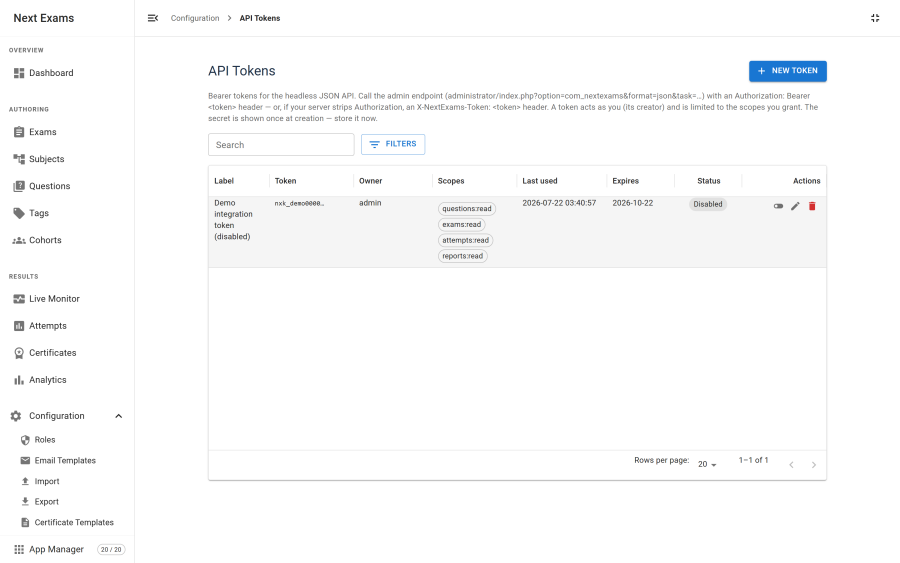
- Go to Next Exams → API tokens and choose New token.
- Give it a label that says what it is for, such as "Moodle gradebook sync".
- Choose its scopes. Grant only what the integration actually needs.
- Optionally set an expiry date. The token stops working at the end of that day.
- Save, and copy the token now.
The token is shown once. Only a hash is stored, so nobody can show it to you again. If you lose it, revoke it and create another.
Tokens start with nxk_. The list shows a masked prefix, so you can tell tokens apart without exposing them.
Scopes
| Scope | Grants |
|---|---|
subjects:read |
List and read subjects |
subjects:write |
Create, update, publish and unpublish subjects |
subjects:delete |
Delete subjects |
questions:read |
List and read questions, their versions, and tags |
questions:write |
Create, replace, publish and unpublish questions; create and edit tags |
questions:delete |
Delete questions and tags |
exams:read |
List and read exams |
exams:write |
Change exams. Also needed, on top of questions:write, for any question write that puts a question into an exam |
exams:delete |
Delete exams |
exams:publish |
Publish and unpublish exams |
lookups:read |
The list of question types |
attempts:read |
List and read attempts |
reports:read |
Per-exam reports |
Scoping is default-deny. Every endpoint is mapped to the scope it needs, and anything not mapped is refused. A new endpoint in a later release is not quietly reachable by your existing tokens.
Authentication
Send the token as a bearer credential:
curl https://your-site.example/api/index.php/v1/nextexams/exams \
  -H "Authorization: Bearer nxk_your_token"
The three gates
Every request passes three independent checks, and any one can refuse it:
- The token's scope for this endpoint. Refused with
403 MISSING_SCOPE. - The Next Exams role of the user who created the token. Refused with
403 FORBIDDEN. - Joomla's
core.managepermission on Next Exams for that user. Refused with403 ACCESS_DENIED.
A token can never do more than its creator can. A write scope on a token whose creator has a read-only role gives that token nothing, because the role check still refuses.
Binding and lifetime
| Property | Behaviour |
|---|---|
| Owner | The user who created it. It cannot be changed afterwards |
| Secret | Fixed. Editing a token never changes its secret |
| Expiry | Optional. An expired token answers 401 INVALID_TOKEN |
| Published | A token can be switched off without deleting it |
| Owner blocked | Refused with 403 ACCOUNT_UNUSABLE, as is an owner who must reset their password |
| Last used | Recorded, so you can find tokens nobody uses any more |
When the web server drops the Authorization header
Some Apache and PHP setups strip the Authorization header before PHP sees it. Your token is then never received, and every request answers 401 MISSING_TOKEN even though you sent one.
Send the token in a custom header instead. Custom X- headers always reach PHP:
curl https://your-site.example/api/index.php/v1/nextexams/exams \
  -H "X-NextExams-Token: nxk_your_token"
If you control the server, Joomla's shipped htaccess.txt contains the rewrite rule that passes Authorization through.
Checking the API is reachable
curl -i https://your-site.example/api/index.php/v1/nextexams/question-types \
-H "Authorization: Bearer nxk_your_token"| Answer | Meaning |
|---|---|
200 with a list of types |
Everything works (the token needs lookups:read) |
401 MISSING_TOKEN |
No token arrived. Try the X-NextExams-Token header |
401 INVALID_TOKEN |
Wrong, expired or switched-off token |
403 API_DISABLED |
The API Tokens app is off |
404 with a numeric code |
The Web Services - Next Exams plugin is disabled, or the address is wrong |
Managing tokens
| Action | Required permission |
|---|---|
| View tokens | api_tokens — view |
| Create, edit, switch off or delete a token | api_tokens — manage |