Setting up webhooks
Webhooks push exam events out to other systems as they happen: an automation platform, a CRM, a gradebook, your own service. Next Exams sends an HTTP POST to each endpoint you configure, signed so the receiver can prove it came from your site.
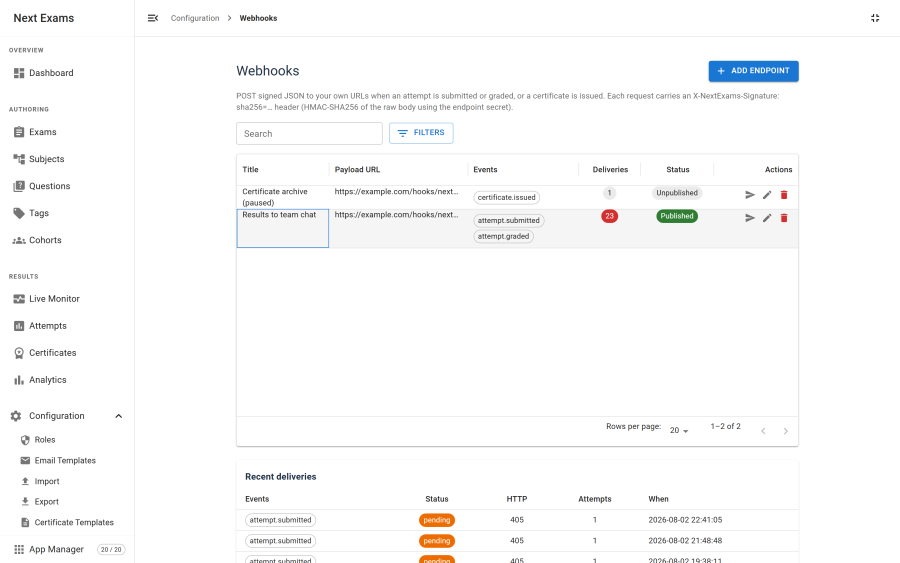
Setting up
- Go to Next Exams → Webhooks and add an endpoint.
- Enter the URL your receiver listens on. Use HTTPS.
- Tick the events it should receive.
- Save. A signing secret is generated for the endpoint; copy it into your receiver. See Verifying signatures.
- Press Send test to confirm the endpoint is reachable and your verification works.
Webhooks need the Webhooks app to be on in the App Manager. With it off, nothing is sent.
Choosing events
| Event | Sent when |
|---|---|
attempt.submitted |
An attempt is handed in: by the examinee, by the timer, by an invigilator, or by the auto-close sweep |
attempt.graded |
Every question of an attempt is graded. Straight after submission for an automatically graded exam; after a person grades the rest otherwise |
certificate.issued |
A passing attempt earns its certificate |
ping |
You press Send test. Never sent by a real event |
An endpoint receives only the events it subscribes to. An endpoint with no events ticked receives nothing, which is worth checking first when a new endpoint seems dead.
attempt.graded is usually the one a gradebook wants: its score is final. An attempt abandoned without being handed in sends nothing.
The event pages in the API Reference list each event's fields with an example.
Delivery and retries
- When an event happens, a delivery is queued for every endpoint subscribed to it.
- Next Exams sends it straight away, with an 8-second timeout.
- Any 2xx answer is a success. Anything else, a timeout, or a redirect is a failure.
- A failed delivery is retried later, waiting 10, 20, 30 and then 40 minutes between attempts.
- After five attempts in all, it is marked failed and not tried again.
A slow or dead endpoint never breaks grading. Delivery runs beside the result, not inside it. Failures are written to the com_nextexams log category.
Warning: retries are sent by the Webhooks scheduled task. Without it, a delivery that fails its first attempt stays pending. See Scheduled tasks.
Redirects are not followed. An endpoint that answers 3xx never succeeds, because a redirect would let a permitted address bounce the request to a forbidden one. Point the webhook at the final URL.
The delivery log
Each endpoint lists its recent deliveries with the status code and any error. That is usually enough to diagnose a failure without the logs.
Choosing endpoints
Next Exams refuses to send to a private or internal address. This is a security control, not a fault, and it is why a receiver on your own machine or local network appears not to work.
Refused destinations:
- anything that is not HTTP or HTTPS
- loopback addresses
- private ranges
- reserved and link-local ranges, which include cloud metadata endpoints
The check runs when the delivery is sent as well as when you save the endpoint. Checking only on save would be defeated by a host name that resolves to a public address when saved and an internal one later.
For a genuine on-premises receiver there is an opt-in setting that allows private addresses. It is off by default. Turning it on means anyone who can create a webhook endpoint can make your server send requests into your internal network, so keep the webhooks permission tightly held.
Webhooks versus the API
Use both:
- A webhook says something happened, at the moment it happens.
- The REST API reads the full record when you need it.
A gradebook integration typically listens for attempt.graded, then fetches that attempt with GET /attempts/{id} if it needs every response. Polling the API for new results instead works, but it is slower and costs more requests.
Access control
| Action | Required permission |
|---|---|
| View endpoints and deliveries | webhooks — view |
| Create, edit or delete an endpoint | webhooks — manage |
| Send a test, regenerate a secret | webhooks — manage |