Scheduled Tasks
Five Next Exams routines run in the background through Joomla's own Scheduled Tasks system. None of them are created for you, because Joomla scheduled tasks need a trigger strategy that only you can choose.
Nothing breaks without them — Next Exams sends its mail immediately when an event fires, and closes abandoned attempts opportunistically. What you lose is every retry and every time-based action.
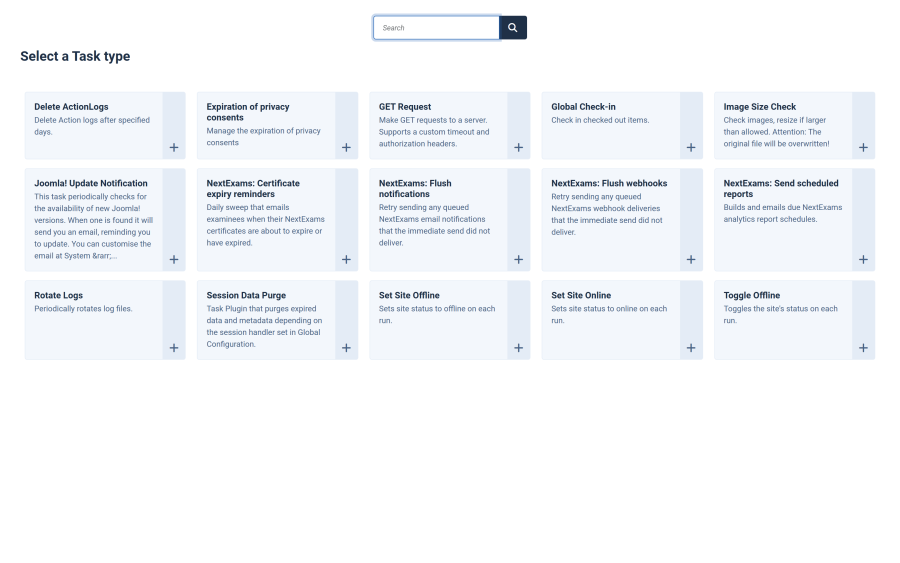
The five routines
| Routine | What it does | Without it |
|---|---|---|
nextexams.notifications.flush |
Retries queued emails that failed their immediate send, and sends certificate issued emails that were waiting for results to be released | A failed email is never retried, and a waiting certificate email goes out only when an administrator next opens Attempts or the Live Monitor |
nextexams.webhooks.flush |
Retries queued webhook deliveries that failed | A failed delivery stays pending forever |
nextexams.certificates.sweep |
Expires certificates that have passed their validity and sends expiry reminders | Reminders are never sent at all |
nextexams.reports.run |
Builds and emails due analytics reports | Scheduled reports are never sent at all |
nextexams.attempts.sweep |
Closes attempts the examinee abandoned — see Auto-close | Attempts still close, but only while somebody has an admin page open |
The distinction in the last column matters, and it splits three ways:
- The two flush routines are safety nets for something that usually succeeds on the first attempt.
- Certificate reminders and scheduled reports have no immediate path at all, so with no task they simply never happen.
- The attempt sweep is the exception: it also runs opportunistically whenever an administrator loads the live monitoring board or the Attempts list, at most once a minute. On a site whose admin pages are opened regularly, it will keep up on its own. Create the task when nobody is watching the admin — an overnight exam window, or a site administered infrequently — because an abandoned attempt holds one of that learner's allowed attempts open until it closes.
Warning: if you configure expiry reminders or report schedules and never create the corresponding task, the interface will show them as configured and nothing will ever be sent. There is no warning about this in the interface.
Creating a task
- Go to System → Scheduled Tasks and click New.
- Choose the routine from the list.
- Give the task a name and set its execution rule — an interval of an hour is a reasonable starting point for all of them.
- Save and publish it.
Repeat for each routine you need. A site using none of the optional features needs no tasks at all.
Making tasks actually run
A Joomla scheduled task only executes when something triggers Joomla's scheduler. Check System → Scheduled Tasks → Options for the trigger mode.
| Trigger | Behaviour |
|---|---|
| Lazy (web-request) | Runs when a visitor happens to load a page. Simple, but timing depends entirely on site traffic |
| Web cron / URL | An external service calls a URL on a schedule |
| Command-line cron | Your host's cron calls Joomla's CLI |
For anything time-sensitive — expiry reminders due on a particular day, a report expected every Monday morning — use a real cron rather than the lazy trigger. A quiet site can go hours without a page load, and the lazy scheduler cannot run a task nobody triggered.
Interaction with notifications and the App Manager
The first four routines ultimately send mail, so they inherit the notification configuration:
- With notifications disabled, or the Notifications app switched off, nothing is sent regardless of the tasks.
- Certificate reminders also need the Certificates app; report runs also need the Analytics app.
- A task whose app is switched off skips rather than failing, so a disabled app does not fill your logs with errors.
The attempt sweep is deliberately different. It is not tied to any app, because closing an abandoned attempt is part of grading rather than an optional feature — switching an app off should never leave attempts stranded and attempt caps quietly consumed. Its only switch is Settings → Taking → Close abandoned attempts automatically. It may still send the examinee an email, and that part does follow the notification configuration.
Checking that they work
- System → Scheduled Tasks shows each task's last run time and its outcome. A task that has never run is the first thing to check.
- Enable the
com_nextexamslog category in System → Global Configuration → Logging and look for failures from the routines. - For the flush routines specifically, the pending queue itself is the evidence — a webhook delivery stuck pending with attempts climbing shows the retry is running; one stuck at a single attempt shows it is not.
Access control
| Action | Required permission |
|---|---|
| Create and manage scheduled tasks | Joomla's own permissions — this is standard Joomla administration |
| Configure what the routines act on | The relevant Next Exams permission for that feature |
The routines run as system processes and are not subject to Next Exams role permissions.