App Manager
Next Exams is a large suite, and most sites do not need all of it. The App Manager at Configuration → App Manager turns whole capabilities on and off from one card grid, so an installation that only runs quizzes is not cluttered with LTI platforms, webhook endpoints and certificate designers.
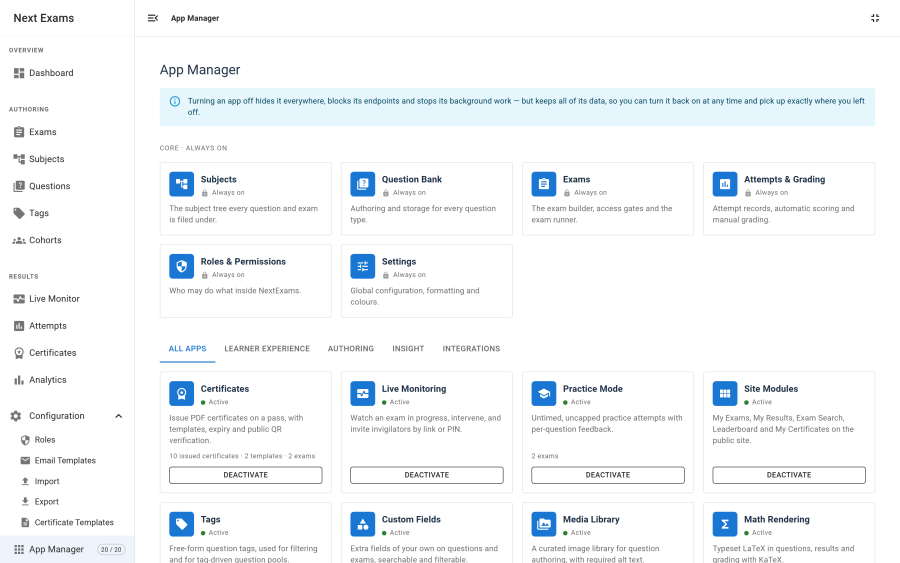
What an app is
An app is one switchable capability. There are twenty-six, in five categories.
| Category | Apps |
|---|---|
| Core | Subjects · Question Bank · Exams · Attempts & Grading · Roles & Permissions · Settings |
| Learner experience | Certificates · Live Monitoring · Practice Mode · Site Modules |
| Authoring | Tags · Custom Fields · Media Library · Math Rendering · Advanced Question Types · Versioning & Approval · Import / Export |
| Insight | Analytics & Reports · Integrity Signals |
| Integrations | Notifications & Email · Cohorts & Enrollment · Webhooks · LTI 1.3 · API Tokens · Joomla Ecosystem · Demo Data |
The six core apps cannot be switched off. They have no toggle and no underlying setting, so a core app cannot be disabled even by a hand-crafted request. Everything the component fundamentally is — subjects, questions, exams, attempts, roles and settings — stays.
The other twenty are all on by default.
What disabling does
Disabling is hide and hard-block, at four separate layers:
| Layer | Effect |
|---|---|
| Navigation | The nav item, its route and any dashboard widget disappear |
| Administrator endpoints | Requests to that app's tasks are refused |
| Site endpoints | Site views return 404; public JSON tasks refuse with an APP_DISABLED code |
| Plugins and tasks | Event listeners no-op and scheduled routines skip |
The site-side gate runs before the guest and management checks, because the switchable public endpoints — LTI launches, the monitoring board, certificate downloads — are exactly the ones an anonymous visitor can reach without passing those checks.
What disabling never does
Data is never touched. Turning an app off deletes nothing, and turning it back on restores the capability exactly as it was, with all its records intact. That is why the confirmation dialog warns you about what will stop working rather than what will be deleted — and why it shows you the usage counts, so you know what you are switching off.
Three behaviours are deliberately exempt, and should not be "fixed":
- Disabling never widens access. With Cohorts off, existing restricted-access rules keep being enforced; only the authoring interface goes. Silently opening a restricted exam because an app was switched off would be a security regression.
- Grading and in-flight attempts are never gated. An attempt already running is undisturbed. Practice mode is applied where the paper is frozen, so a running practice attempt stays a practice attempt.
- Existing advanced questions keep working. Turning off Advanced Question Types stops authors creating new ordering, matching, EMQ and cloze questions. Existing ones keep rendering and grading.
One more exemption is a legal rather than a design decision: GDPR export and erasure are never switched off, even when the Joomla Ecosystem app is disabled. That app controls the article macro and Smart Search indexing. Privacy obligations are not a feature to be toggled, and a disabled privacy integration would make Joomla's own privacy component return a silently incomplete export.
Relatedly, the Smart Search adapter stops indexing when the app is off but never purges the existing index — an App Manager toggle must not be destructive.
Status
Each card shows one of three states:
| State | Meaning |
|---|---|
| Active | Running normally |
| Inactive | You switched it off |
| Paused | Something it depends on is off |
Failing open
Every resolution path fails open, on purpose:
- A missing settings row falls back to the app's built-in default.
- An unrecognised app key is treated as enabled.
- A settings table that cannot be read does not disable the product.
The reasoning is that a half-applied migration or a database hiccup should never black out a working assessment system. The failure mode of this feature is "too much is available", not "nothing works".
The page that switches things back on
The App Manager itself has no app gate. Switching every app off must never hide the page that switches them back on, so it is reachable whatever else is disabled. It sits outside the Configuration group in the navigation for the same reason.
Saving
Saving reloads the page. The enabled map is read once when the application boots, and the application navigates by URL fragment without re-fetching the page, so a reload is the only reliable way to apply the change everywhere at once.
Access control
| Action | Required permission |
|---|---|
| View app status | configuration — manage_settings |
| Enable or disable an app | configuration — manage_settings |
Two things cannot be toggled regardless of permission: core apps, and the Demo Data app while a demo dataset is installed.