Integrity Signals
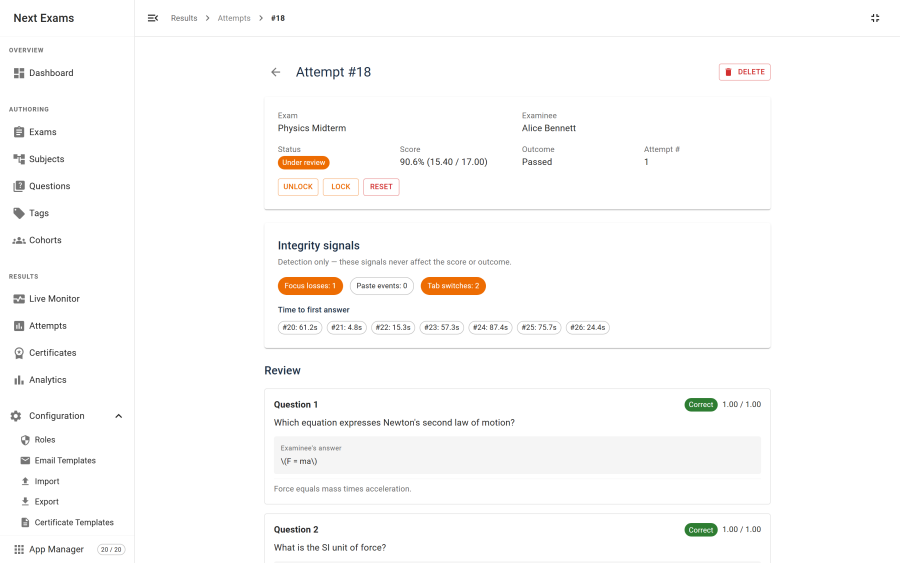
Next Exams can record a small number of behavioural signals during an attempt and show them to you afterwards. It does not act on them.
That restraint is the design, not a limitation waiting to be lifted. Integrity signals are detection-only: they never fail an attempt, never lock a candidate out, and never flag anyone automatically. Every one of them has an innocent explanation, and the judgement about what a given pattern means belongs to a human who knows the context.
What is captured
| Signal | What it counts |
|---|---|
| Focus loss | How many times the exam window lost focus |
| Paste | How many times content was pasted into an answer |
| Tab switch | How many times the browser tab was switched away from |
| Fullscreen exit | How many times the examinee left fullscreen, on an exam that expects it |
| Time to first answer | Per question, how long between seeing it and answering it |
The four counters are cumulative for the attempt. The timing is recorded per question, first answer only.
How to read them
Each signal is ambiguous on its own, and it is worth being explicit about how:
- Focus loss happens when a notification steals focus, when someone alt-tabs to a calculator you permitted, or when a screen reader user moves between applications. A candidate on a laptop with a chat client open will accumulate these honestly.
- Paste is how many people move text they drafted elsewhere into an essay box. It is also how someone pastes an answer they were sent. The count alone does not distinguish them.
- Tab switching overlaps heavily with focus loss and carries the same ambiguity.
- Fullscreen exits are the most ambiguous of the four. A browser drops fullscreen by itself for a print dialog, an operating-system notification or a permission prompt, and some devices — Safari on iPhone and iPad, many LMS embeds — cannot enter fullscreen at all, so those candidates register nothing however they behave. Read a high count as "worth asking about", never as evidence.
- Time to first answer being very short across a whole paper is more interesting than any single fast answer.
The useful reading is comparative — one candidate's pattern against the rest of the cohort on the same exam — rather than absolute. A threshold applied blindly would mostly catch people with busy computers.
Enabling capture
Capture requires both switches to be on:
| Switch | Scope |
|---|---|
| Integrity capture | Global — the master switch, and the App Manager app |
| Track integrity | Per exam |
A global default seeds the per-exam setting on new exams, so you can make capture the norm without setting it each time.
The per-exam flag is frozen into the attempt when it starts, along with the rest of the taking mode. Turning capture off part-way through an exam therefore does not corrupt attempts already running — they continue as they began.
How it is recorded
Capture is deliberately cheap and deliberately additive:
- The runner accumulates signals in the browser and ships them inside the existing autosave and submit requests. There is no separate endpoint and no extra network traffic.
- Counters are merged by taking the higher value rather than adding, so a duplicated or out-of-order save cannot inflate a count.
- Per-question timings are first-wins — a later save cannot overwrite the original timing.
- Writes are refused unless the attempt is in progress and both switches are on.
- The capture code sits on top of the server-rendered form and touches nothing else, so the no-JavaScript submit path is unaffected.
An examinee with JavaScript disabled produces no signals at all. That is a visible fact about the attempt rather than a hidden failure.
What is deliberately not here
Video proctoring, webcam streaming and biometric capture are out of scope for Next Exams and will not be added. Lockdown-style signals and counters are the ceiling.
If your assessment genuinely requires identity verification by camera, it needs a dedicated proctoring service; this feature is not a substitute for one and does not pretend to be.
Access control
| Action | Required permission |
|---|---|
| See integrity signals on an attempt | attempts — view |
| Enable capture globally | configuration — manage_settings |
| Enable tracking on an exam | exams — edit |
Signals are shown read-only. There is no interface for editing them, because an edited signal is not evidence of anything.