Question Bank
The question bank is the centre of Next Exams. Questions live independently of any exam, filed against a hierarchical subject tree, and exams reference them. Write a question once and it is available to every exam, every pool rule and every report.
This page covers the nine question types, how each one is stored and graded, and the authoring features layered on top of them — subjects, tags, custom fields, maths, media and versioning.
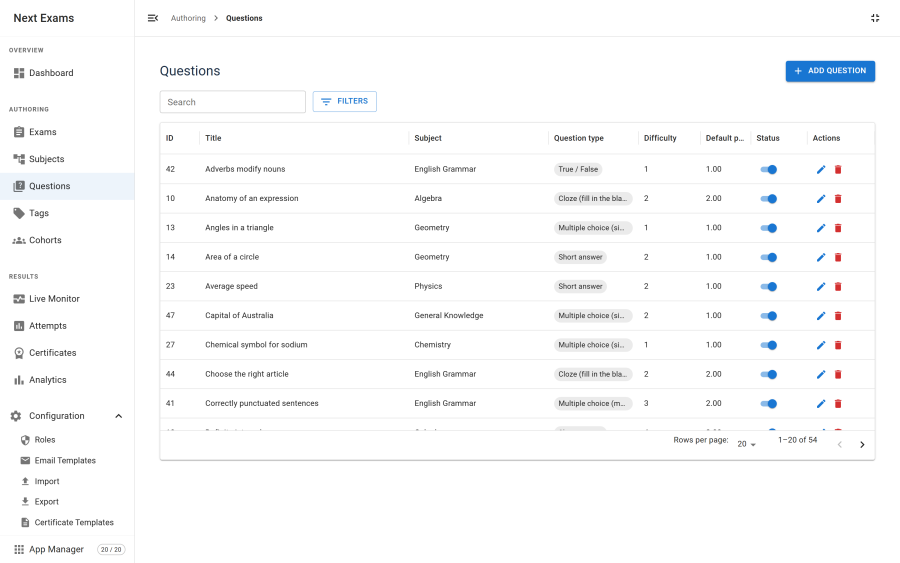
Question types
Nine types are available. Eight grade automatically; essay is marked by a person.
| Type | What the examinee does | Graded |
|---|---|---|
| Multiple choice (single) | Picks exactly one option | Automatically |
| Multiple choice (multiple) | Picks any number of options | Automatically, with optional partial credit |
| True / false | Picks one of two fixed options | Automatically |
| Short answer | Types a word, phrase or number | Automatically, against an accepted-answer list |
| Essay | Writes free text | By a grader |
| Ordering | Arranges items into the correct sequence | Automatically, per position |
| Matching | Pairs each item on the left with one on the right | Automatically, per pair |
| Extended matching (EMQ) | Answers several stems from one shared option bank | Automatically, per stem |
| Cloze | Fills blanks embedded in a passage | Automatically, per blank |
Ordering, matching, EMQ and cloze are grouped as advanced types and can be switched off in the App Manager. Doing so stops authors creating new advanced questions; existing ones keep rendering and grading normally, so switching the app off can never break a live exam.
How answers are stored
Next Exams uses a deliberate hybrid, because the two halves of a question have different lifetimes.
| What | Where it lives | Why |
|---|---|---|
| Choice options | Rows in their own table, each with a stable identifier | Attempt responses reference option identifiers directly. Stable rows mean a result stays meaningful even after an option's text is edited. |
| Grading configuration | A compact answer key stored with the question | Accepted answers, matching rules, tolerances and credit policy are not tabular, and do not need a row each. |
The practical benefit is that a new question type needs a grading case and an answer-key shape — not a schema change.
Grading rules per type
The answer key holds only what a given type actually needs.
| Setting | Applies to | What it does |
|---|---|---|
partial_credit |
Multiple choice (multiple), ordering, matching, EMQ, cloze | Awards a share of the points for a partly-correct answer instead of nothing. |
partial_policy |
The same types | all_or_nothing (the default) or proportional. |
accepted |
Short answer | The list of answers treated as correct. |
trim |
Short answer | Ignores leading and trailing whitespace. |
case_insensitive |
Short answer | Ignores letter case when comparing. |
use_regex |
Short answer | Treats each accepted answer as a regular expression rather than a literal. |
numeric |
Short answer | Compares as a number rather than a string. |
tolerance |
Short answer, numeric mode | Accepts anything within this margin of the expected value. |
Note: an empty answer and a wrong answer are not the same thing, and Next Exams is careful about the difference. The values
0,"0"andfalseare all real answers, not emptiness — a learner who answers zero has answered.
Subjects
Every question is filed against a subject. Subjects form a tree: each has an optional parent, and the component maintains each node's full path and depth automatically.
- Reorganising is safe. Moving a subject rebuilds the paths of everything beneath it in one operation, and a move that would make a subject its own ancestor is rejected.
- Subjects drive pools. A pool rule that draws from a subject is the most common way to build a randomised exam.
- Subjects drive feedback. When an exam spans two or more subjects, the result page breaks the score down per subject, weakest first, so the learner knows what to revise.
Tags
Tags are free-form labels, independent of the subject tree. Where a subject answers "what is this question about", a tag answers anything else you want to slice by — difficulty, syllabus reference, exam board, year.
Tags are useful for two things in particular:
- Filtering the bank while authoring, alongside subject, type and published state.
- Tag-driven pools — an exam can draw its random questions from a tag rather than a subject, which lets one pool cut across the subject tree.
Tags are a switchable app. Turning them off removes the authoring interface; existing tags remain in the database.
Custom fields
If the built-in fields do not capture something you need, add your own. Custom fields apply to two contexts — questions and exams — and are merged into the editing form at runtime, so they appear alongside the native fields rather than in a separate panel.
| Field behaviour | Where the value is stored |
|---|---|
| Marked searchable | Its own value table, so it can be filtered and searched efficiently |
| Not searchable | A JSON column on the question or exam itself |
There is deliberately no file field type — Next Exams does not accept arbitrary uploads through custom fields. Images belong in the media library, which validates them properly.
Rich text, maths and media
Question stems, options and explanations are authored in a rich text editor built on the Joomla installation's own bundled TinyMCE, so it inherits your editor configuration.
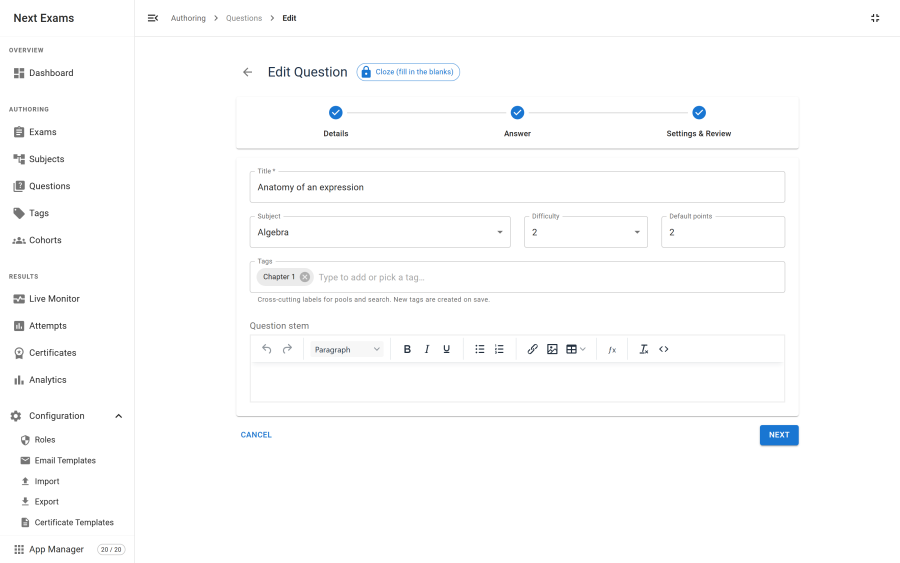
Mathematics. LaTeX is typeset with KaTeX, in stems, options, explanations and on the result page. Maths is a switchable app, and the library is loaded only on pages whose content actually contains notation — a catalogue page with no formulae never downloads it.
Images. The editor's image button opens the Next Exams media picker rather than Joomla's general media manager. It offers a curated library, an upload, and an external URL, and:
- Uploads are raster only — PNG, JPEG, GIF and WebP. SVG is excluded deliberately, because an SVG can carry script.
- Every upload is validated by extension and by inspecting the file's actual image data, so a script renamed
.pngis rejected. - Alt text is required. The Insert button stays disabled until alt text is supplied.
The alt-text requirement is also enforced when the question is saved, not only in the picker, so an image pasted in as raw HTML cannot bypass it. Administrators can relax this for legacy content with a setting, but it is on by default.
Versioning and approval
Questions can carry a version history, with an approval workflow for changes.
- Each save records a version, so you can see how a question has evolved and who changed it.
- Changes can require review before they go live, which matters when several authors share a bank.
- Attempts are unaffected either way: the paper is frozen when an examinee starts, so a question edited mid-exam never changes under them.
Versioning is a switchable app.
Access control
| Action | Required permission |
|---|---|
| View the question bank | questions — view |
| Create a question | questions — create |
| Edit a question | questions — edit |
| Delete a question | questions — delete |
| Upload to the media library | questions — create |
| Manage subjects | subjects — the matching action |
Reads are gated as strictly as writes. A user without questions view permission cannot list questions, and cannot reach a single question's answer key by requesting it directly.