Cohorts and Enrollment
A cohort is a named list of people. Restricting an exam to one or more cohorts turns it from something anybody with the link can sit into something only your enrolled candidates can.
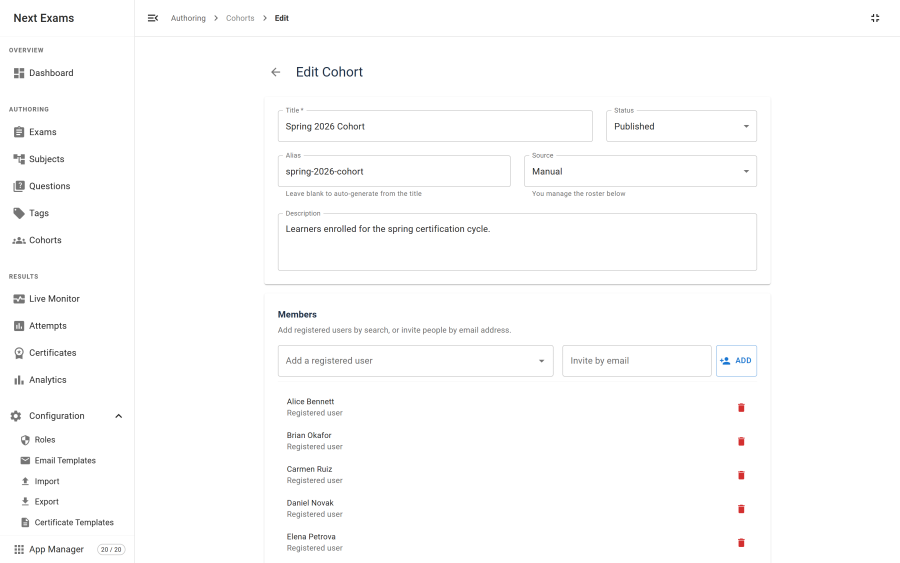
Building a cohort
A cohort gets its members one of two ways, chosen when you create it.
| Source | Behaviour |
|---|---|
| Manual | You add members yourself — registered users, or email addresses for people with no account |
| Group | The cohort mirrors an existing Joomla user group |
Group cohorts are the right choice when the membership already exists in Joomla and is maintained there. Manual cohorts are for lists that exist only for assessment purposes.
Members without accounts
A manual cohort can include an email address for someone who has not registered. This matters because assessment often precedes registration — you know who you are examining before they have a login.
An invited email address is matched when that person later sits the exam as an identified guest, so the allow-list works before and after they register.
Note: a cohort roster contains personal data — names and email addresses, including of people who are not yet users of your site. Viewing a roster requires the cohorts view permission for exactly this reason, and rosters are covered by Joomla's privacy export. See Security and privacy.
Per-exam access rules
Cohorts do not themselves grant access — an exam opts in. Set the exam's access type to restricted, then add one or more access rules.
A rule names a subject and, optionally, a window:
| Rule targets | Meaning |
|---|---|
| Cohort | Everyone in that cohort |
| Joomla user group | Everyone in that group, without creating a cohort for it |
| Individual user | One named person |
| View level | Everyone whose Joomla view level matches |
| Rule window | Meaning |
|---|---|
| Available from | This rule does not grant access before this time |
| Available until | This rule stops granting access after this time |
| Due at | The deadline shown to that audience |
Multiple rules are additive: anyone matching any rule may sit the exam. Per-rule windows let one exam open to different audiences at different times — an early sitting for one cohort, a later one for another — without duplicating the exam.
What happens when someone is not on the list
The gate refuses the start with a clear reason. Two common causes:
- They joined the Joomla group after the cohort mirrored it. Refresh the cohort so it picks up the new members.
- They registered with a different email than the one invited. The invitation matches on the address you entered.
Interaction with the App Manager
Cohorts is a switchable app, with one deliberate asymmetry: switching it off does not open restricted exams.
With the app off, the cohort authoring interface disappears, but existing restricted access rules keep being enforced exactly as before. Anything else would mean an administrator tidying up their navigation had silently published a restricted assessment to the world.
Access control
| Action | Required permission |
|---|---|
| View cohorts and their rosters | cohorts — view |
| Create a cohort | cohorts — create |
| Edit a cohort | cohorts — edit |
| Delete a cohort | cohorts — delete |
| Add or remove members | cohorts — manage_members |
| Build a restricted rule on an exam | exams — edit, plus cohorts — view |
Deleting a cohort also removes its members and any exam access rules pointing at it, so no exam is left referencing a cohort that no longer exists.