Certificates
Next Exams can issue a PDF certificate when someone passes, design it visually, number it, expire it, and let anyone in the world verify it is genuine without logging in.
Certificates are rendered by a PDF engine bundled with the component, so there is nothing to install and no external service involved — the certificate never leaves your server.
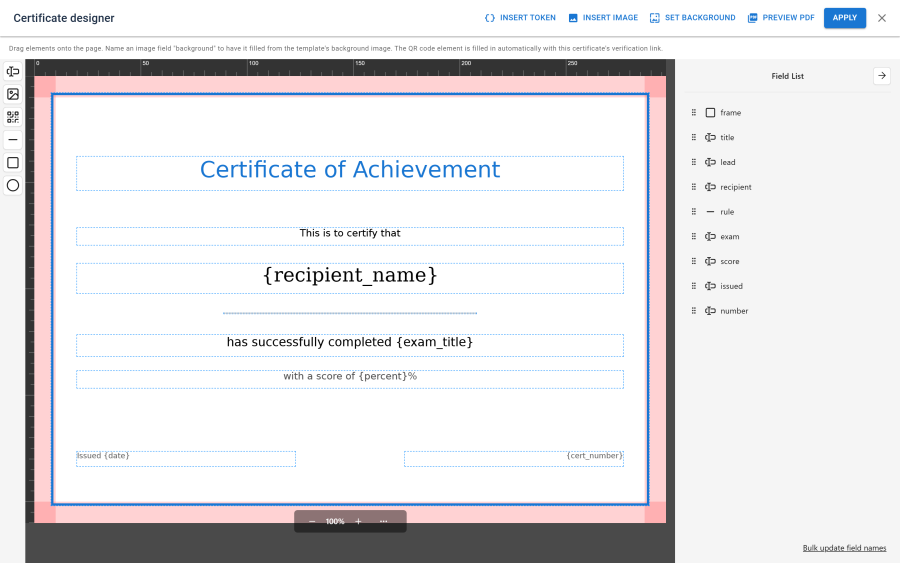
Templates
A certificate template defines the layout: background, fonts, colours, and the positioned elements that carry the content. Templates are designed in a visual editor rather than by editing markup.
Elements are placed by dragging, and each carries its own font, size, colour and alignment. Text elements can contain merge tokens, which are replaced with the real values at issue time.
| Token | Replaced with |
|---|---|
{recipient_name} |
The examinee's name |
{exam_title} |
The exam's title |
{score}, {percent} |
The result |
{date} |
The issue date |
{number} |
The certificate number |
{verify_url} |
The public verification URL for this certificate |
Note: the template preview has no real certificate behind it, so it renders with a placeholder verification token. This is intentional — without it a QR element would render nothing in preview and could not be positioned.
Issuing
Certificates are issued automatically. To turn them on for an exam, assign a certificate template to it; the default is none.
| Condition | Behaviour |
|---|---|
| The examinee passed | A certificate is issued |
| The examinee failed | Nothing is issued |
| The attempt is awaiting essay marking | Nothing yet — it issues once marking completes and a pass is confirmed |
| A certificate already exists for this attempt | Nothing — issue is idempotent, one per attempt |
Issue is driven by an attempt event, so it happens as a consequence of grading rather than as part of it. A certificate that cannot be produced never blocks or breaks the grading itself; the failure is logged.
Numbering, validity and expiry
| Setting | What it does |
|---|---|
| Number format | A pattern combining a year and a zero-padded sequence, producing numbers like NX-2026-000001. |
| Validity | How long the certificate remains valid. Blank means it never expires. |
| Expiry reminders | Optional emails sent ahead of expiry, at offsets you configure. |
Expiry reminders and the expiry sweep run from a scheduled task. Without that task the certificate still expires — the verification page reports it correctly — but no reminder email is ever sent. See Scheduled tasks.
Certificates can also be revoked. A revoked certificate stays in the record and its verification page says so plainly, rather than pretending it never existed.
Frozen snapshots
Each certificate is rendered from a snapshot of the template captured at the moment it was issued.
This means editing a template never rewrites certificates already awarded. A certificate issued last year still renders exactly as it did last year, with the layout, wording and branding in force at the time. That is a requirement for anything used as evidence of achievement, not an implementation detail.
Public verification
Every certificate can carry a QR code linking to a public verification page. Anyone can open it — no account, no login.
The page reports:
- Whether the certificate is valid, revoked, expired, or not found
- The recipient, the exam, the certificate number, and the issue and expiry dates
It deliberately does not offer the PDF. Downloading still goes through the normal authorisation check, so verification confirms authenticity without handing out a copy of the document.
The verification link is keyed by a random token, not the certificate number. Certificate numbers are sequential, so a number-keyed page would let anyone walk the series and harvest recipient names and exam titles. The random token makes the series unguessable. The page is also served with no-store and marked as not to be indexed by search engines.
QR codes are embedded as small PNG images when the gd extension is available, and fall back to SVG when it is not.
Downloading
A certificate PDF can be downloaded by:
- An administrator with the certificates permission
- The examinee who earned it
- A guest examinee holding the token for their own attempt
Guests are covered deliberately — someone who sat an exam without an account still owns their certificate.
Site display
Learners find their certificates in three places:
- the My Certificates page — a menu item of type NextExams - My Certificates;
- the My Certificates site module;
- the result page, which shows a download button when a certificate was issued for that attempt and has not expired.
The page and the module list the same thing, by the same rule:
| Certificate | Shown as |
|---|---|
| Valid | Download and a link to its verification page |
| Expired | Listed with an Expired badge, and no download |
| Revoked | Not listed |
| From an exam whose results are not released yet | Not listed until they are |
The last rule matters because a certificate is issued the moment an attempt passes, whatever the exam's release policy — listing it earlier would tell a learner they passed on an exam whose results you have not released.
The same rule covers every other way to learn of it. The download refuses the learner until results are released, with a message saying the certificate comes with the results; staff with the certificates permission can always download. The certificate issued email is held and sent once results are released, and expiry reminders are skipped for a certificate whose results were never released — see Notifications.
Only certificates of the signed-in account are listed, never ones matched by email address. The page sends guests to the login screen and back, and it is kept out of search engines. See Site modules and menu items.
Access control
| Action | Required permission |
|---|---|
| View issued certificates | certificates — view |
| Manage certificate templates | certificates — the template-management action |
| Revoke a certificate | certificates — the matching action |
| Download a certificate | The permission above, or ownership of the attempt |
| Verify a certificate | None — the verification page is public by design |
Certificates are a switchable app. With it off, nothing new is issued and the interface disappears; existing certificates are untouched and become available again when it is switched back on.