Webhooks
Webhooks push exam events out to other systems as they happen — an automation platform, a CRM, your own service. Each delivery is signed so the receiver can prove it came from you.
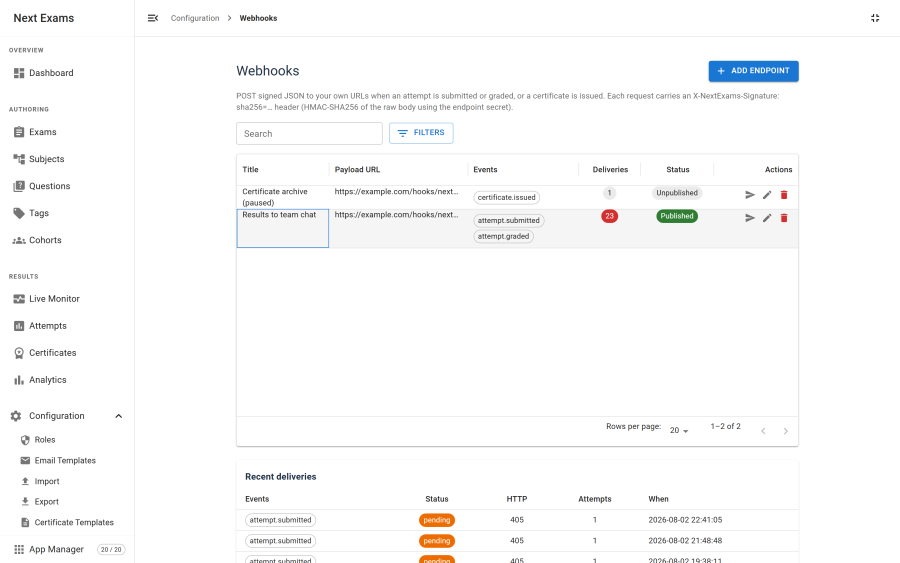
Events
| Event key | Fires when |
|---|---|
attempt.submitted |
An examinee submits a paper |
attempt.graded |
An attempt becomes fully graded |
certificate.issued |
A certificate is awarded |
An endpoint subscribes to any combination. An endpoint with no events subscribed receives nothing — a silent no-op that is worth checking if a new endpoint seems dead.
The payload
Each delivery is a JSON POST with a consistent envelope: the event key, a timestamp, the site it came from, and a data object carrying the event's own fields.
| Header | Value |
|---|---|
X-NextExams-Signature |
sha256= followed by the HMAC |
X-NextExams-Event |
The event key |
X-NextExams-Delivery |
A unique identifier for this delivery attempt |
Verifying the signature
The signature is an HMAC-SHA256 of the raw request body, keyed with that endpoint's secret.
Warning: compute it over the raw bytes you received, not over a re-serialised copy of the parsed JSON. Re-serialising changes key order and whitespace, and the signature will not match. This is the single most common integration mistake.
Compare using a constant-time comparison, and reject anything that does not match rather than processing it anyway.
Each endpoint has its own secret, generated automatically when you create it and regenerable at any time. Regenerating takes effect on the next delivery, so update the receiver first.
The SSRF guard
Next Exams refuses to send a webhook to a private or internal address. This is a security control, not a bug, and it is the reason a locally-hosted test receiver appears not to work.
Blocked destinations:
- Anything that is not HTTP or HTTPS
- Loopback addresses
- Private ranges
- Reserved and link-local ranges, which covers cloud instance-metadata endpoints
The check runs at send time as well as when you save the endpoint. Checking only at save time would be defeated by a hostname that resolves to a public address when you save it and an internal one when it fires.
Redirects are not followed. An endpoint answering 3xx never completes, because a redirect is otherwise a trivial way to bounce a request from a permitted address to a forbidden one. Point the webhook at the final URL.
For a genuine on-premises receiver, there is an opt-in setting that allows private addresses. It is off by default, and turning it on means accepting that anyone who can create a webhook endpoint can make your server issue requests to your internal network — so it belongs with a tightly-held webhooks permission.
Delivery, failure and retry
- When an event fires, matching endpoints are resolved and a delivery is queued for each.
- An immediate POST is attempted, with a short timeout.
- A failure leaves the delivery pending with an increasing backoff.
- After five attempts it is marked failed.
A slow or dead endpoint never breaks grading. Delivery is best-effort and runs alongside the result, not inside it. Failures are logged to the com_nextexams log category.
Warning: retries need the webhook flush scheduled task. Without it, a delivery that fails its immediate attempt stays pending forever. See Scheduled tasks.
Testing an endpoint
The Send test button posts a signed test payload immediately, bypassing the queue and creating no delivery record. Use it to confirm the URL is reachable and your signature verification works before wiring it to real events.
The delivery panel on each endpoint shows recent attempts with their status codes and any error, which is usually enough to diagnose a failure without touching the logs.
Access control
| Action | Required permission |
|---|---|
| View endpoints and deliveries | webhooks — view |
| Create, edit or delete an endpoint | webhooks — manage |
| Send a test | webhooks — manage |
| Regenerate a secret | webhooks — manage |
There is also a master switch in settings and a Webhooks app in the App Manager; either one off means nothing is sent.