LTI 1.3
Next Exams is a full LTI 1.3 Tool Provider. An LMS launches an exam, the learner sits it inside Next Exams, and the score goes back to the LMS gradebook automatically. Instructors can also browse and pick exams from within the LMS using Deep Linking.
This means Next Exams can be the assessment engine for a course that lives in Moodle, Canvas, Blackboard or anything else speaking LTI 1.3, without the learner needing a Joomla account.
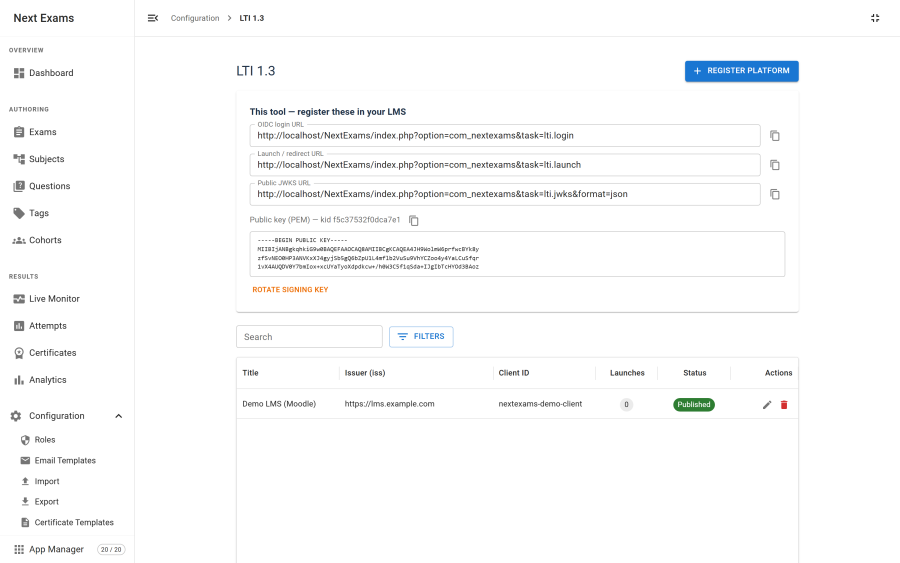
What you register where
LTI registration is mutual: the LMS needs details about Next Exams, and Next Exams needs details about the LMS.
Give the LMS these, from the tool information panel:
| Value | Purpose |
|---|---|
| Login / initiation URL | Where the LMS begins the OIDC handshake |
| Launch / redirect URL | Where the LMS sends the signed launch |
| JWKS URL | Where the LMS fetches the tool's public keys |
| Public key | An alternative to the JWKS URL for platforms that want the key pasted directly |
| Deep Linking URL | Where the LMS sends a content-selection request |
Register the LMS in Next Exams with these, from the platform's own configuration:
| Field | What it is |
|---|---|
| Issuer | The platform's identifier |
| Client ID | The identifier the platform assigned to this tool |
| Deployment ID | The specific deployment. A platform can have several |
| Authentication URL | Where to send the learner during the handshake |
| JWKS URL | Where to fetch the platform's public keys for verifying its tokens |
| Token URL | Where to obtain an access token for score passback |
The tool key pair
Next Exams generates its own RSA key pair the first time LTI is used, and stores it privately.
- The key pair is never included in the settings interface or any export, and is excluded from the settings API.
- The public half is published at the JWKS URL and shown in the tool panel; the private half never leaves the server.
- Generation needs the
opensslPHP extension. Some hosts run PHP OpenSSL with no default configuration path, so the component ships a minimal configuration file to cover that case.
What a launch does
- The LMS starts the OIDC handshake against the login URL.
- Next Exams redirects to the platform's authentication URL with a state and a nonce.
- The platform posts a signed launch token back.
- Next Exams verifies it — signature against the platform's keys, then issuer, audience, expiry, nonce, deployment and message type.
- Either the bound exam runs, or the Deep Linking picker is shown.
Verification is strict on purpose. Timestamps are accepted within sixty seconds, and nonces are single-use — a launch URL cannot be replayed, so reloading it fails and the launch must be restarted from the LMS.
Identity
An LTI learner is identified deterministically from the platform, deployment and their subject identifier. The same learner returning through the same course reaches the same attempt rather than starting a new one.
They do not need a Joomla account. The launch marks the session as authorised for that specific exam, scoped to it rather than to the site, so an LTI launch cannot be used as a general-purpose way past the access gate.
Deep Linking
Deep Linking lets an instructor pick an exam from inside the LMS rather than pasting URLs. The LMS sends a content-selection request, Next Exams shows a picker of available exams, and the selection is returned to the LMS as a signed response that the LMS turns into a link in the course.
Score passback
When an attempt is graded, the score is sent to the LMS gradebook through Assignment and Grade Services.
- Passback fires on grading, and on submission when the attempt is already fully graded.
- It is best-effort and logged. A gradebook that is unreachable never breaks grading in Next Exams; the score is recorded locally regardless and the failure goes to the
com_nextexamslog. - An attempt awaiting essay marking passes back when marking completes, not at submission.
Troubleshooting a launch
Most launch failures are one of five things:
- A mismatched deployment ID — the most common single cause.
- The JWKS URL unreachable — your server must be able to make outbound HTTP requests to the platform.
- Clock skew beyond sixty seconds — check NTP on the server.
- A replayed launch — start it again from the LMS rather than reloading.
- Cookies dropped in the LMS iframe — browsers restrict third-party cookies. Launching in a new window is reliable.
Access control
| Action | Required permission |
|---|---|
| View platform registrations | lti — view |
| Register, edit or remove a platform | lti — manage_platforms |
| Launch an exam | None — the platform's signed token is the credential |
The launch, login, JWKS and Deep Linking endpoints are necessarily reachable without a Joomla login, and each one validates the signed token itself rather than relying on a session.