API Tokens
An API token lets an external program call the Next Exams JSON API with no browser session — to maintain the question bank from a script, pull results into a data warehouse, or wire the component into your own tooling.
Because a token request bypasses the browser's CSRF protection by design, tokens are built to be conservative: they are default-deny, bound to the person who created them, scoped per capability, stored only as a hash, and revocable.
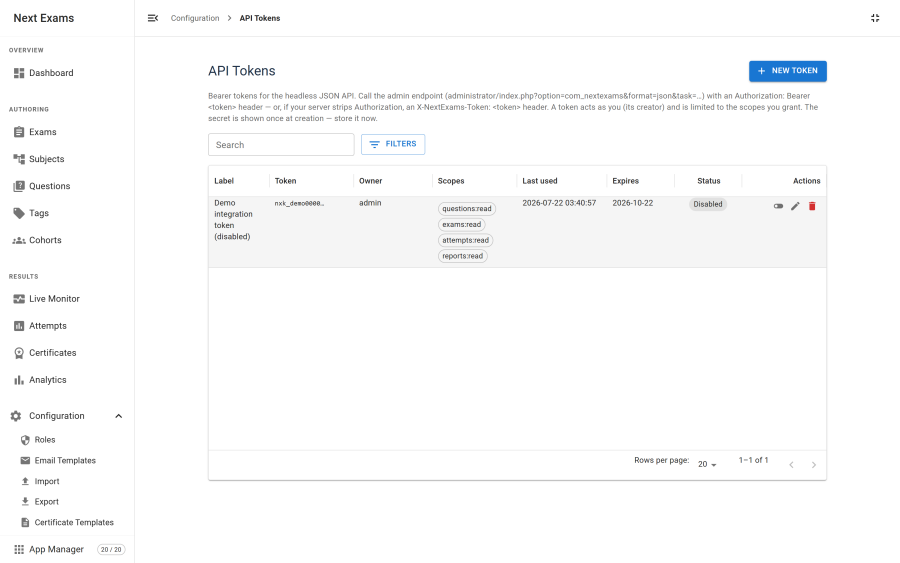
Creating a token
- Go to Configuration → API tokens and create one.
- Give it a label describing what it is for. You will thank yourself later.
- Choose its scopes — grant only what the integration actually needs.
- Optionally set an expiry.
- Save.
The token is shown once. Only a hash is stored, so it cannot be shown again. Copy it into your integration's configuration at that moment; if you lose it, revoke the token and create another.
Scopes
Scopes are granted per capability and per level of access.
| Scope family | Levels |
|---|---|
subjects |
read, write, delete |
questions |
read, write, delete, publish |
exams |
read, write, delete, publish |
attempts |
read |
reports |
read |
lookups |
read |
Attempts and reports are read-only by design — there is no scope that lets an external program create or alter an attempt, because an attempt is a record of what a person did.
Scoping is default-deny. Every endpoint the API exposes is mapped to a required scope, and anything not explicitly mapped is refused. Adding a new endpoint does not silently make it reachable by existing tokens.
Making a request
Send the token as a bearer credential:
Authorization: Bearer <token>— the standard header.X-NextExams-Token: <token>— an alternative carrying the raw token.
Use the second one if the first appears to be ignored. Some Apache and PHP configurations strip the Authorization header before PHP ever sees it, and do not expose it through any of the usual header functions. This is a server configuration issue rather than something Next Exams can detect, so the alternative header exists as a no-configuration fallback. Custom X- headers always reach PHP.
If you control the server, Joomla's shipped htaccess.txt contains the rewrite rule that forwards Authorization correctly.
Requests without a bearer token are untouched and fall through to normal session handling, so enabling tokens does not affect the interface.
The three gates
Every token request passes three independent checks:
- Joomla's
core.manage, for the user the token is bound to. - The token's scope, for the endpoint being called.
- The Next Exams role held by that user.
A token cannot exceed its creator's own permissions. Granting a write scope to a token owned by a read-only user gives that token nothing — the role check still refuses.
Binding and lifetime
| Property | Behaviour |
|---|---|
| Owner | The user who created it. A token cannot be created on behalf of someone else, and the owner cannot be changed afterwards |
| Secret | Immutable. Editing a token cannot change its secret |
| Expiry | Optional. An expired token is refused |
| Published state | A token can be disabled without deleting it |
| Blocked owner | A token whose owner has been blocked or deleted stops working |
| Last used | Recorded, so you can find tokens nobody uses any more |
The list shows a masked prefix rather than the token, so you can identify one without exposing it.
Good practice
- One token per integration. Shared tokens cannot be revoked without breaking everything at once.
- Grant the minimum scopes. A reporting integration needs
reports:readand nothing else. - Set an expiry for anything temporary, such as a migration script.
- Revoke on staff change, the same as any other credential.
- HTTPS only. A bearer token in a request over plain HTTP is readable in transit.
Access control
| Action | Required permission |
|---|---|
| View tokens | api_tokens — view |
| Create, revoke or delete a token | api_tokens — manage |
There is also a master switch and an App Manager app; either off refuses all token authentication, which makes both a usable emergency stop if a token is believed compromised and you cannot immediately identify which one.
Note: token authentication is intercepted on the administrator endpoint. Point integrations at the administrator JSON endpoint rather than the site one, even though most of the same tasks are reachable from both with a session.