SEF URLs and SEO
How Next Exams builds the web addresses of its site pages, and the choices you have at Configuration → Settings → SEF / SEO.
Next Exams uses Joomla's own router, so everything here sits on top of Joomla's Search Engine Friendly URLs setting (Global Configuration → Site → SEO). With that switched off, every Next Exams page keeps its plain index.php?option=com_nextexams&… address and the options below have no effect.
Start with a menu item
Clean addresses hang off a menu item. Create one NextExams - Exams menu item (see Site modules and menu items) and every exam gets an address beneath it:
/exams/12-final-testWithout any Next Exams menu item, Joomla falls back to its generic /component/nextexams/… form. It works, but it is not the address you want to share.
An Exams menu item filtered to one subject is used for the exams of that subject: with an item for Mathematics and another for all exams, a mathematics exam is linked beneath the Mathematics item. The filter itself never appears in the address.
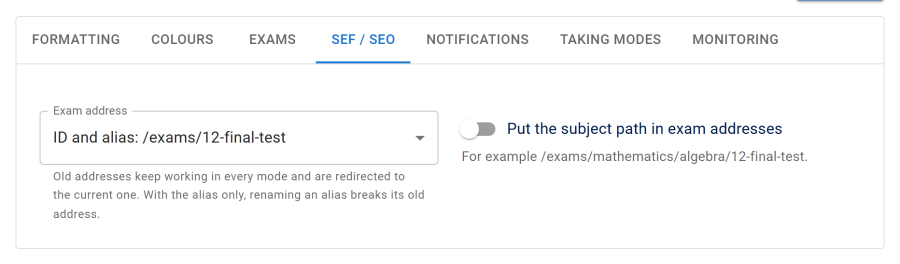
Exam address
| Choice | Address | Use it when |
|---|---|---|
| ID and alias (default) | /exams/12-final-test |
You want readable addresses that never break |
| Alias only | /exams/final-test |
You want the shortest address and will not rename aliases |
| ID only | /exams/12 |
You want the address before 6.2.0 |
Old addresses keep working whatever you choose. Every shape is understood in every mode, so switching the setting, or renaming an exam, never breaks a link already in an email, a certificate QR code or a bookmark. A visitor who arrives by an old or wrong address is sent to the current one with a permanent (301) redirect, and every exam page names its current address as the canonical link, so search engines index one address per exam.
The one exception is Alias only: there the alias is the whole address, so renaming the alias leaves nothing that still points at the exam. With ID and alias the number carries the link and the alias is only for people to read.
The alias
Each exam's alias is in the Exam Studio, under Settings → General → Alias. Leave it empty and it is made from the title. Two exams can never share an alias: if one is already taken, the new one is saved with -2, -3… added, and the Studio shows what the address became. Two aliases are reserved because other pages use them beneath the Exams item: runner and verify.
Subject path
Switch on Put the subject path in exam addresses to include the exam's subject, and its parents, in the address:
/exams/mathematics/algebra/12-final-testThe steps come from each subject's own Alias (Authoring → Subjects, then edit a subject). Two subjects with the same parent cannot share an alias; subjects under different parents can.
Moving an exam to another subject, or renaming a subject, changes the path. Old paths still lead to the exam: only the last step identifies it, so the redirect described above corrects the rest.
Links that leave the site
Links in emails, certificate QR codes, invigilator invitations and webhook payloads are built by the same router, so they use the clean address too, including those sent by a scheduled task or from the command line. If an address cannot be built, the plain index.php?… form is sent rather than failing the email.
LTI addresses are the exception. The launch, login and key addresses an LMS registers stay in their plain form, because they are typed into your LMS once and must never change.
Pages search engines skip
My Attempts, My Certificates and the result page show one person's own results and are marked noindex, and so is the certificate verification page. See Security and privacy.
If addresses look wrong
- Every address is
/component/nextexams/…. There is no Next Exams menu item, or the one there is is unpublished or not visible to that visitor. Add a published NextExams - Exams item. - Addresses change between pages. Check the System - SEF plugin's Strict routing option. With it off, Joomla builds links beneath whichever menu item happens to be active, so the same exam can appear under two addresses; the canonical link and redirect still lead to one. Joomla 7 will always route strictly.
index.phpis in every address. That is Joomla's Use URL Rewriting option, which needs the web server's rewrite rules (htaccess.txtrenamed to.htaccesson Apache).