Languages and Right-to-Left
Next Exams ships in seven languages, and follows Joomla's own language choice everywhere: the administrator, the management app on the site, the exam pages, emails and certificates.
| Language | Joomla tag |
|---|---|
| English (source) | en-GB |
| German | de-DE |
| French | fr-FR |
| Italian | it-IT |
| Spanish | es-ES |
| Hungarian | hu-HU |
| Arabic (right-to-left) | ar-AA |
Install the Joomla language first
Next Exams installs its translation for a language only if that language is already installed on the site. This is how Joomla installs every extension's language files: there is nowhere to put a translation for a language the site does not have.
So the order matters:
- Install the Joomla language pack: System → Install → Languages, then pick the language.
- Install or update Next Exams.
Added a language after Next Exams? Install the same Next Exams package again (it takes Joomla's update route and keeps all your data and settings), and the new language's files are copied in.
Any text without a translation, in a language Next Exams does not ship, shows in English rather than as a raw COM_NEXTEXAMS_… key in the management app.
Which language each person sees
| Where | Language |
|---|---|
| Administrator and the management app | The administrator's own language (their user profile, else the default administrator language) |
| Exam, runner and result pages | The site language of the page, so a multilingual site serves each visitor their own |
| Emails | The email template written for the language of the page that sent it (for example the examinee's site language when they hand in), else the template set to All languages — see Notifications |
| Certificates | The language the certificate template was written in. Template text is your own, so it is never translated |
Question and exam content is your own text and is shown as you wrote it. To offer an exam in two languages, create it twice.
Right-to-left (Arabic)
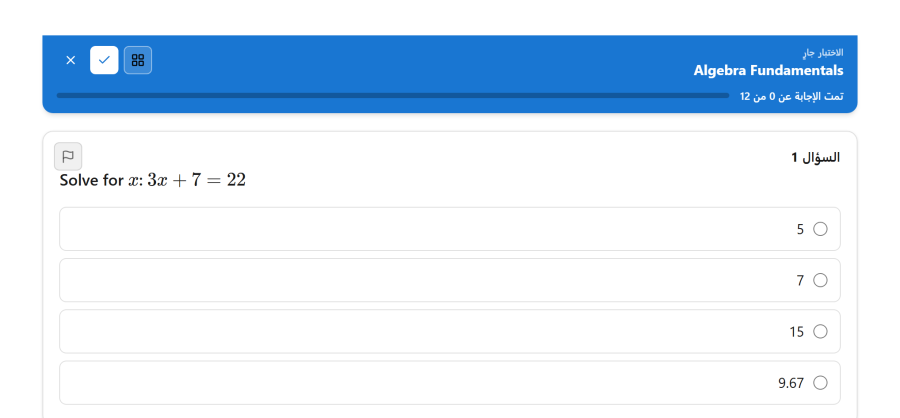
With Arabic active, the whole product turns right to left:
- Administrator and management app: menus, tables, drawers, dialogs and arrows are mirrored. Pictures you draw on (hotspot areas, image marking, graphs, the range scale and puzzles) and charts keep left to right, because their positions belong to the picture, not to the reading direction.
- Exam pages: the runner and result pages follow the direction of your site template (
<html dir="rtl">, which Joomla sets for an RTL language). Numbers and coordinates inside a sentence keep their order, so-6is never shown as6-. - The editor gets right-to-left direction and the editor's own Arabic interface when your site has it.
- Question content follows the text itself: a question written in Arabic reads right to left, one written in English left to right, even on the same page.
Certificates in Arabic
Arabic text in a certificate is joined into its proper letter shapes and put in reading order when the PDF is made. It is always printed in DejaVu Sans, whatever font the text block names, because the other bundled faces have no Arabic letters. Certificates issued before you switched to Arabic benefit too: the shaping happens each time the PDF is made, not when the certificate is stored.
Known limit: an Arabic paragraph long enough to wrap onto a second line prints its lines in the wrong order. Keep Arabic certificate text to one line per text block, as certificate text usually is.
Your own wording
Every interface string can be changed with Joomla's Language Overrides (System → Manage → Language Overrides). Search for the English text and override the key for your language: in the Administrator client for the management app (it uses those overrides on the site too), in the Site client for the exam pages. Overrides survive Next Exams updates.