Access Passes
An access pass gives one learner timed access to a set of exams and cohorts — "Reading practice papers for 30 days", "Mock exam weekend, 72 hours". You grant passes by hand, from a CSV file, or automatically from a shop through the REST API.
There are no prices and no payments in Next Exams. A pass is the access that a sale (or a scholarship, or a class enrolment) gives; selling it is the shop's job. A ready-made bridge to Next Shop, our upcoming shopping cart, is planned — it appears in the App Manager as a coming-soon card — and any other shop can use the REST API today.
Note: Access passes are off by default. Switch on the Access Passes app in the App Manager to use them.
Plans
A plan says what a pass opens and for how long. Plans are at Results → Pass plans.
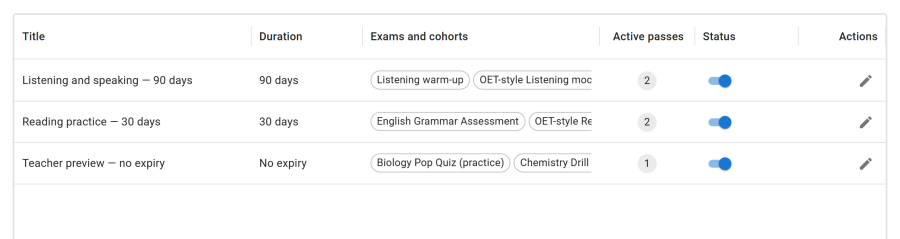
| Field | What it does |
|---|---|
| Title, Description | How the plan is listed, and named in the learner's emails |
| Exams and cohorts | What a pass of this plan opens — see below |
| Duration | Days and hours, counted from the start of each pass. 0 means no expiry |
| Published | Published (new passes can be granted). Unpublished: no new grants, but existing passes keep working |
What a plan opens:
- An exam in the list opens that exam — when the exam's access type is Access pass. An exam with another access type is not affected by the plan; the list marks it access is not "Access pass".
- A cohort in the list makes the holder a member of that cohort for as long as the pass lasts. Every exam restricted to that cohort then admits them, with the rule's own dates.
Passes follow the plan's current list. Adding an exam to a plan opens it to every holder of the plan straight away; removing one closes it to them. The plan editor says so: Changing the list changes what every holder of this plan can open, now.
Durations are hours, not calendar days. A three-day pass lasts 72 hours from its start, wherever the learner is.
A plan that has been granted cannot be deleted — unpublish it instead. A plan that was never granted can be deleted.
Each exam's own attempt limit, cooldown and window still apply to pass holders. A pass opens the door; it does not give extra attempts.
Granting passes
Passes are at Results → Access passes. Each has a holder, a plan, a start, an end, a status (Active, Expired or Revoked) and a Source.
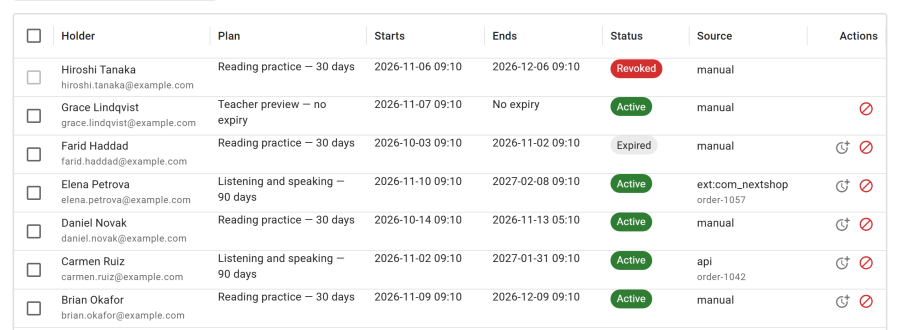
By hand
Grant a pass, choose the user and the plan, and optionally when it Starts (empty means now; times are shown in your timezone). It ends after the plan's duration.
The learner must already have a Joomla account. A pass is always for a signed-in user, never a guest.
From a CSV file
Import CSV takes one line per pass: the user's email, then the plan's id or its exact title, separated by a comma or a semicolon.
[email protected];3
[email protected],Reading practice — 30 days
Each pass starts now. The import shows how many lines are ready and which would be skipped, and why, before anything is granted. Up to 500 lines at a time.
Extending
Extend adds time to a pass. It is added to the current end, or to now if the pass has already ended, so a renewal bought before the end stacks onto it and is never lost. An expired pass becomes active again. A pass with no end has nothing to extend, and a revoked one cannot be extended.
Revoking
Revoke ends the selected passes at once. They are kept in the list, marked Revoked. An exam the holder has already started can still be finished; no new one can be started.
The Access pass access type
In the Exam Studio, Exam settings → Access → Access type → Access pass makes an exam open only to signed-in learners holding an active pass whose plan lists it. Everyone else is refused:
This exam needs an access pass, and your account has no active pass for it.
A guest is asked to sign in. See Access gates.
What the learner sees
- The exam page shows Access until 12 Dec 2026 18:00 (or no end date) under the exam, in the learner's own timezone.
- My Exams lists the exams their passes open, with the same Access until.
- Emails. Two email templates, both sent to the learner and editable under Notifications:
| Template | Sent | Tokens |
|---|---|---|
| Access pass granted | When a pass is granted | {plan_title} {starts_at} {expires_at} {exams_url} {recipient_name} {site_name} {date} |
| Access pass ending soon | 24 hours before a pass ends, once per end date | The same |
A pass of 24 hours or less gets no "ending soon" email: the "granted" one already says when it ends. An extension moves the end date, so the learner gets a new reminder before the new end. Times in both emails are in the learner's own timezone.
When a pass ends
A pass ends when its time runs out or it is revoked.
A pass that ends during an attempt never strands it. The learner can carry on, resume after a break, and hand in the attempt they had already started — the gate admits them for that attempt alone. What they cannot do is start a new one.
Expiry runs on its own. Passes whose end has passed are marked Expired by Next Exams' housekeeping, which also sends the "ending soon" emails. Access stops at the end time either way: a pass past its end no longer admits anyone, even in the minutes before it is marked.
When the app is off
Switching Access Passes off hides the pages, refuses the REST endpoints and hides the Access pass option in the Exam Studio. It does not change who may sit an exam:
- Passes already granted keep admitting their holders until they end.
- Exams set to Access pass stay closed to everyone else. Switching an app off never widens access.
- Passes still expire, and the expiry webhook is still sent.
Nothing is deleted.
For shops and other systems: the REST API
A shop grants a pass after a sale with one call. Everything is under /api/index.php/v1/nextexams/passes:
| Method | Path | Scope | Role needs | Does |
|---|---|---|---|---|
GET |
/passes/plans |
passes:read |
passes — view |
List plans, with what each opens and its duration in seconds |
GET |
/passes/grants |
passes:read |
passes — view |
List passes; filter by user_id, plan_id, status or source_ref |
POST |
/passes/grants |
passes:write |
passes — grant |
Grant a pass |
GET |
/passes/grants/{id} |
passes:read |
passes — view |
Get one pass |
DELETE |
/passes/grants/{id} |
passes:write |
passes — revoke |
Revoke it |
POST |
/passes/grants/{id}/extend |
passes:write |
passes — grant |
Extend it, by seconds or the plan's duration |
curl -X POST https://your-site.example/api/index.php/v1/nextexams/passes/grants \
  -H "Authorization: Bearer nxk_your_token" \
  -H "Content-Type: application/json" \
  -d '{"email": "[email protected]", "plan_id": 3, "source_ref": "order-1042-line-1"}'
Send your order reference as source_ref, always. The call is idempotent on it: a retry with the same reference — after a timeout, a webhook replayed by your payment provider — answers the pass it already granted, with 200 instead of 201, and grants nothing twice. The same reference for a different user or plan is refused with 409 REF_CONFLICT, because that is a bug, not a retry.
| Answer | Meaning |
|---|---|
201 |
Granted |
200 |
This reference was already used; here is the pass it granted |
404 USER_NOT_FOUND |
No account has this id or email. Create the account first: Next Exams never creates users |
404 PLAN_NOT_FOUND |
No such plan |
409 REF_CONFLICT |
The reference was used for another user or plan |
422 PLAN_UNPUBLISHED |
The plan is unpublished: no new passes |
422 REF_INVALID |
Over 191 characters, or control characters |
403 APP_DISABLED |
The Access Passes app is off |
A pass granted through the API records its source as api. A refund is a DELETE. A renewal is an extend on the existing pass, which stacks onto its current end.
See Getting started with the REST API for tokens and the API Reference for every field.
Extensions
A Joomla extension can grant passes directly in PHP, with a source of ext:<its element> so its passes are told apart from manual and API ones, and the same idempotent reference.
Webhooks
Three webhook events follow a pass's life:
| Event | Sent when |
|---|---|
pass.granted |
A pass is granted, by any route, or extended (extended is true). Not sent again for a retried grant with the same reference |
pass.revoked |
A pass is revoked |
pass.expired |
The expiry sweep closes a pass whose end has passed — whether or not the app is on |
See Payload data. For developers, the same moments are Joomla events: onNextexamsPassGranted, onNextexamsPassRevoked and onNextexamsPassExpired.
Privacy
A Joomla privacy export lists a person's passes, with their plans. An erasure deletes them. See Security and privacy.
Access control
Access passes have their own permission feature, passes. The stock Exam Admin role holds all four actions; the other stock roles hold none.
| Action | Required permission |
|---|---|
| See passes and plans | passes — view |
| Create, edit, publish or delete plans | passes — manage_plans |
| Grant, import or extend passes | passes — grant |
| Revoke passes | passes — revoke |
| Set an exam's access type to Access pass | exams — edit |