Score Scales
A score scale reports a result as a scaled score and a grade instead of only a percentage — 350 and grade B on a 0–500 scale, or band 6.5 — converted from the raw marks or from the percentage by a table you write. With a scale, the grade decides pass or fail.
How a scale converts
A scale is a conversion table. Each row says: from this mark upwards, the scaled score is this, the grade is this, and it passes (or not).
| From (marks) | Scaled score | Grade | Passes |
|---|---|---|---|
| 0 | 0 | E | No |
| 10 | 100 | D | No |
| 17 | 200 | C | No |
| 24 | 300 | C+ | No |
| 30 | 350 | B | Yes |
| 37 | 450 | A | Yes |
A result takes the highest row whose starting mark is at or below it. With the table above, 29 marks is 300, C+, and does not pass; 30 marks is 350, B, and passes. There is no interpolation between rows: a scale is a step table, as published boundary tables are.
| Field | What it does |
|---|---|
| Title, Description | How the scale is listed |
| Converts | Raw marks (the points scored) or Percentage |
| From (marks) / From (%) | Where a row starts. The first row must start at 0, so every result has a grade; two rows cannot start at the same mark; a percentage cannot be over 100 |
| Scaled score | The number reported for that row |
| Grade | A label of up to 64 characters, such as B or 6.5 |
| Passes | Whether a result in this row passes |
A table holds between 1 and 60 rows. Try a mark (or Try a percentage) under the table shows what a given result would be given, before you save.
Choose Raw marks when your boundaries are published against a fixed paper ("30 out of 42 is a B"). Choose Percentage when papers of different lengths share one scale.
The library and the exam's own copy
Scales live in two places, and the difference matters.
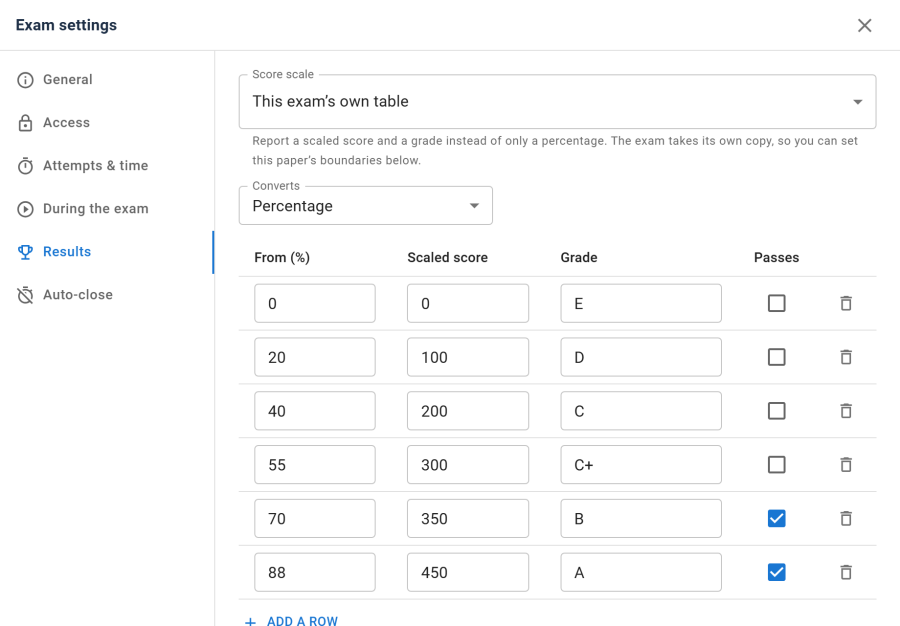
- The library — Authoring → Score scales — holds scales to start from.
- Each exam has its own copy. In the Exam Studio, under Exam settings → Results → Score scale, choose a library scale and the exam takes a copy of its table, shown below the picker as This exam's own table. You can then tune this paper's boundaries without touching any other exam.
Because of that copy:
- Editing a library scale changes no exam. Exams that took it keep their own table, and their results.
- Deleting a library scale changes no exam either. The confirmation says so.
- Two papers with different difficulty can start from the same scale and end with different boundaries, which is how real boundary tables work.
To stop using a scale on an exam, choose None: percentage and pass mark.
Starting from a preset
New score scale opens with a Start from list. An empty table gives you a single row starting at 0. A preset fills the title, description, what the scale converts, and the table:
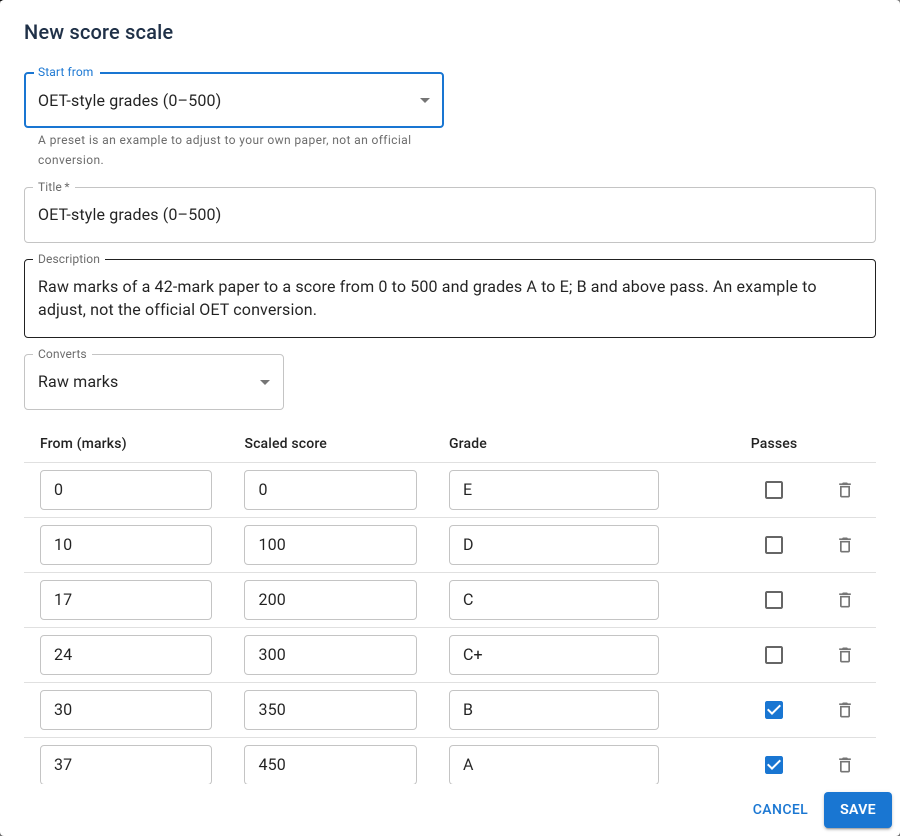
| Preset | Converts | Grades | Passes from |
|---|---|---|---|
| OET-style grades (0–500) | Raw marks (a 42-mark paper) | E, D, C, C+, B, A | B |
| IELTS-style bands (0–9) | Raw marks out of 40 | 0 to 9 in half bands | 6 |
| CEFR levels (A1–C2) | Percentage | A1, A2, B1, B2, C1, C2 | B1 |
| Letter grades (A–F) | Percentage | F, D, C, B, A (grade points 0–4) | D |
| Pass, merit and distinction | Percentage | Fail, Pass, Merit, Distinction | Pass |
A preset is an example to adjust to your own paper, not an official conversion table. Change any row before you save. Once saved, it is an ordinary library scale. The OET and IELTS presets use the same tables as the matching blueprints.
The grade decides pass
With a scale, the exam's Pass mark is not used: the studio disables the field and says Not used: with a score scale, the grade decides pass or fail. Whether a result passes is the Passes column of the row it lands in.
That one verdict drives everything that depends on passing: the pass or fail banner and message, certificates, webhooks and the pass rate in analytics.
On the site, the exam card says Graded on a score scale and Passes from grade B, so a learner knows the target before they start.
Note: an exam whose scale table could not be read grades by its pass mark instead. A broken table never fails a paper.
Recalculating results
A result is converted when it is graded, and the scaled score, grade and pass verdict are stored with the attempt. Changing an exam's table afterwards does not silently move results that were already given.
When you change the table of an exam that has finished attempts, the Results panel tells you what it would change, after you save:
- Finished attempts that would get a different result: 12.
- Would now pass: 3. Would no longer pass: 1.
Recalculate applies the exam's current table to them. It works through large exams in batches and reports how many attempts were updated.
- An attempt that now passes is treated like any new pass: if the exam issues a certificate, it is issued, and the
attempt.gradedwebhook is sent. - An attempt that no longer passes keeps any certificate it already has. The panel counts them, so you can revoke them under Certificates if they should not stand.
- Attempts graded before the exam had a scale have no grade until you recalculate. Analytics counts them separately.
Recalculating needs exams — edit, and is refused in demo mode like any other write.
Where scaled scores appear
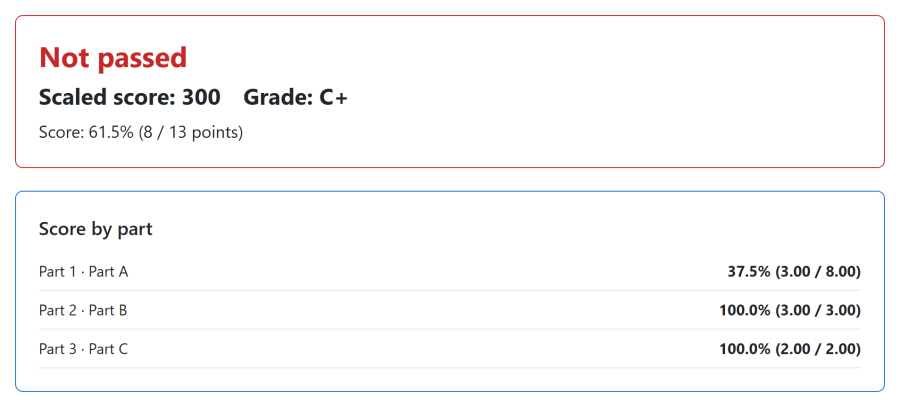
Everywhere a score leaves Next Exams, the scaled score and grade go with it, and they follow the exam's result release like the score itself:
| Where | What is shown |
|---|---|
| Result page | Scaled score: 350 and Grade: B beside the raw score |
| My Attempts, the My Results module, the exam card | The scaled score and grade |
| Emails and certificates | The tokens {scaled_score} and {band} |
| Attempts list | The scaled score and grade |
| Analytics | A distribution of grades for the exam; the per-student CSV adds each learner's best scaled score |
| Webhooks | scaled_score and band in the attempt events — see Payload data |
| REST API | scaled_score and band_label on attempts |
LTI keeps raw points. A grade passed back to an LMS gradebook is the raw score out of the maximum, never the scaled score: a gradebook expects points, and 350 is not a fraction of anything. See LTI 1.3.
The Score Scales app
Score scales belong to the Score Scales app in the App Manager. Switched off, the Score scales page and the studio picker are hidden. Exams that already have a scale keep grading with it and showing scaled results, because grading is never switched off. Nothing is deleted.
Blueprints create exams with an example scale already copied in.
Access control
Score scales use the exams permissions rather than a feature of their own.
| Action | Required permission |
|---|---|
| View the library | exams — view |
| Create a library scale | exams — create |
| Edit a library scale | exams — edit |
| Delete a library scale | exams — delete |
| Choose or edit an exam's scale | exams — edit |
| Recalculate an exam's results | exams — edit |