Blueprints
A blueprint starts a new exam from a ready-made structure: the parts of a recognised paper, their timers, layout and navigation rules, and an example score scale. You then write the passages and questions yourself in the Exam Studio.
Five blueprints ship: OET-style Reading, Listening, Writing and Speaking, and IELTS-style Reading.
Creating an exam from a blueprint
- Go to Exams and choose New from blueprint.
- Pick a blueprint. Each card shows its total time, number of parts and texts, and what each part does — Split screen, One question at a time, Forward only, Closes on exit, its minutes and any reading time — and the example scale.
- Give the exam a title, or keep the blueprint's.
- Create and open in the Studio.
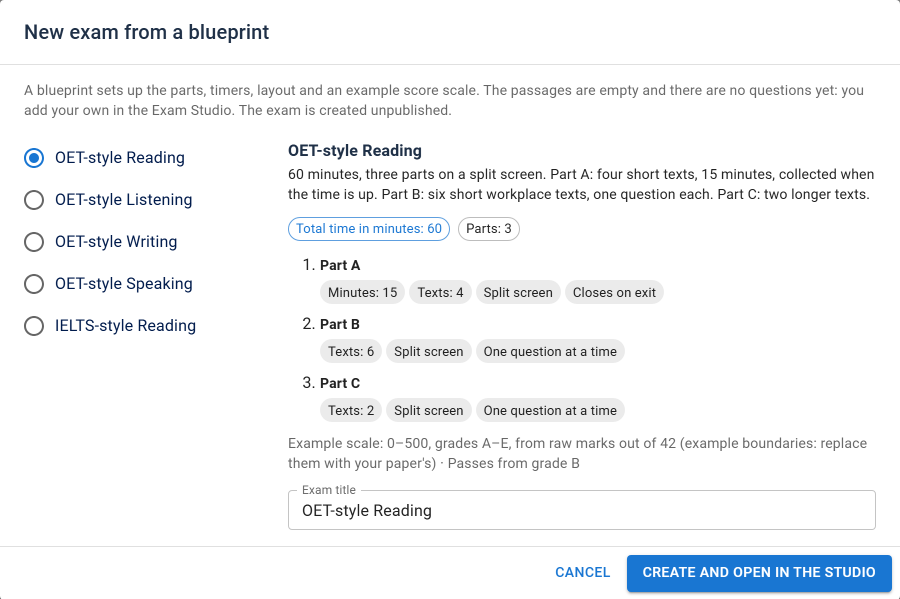
The exam is created unpublished, and opens in the Exam Studio. From then on it is an ordinary exam: change anything, add parts, remove them. Nothing ties it back to the blueprint.
Structure only
A blueprint contains no exam content. The passages are empty, titled placeholders (Text A, Reading passage 1, Case notes, Role-play card), and there are no questions. Next Exams does not ship the passages or questions of any real paper; you write or license your own.
What a blueprint does set up:
- the exam's time limit and its introduction
- each part's title and instructions
- each part's layout, question display, navigation, timer, reading time and whether it closes on exit — see Exam parts
- an example score scale, copied into the exam
- on listening and speaking parts, defaults for new content: how a recording you attach to the part will play, and the timings of a new speaking question you add to it. They show under Part settings → Defaults for new content, change nothing that is already in the part, and can be removed there
Note: the score scale boundaries are examples. Real boundary tables differ from paper to paper and are set by whoever owns the test. Replace them with your own paper's boundaries under Exam settings → Results before you rely on a grade — the scale's own description says the same.
The blueprint names describe the shape of a paper. Next Exams is not affiliated with, or endorsed by, the owners of OET or IELTS.
The five blueprints
OET-style Reading
60 minutes, three parts on a split screen.
| Part | Passages | Rules |
|---|---|---|
| A | Text A to Text D | 15 minutes. Closes when the learner leaves it or the time is up. All questions at once |
| B | Text 1 to Text 6 | One question at a time |
| C | Text 1 and Text 2 | One question at a time |
Example scale: 0–500, grades A–E, from raw marks out of 42; B (350) and above pass.
Because Part A closes on exit, this is a strict exam: parts are taken in order.
OET-style Listening
About 40 minutes, three parts answered in order, each closing when the learner moves on, and each forward only.
| Part | Rules |
|---|---|
| A | Note completion. All questions at once |
| B | Short workplace extracts. One question at a time |
| C | Longer recordings. All questions at once |
Example scale: 0–500, grades A–E, from raw marks out of 42.
Add a recording to each part. A blueprint cannot include audio, so the parts are created without it. In each part's settings, upload the recording under Listening audio: its settings are pre-filled from the blueprint — Exam conditions with one play, 30 seconds of checking time for Parts A and C and 15 seconds for Part B. Change them for that recording if your paper differs.
OET-style Writing
45 minutes: one part, with the case notes beside the answer box on a split screen. 5 minutes of reading time, during which the notes can be read but nothing written, then 40 minutes to write.
Example scale: 0–500, grades A–E, from the percentage. Writing is marked by a person, so add an essay question with a rubric — see Rubrics.
OET-style Speaking
20 minutes: two role plays answered in order, each on a split screen with its role-play card beside it, each 9 minutes, forward only and closing on exit.
Example scale: 0–500, grades A–E, from the percentage.
Add a speaking question to each role play. A blueprint creates no questions. A new speaking question added to a role play in the studio is pre-filled from the blueprint with 3 minutes of preparation and one take of 5 minutes, which fits each 9-minute part; add the role-play card and your rubric. The studio refuses a speaking question that would not fit.
IELTS-style Reading
60 minutes, three parts with one reading passage each on a split screen, and free movement between the parts — no part closes behind the learner, so this is a relaxed exam.
Example scale: bands 0–9 from raw marks out of 40; band 6 and above pass.
The Exam Blueprints app
Blueprints belong to the Exam Blueprints app in the App Manager, which needs Exam Parts: a blueprint is a set of parts, so with the Exam Parts app off the Blueprints app is paused too. Switched off, the New from blueprint button is hidden. Exams already made from a blueprint are ordinary exams and keep working.
The demo dataset includes one exam made from a blueprint, with original texts written for the demo, to show a finished paper.
Access control
| Action | Required permission |
|---|---|
| See the blueprints | exams — view |
| Create an exam from one | exams — create |
The exam is always created unpublished; publish it from the studio, with exams — publish, once its content is in place.