Setting up webhooks
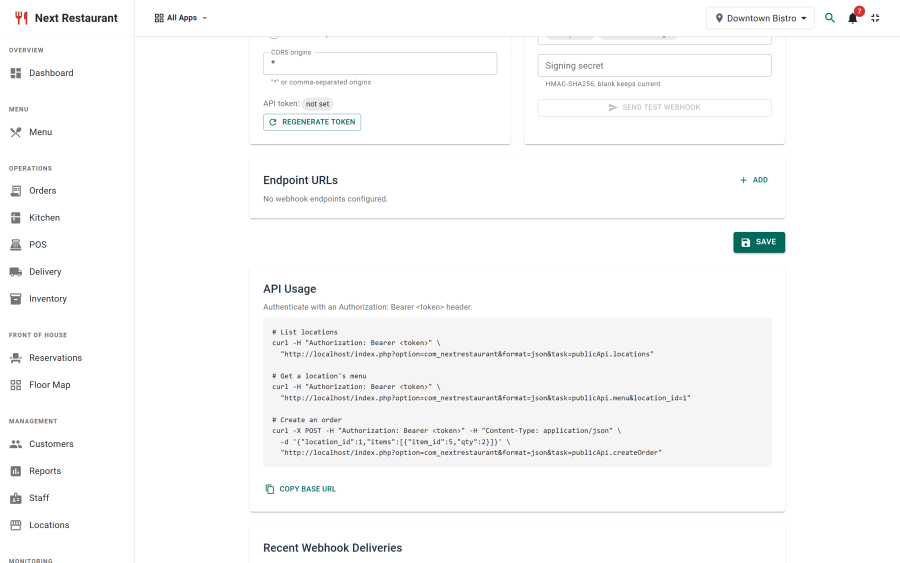
Outbound events. When something happens in Next Restaurant, an HTTP POST is sent to the endpoints you configure — so another system can react without polling.
Configure them under Integrations.
Setting up
- Enable the API module under Apps.
- Go to Integrations.
- Add one or more endpoint URLs.
- Select which events to send.
- Press Generate secret to mint a signing secret, and copy it into your consumer. It is shown once.
- Use Test webhook to fire a
pingat every endpoint and confirm they receive it.
Choosing events
Select only the events you actually consume. Every selected event is delivered to every configured endpoint. Selecting none means all of them, not none. The full list, with each payload, is under Events in this tab.
Delivery log
Integrations shows recent delivery attempts: when, which event, which endpoint, how it
responded, whether it was signed and under which schemes, and the delivery ID. It is
the first place to look when an integration "didn't get" something — usually the delivery went
out and the receiving end rejected it. A run of signed: no rows means the signing secret is
empty.
The delivery ID is the same value the consumer saw in webhook-id, so "did you receive this
one?" is a question with an answer on both sides.
Choosing endpoints
- The endpoint must be reachable from your server over HTTP(S). A URL on a private network your Joomla host can't reach will never receive anything.
- Use HTTPS. Payloads carry order data.
- Respond quickly. Acknowledge receipt and do the slow work asynchronously; a consumer that takes a long time to reply makes delivery unreliable.
- There are no retries. One attempt per endpoint, with a five-second timeout. If your endpoint is down, slow, or answers anything outside the 2xx range, that event is gone — it is not queued and it will not be sent again. The attempt is recorded in the delivery log and nothing else happens. Treat webhooks as a fast path, not as a guaranteed ledger, and reconcile from your own records if a gap would matter.
- Be idempotent. Dedupe on
webhook-id(or the body'sid, which is the same value). It is stable for one event across every endpoint it is sent to, so a consumer subscribed twice can tell the second copy is not a second event.
Webhooks versus the API
They solve different problems and are usually used together:
| Use | Reach for |
|---|---|
| "Tell me when an order is placed" | Webhooks |
| "Give me the current menu" | REST API |
| "Place an order from my kiosk" | REST API |
| "Keep my dashboard in sync" | Webhooks to invalidate, API to fetch |
Polling the API on a timer to detect new orders is the wrong shape — it is slower, heavier, and misses changes between polls.
Payment webhooks are different
The webhooks described here are outbound, from Next Restaurant to you.
Payment providers also send inbound webhooks — from PayPal to your site — to confirm settlements. Those are configured per gateway, not here. See Payment Gateways.
See also
- REST API — the inbound API
- Payment Gateways — inbound provider webhooks
- Apps & Modules — enabling the API module