Apps & Modules
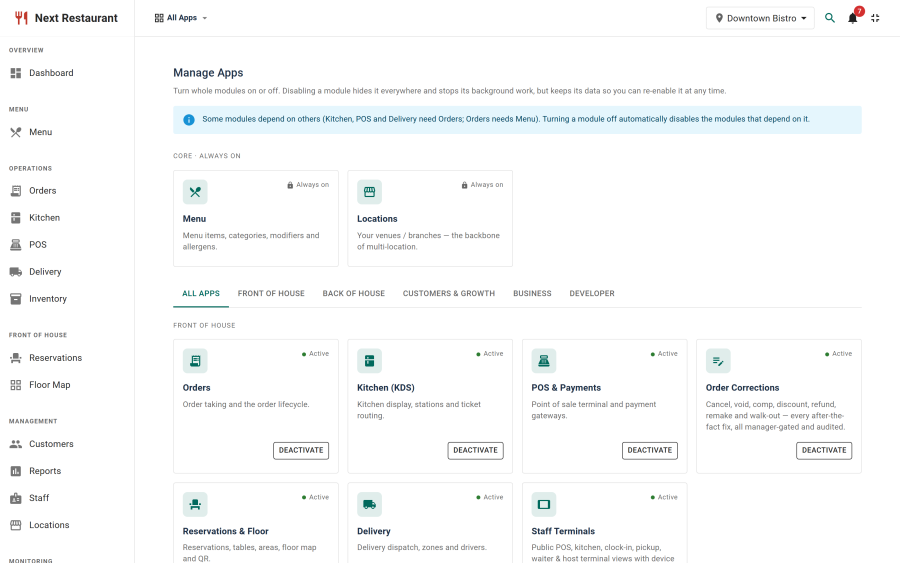
Next Restaurant is a large product, and most restaurants don't need all of it. Fourteen functional areas are modules, and thirteen of them can be switched off individually on the Apps page — open the app launcher in the admin header and click the cog.
Switching a module off is not cosmetic. Its navigation disappears, and its server-side endpoints refuse the request — so a disabled area is genuinely unreachable, not merely hidden.
The module list
| Module | Default | Depends on | What it covers |
|---|---|---|---|
| menu | On (core) | — | Menu items, categories, modifiers, allergens, galleries |
| orders | On | menu | The order pipeline across every channel |
| kds | On | orders | Kitchen display, stations, routing rules |
| pos | On | orders | Point of sale, payment gateways, cash drawer |
| corrections | On | orders | Cancel, modify, remake, comp, discount, refund |
| delivery | On | orders | Zones, drivers, dispatch |
| reservations | On | — | Bookings, floors, areas, tables, QR sessions |
| inventory | On | — | Stock items, recipes, movements, waste |
| customers | On | — | Customer records and reviews |
| loyalty | On | — | Coupons and gift cards |
| reports | On | — | Reporting and the audit log |
| staff | On | — | Staff records and the time clock |
| terminals | On | — | Staff terminal provisioning and the PIN lane |
| api | Off | — | The public REST API and integrations |
Menu is core. No menu, no restaurant — it is the root that orders, KDS, POS and delivery all depend on, so it cannot be switched off and is excluded from the save.
The API is off by default. Public endpoints are opt-in, which is the right default for a surface that is reachable without an admin session.
Dependencies and grey-out
The dependency chain is short but it matters:
menu ──> orders ──> kds
                └─> pos
                └─> delivery
                └─> corrections
A module is effectively enabled only when its own switch is on and every module it depends on
is effectively enabled. Turn orders off and KDS, POS, delivery and corrections grey out
automatically — you don't have to remember to switch four more things off, and you can't leave a
half-configured state where the POS is on but orders aren't.
Turning orders back on restores whatever the dependents' own switches were set to.
Always-on areas
Some things are never gated, because they are the shell rather than a feature:
Dashboard, Locations, Settings, Roles & Permissions, Notifications, media handling, the storefront itself, and demo mode. Switching off "settings" would leave you unable to switch it back on.
The payments ledger is also deliberately not module-gated. It is a financial record: if you take a payment, you should be able to see it, even if you later switch the POS module off.
Modules versus permissions
These are two different controls and it is worth being clear about which to reach for:
| Module | Permission (role feature) | |
|---|---|---|
| Question it answers | Is this capability part of our install? | May this person use it? |
| Scope | The whole install | One role |
| Set under | The Apps page (launcher → cog) | Settings → Roles & Permissions |
| Effect when off | Nobody can use it, endpoints refuse | That role can't use it; others still can |
"We don't do delivery" is a module. "The kitchen shouldn't see sales reports" is a permission. Using a module toggle for a per-person concern removes the feature from everyone; using permissions for "we don't do this at all" leaves endpoints reachable by anyone whose role happens to grant them.
See Roles & Permissions.
Turning a module off safely
Switching a module off does not delete its data. The records stay; they simply become unreachable until it is switched back on.
That said, a few things are worth checking first:
- Storefront menu items. Disabling
ordersleaves an Order menu item published on the site pointing at a disabled area. Unpublish the Joomla menu item too. - Terminals. Disabling
terminalsstops provisioned devices from authenticating — which is the intent, but tell the floor before you do it mid-service. - Reservations and QR. QR sessions and dining tables live under
reservations, so disabling it stops QR ordering as well as bookings.
See also
- Roles & Permissions — the per-person control
- Settings — the rest of the configuration
- REST API — what the
apimodule exposes