Point of Sale
A full-service point of sale, built for a counter that stays busy — open checks held across a service, seats and splits, manager-gated adjustments, receipts, refunds and a cash drawer.
The POS runs in two places: as a page in the admin (POS), and as a lean staff terminal that runs on a tablet with no Joomla login. Both are the same application; the terminal simply strips the admin shell. See Staff Terminals.
The screen
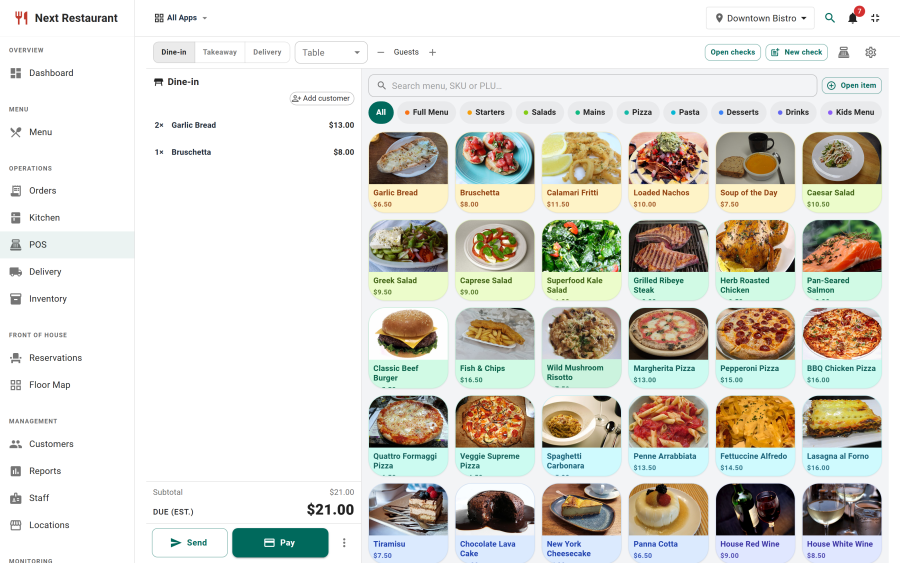
The layout is ticket-left, menu-right. The ticket panel holds the current check and its totals; the menu pane is a searchable tile grid organised by category. Tiles are available in light and dark, so a screen under kitchen lighting can be legible without changing the admin theme.
Building a check
Adding items
Tap a tile to add the item. If it carries modifier groups, the configuration dialog opens and enforces the group rules — a required single choice must be answered, a multi-select stops at its maximum.
Open items cover anything not on the menu: enter a name and a price for a one-off sale.
Line actions
Selecting a line opens its action sheet:
| Action | Notes |
|---|---|
| Quantity | Increase or decrease |
| Note | Free text passed through to the kitchen ticket |
| Discount | Line-level, manager-gated |
| Void | Removes the line with a reason, manager-gated |
| Remake | Fires the line again, recording why |
Order type and table
A check carries its order type — dine-in, pickup, delivery — and, for dine-in, its table. Both can be changed while the check is open.
Open checks
Checks are held open across a service rather than closed at the point of ordering. Open Checks lists everything currently running, so a server can pick a table back up, add a round, and leave it open again.
Appending to an open check fires only the new lines to the kitchen — previously bumped lines are not re-sent.
Seats, splits and transfers
| Capability | What it does |
|---|---|
| Seats | Assign lines to seat numbers so a table's items stay attributable |
| Split — even | Divide the check into n equal parts, each payable independently |
| Split — by seat | Divide the check along seat assignments, so everyone pays for what they had |
| Transfer | Move the whole check to another table, or to another server |
Splits sum to the check's grand total, and each split is paid on its own. The order completes when every split is covered — so a table can settle in stages without leaving the check half-paid in an ambiguous state.
Manager-gated actions
Voids, comps, discounts and corrections require a manager PIN. The PIN is verified on the server, not in the browser, and the action is written to the audit log with the amount, the reason and who authorised it.
This is the control that makes the POS auditable. A server can run a table all night; only a manager can make money disappear from a check, and every time they do it leaves a record.
Taking payment
The payment dialog offers whichever providers you have enabled — cash, card terminal, PayPal, voucher, bank transfer or on-account. Split payments across more than one method are supported: take £20 in cash and the balance on a card, and both are recorded against the check.
Gift card and loyalty redemption are Coming soon and cannot be enabled yet; see Payments.
Receipts
Receipts can be printed or emailed. The receipt shows the lines, modifiers, discounts, tax, service charge and how the check was settled.
Refunds
Full and partial refunds are issued from the POS or from the payments ledger, back through the original provider where there is one. Refunds are recorded against the order and appear in the refunds tab of Payments. See Payments.
Cash drawer
Drawer sessions bracket a shift: open the drawer with a starting float, take payments against it, then count and reconcile at the end. The session records the expected and counted amounts so a variance is visible rather than absorbed.
86-ing an item
Anyone on the POS can mark an item unavailable. It disappears immediately from every ordering channel — the storefront, QR table ordering and every other terminal — not just from the POS it was 86'd on. Clearing it puts the item back everywhere.
What the POS does not do
Being explicit is more useful than a feature list that quietly overpromises:
- No coursing. Lines fire when the check is fired; there is no hold-and-fire-by-course sequencing.
- No offline mode. The POS needs a connection to write an order. It shows an offline banner when the connection drops so staff know the screen is stale, but orders are not queued locally.
See also
- Payments — providers, ledger and refunds
- Order Corrections — what happens after a check is closed
- Staff Terminals — running the POS on a tablet
- Kitchen Display — where fired lines go