Payment Gateways
A gateway is a configured instance of a payment provider. Until you configure one, only the manual settlement types are available; card payments online need a provider.
Configure them under Payment Gateways.
Adding a gateway — the two-step picker
Adding a gateway is deliberately two steps, because every provider needs different fields:
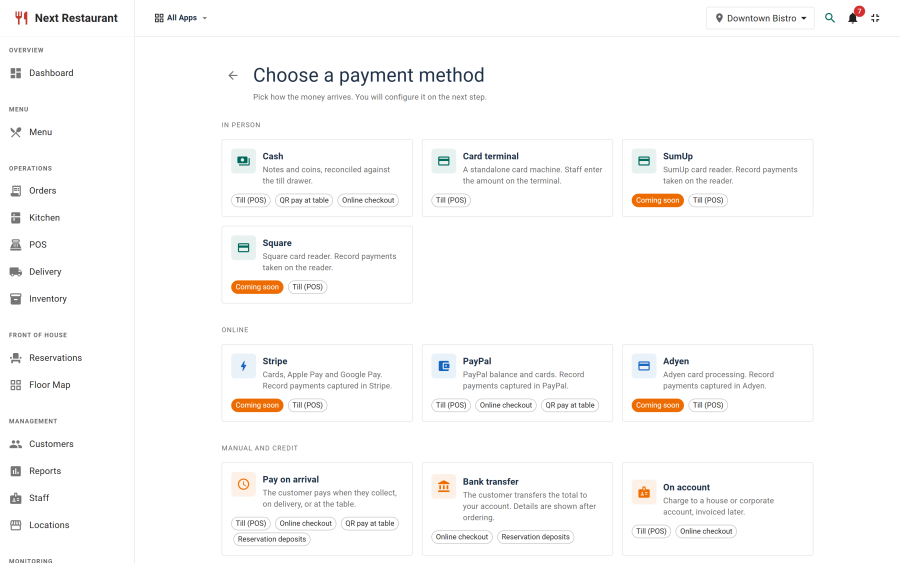
Step 1 — pick the provider
Choose from the registry:
| Provider | Type | Available in 6.0.0 |
|---|---|---|
| PayPal | Orders v2 redirect and capture, webhook backstop | Yes |
| Cash | Manual | Yes |
| Card terminal | Manual — a standalone machine takes the money, the amount is recorded | Yes |
| Bank transfer | Manual | Yes |
| On account | Charged to an account customer | Yes |
| Voucher | Promotional instrument | Yes |
| Pay on arrival | Generic manual fallback — the customer pays on collection or at the table | Yes |
| Stripe | Hosted checkout, webhook-confirmed | Coming soon |
| Adyen | Hosted flow | Coming soon |
| Square | Hosted flow | Coming soon |
| SumUp | Hosted flow | Coming soon |
| Gift card | Redemption against an issued card | Coming soon |
| Loyalty | Settlement from a loyalty balance | Coming soon |
Providers marked "Coming soon"
Six providers are registered and described but cannot yet be selected or enabled. They appear in the picker greyed out, carrying a Coming soon badge, so you can see what is on the way without being able to switch on something unfinished.
The four card providers store credentials but cannot yet initiate a charge; gift card and loyalty have no balance validation behind them yet. Rather than let a guest meet a pay button with nothing behind it, the block is enforced on the server as well as in the interface — a gateway on one of these providers cannot be published, however the request is made.
Each unlocks in a future update. Nothing you configure now needs redoing.
For card payments today, use PayPal online and Card terminal in person — including alongside a Square or SumUp reader you already own.
Step 2 — fill in that provider's form
The configuration form is generated from the provider's own schema, so you are asked for exactly what that provider needs — client credentials for PayPal, bank details for a transfer, nothing at all for cash — and nothing you don't.
Common settings
Whatever the provider, a gateway carries:
| Setting | Purpose |
|---|---|
| Title | What guests and staff see as the payment option |
| Status | A configured but disabled gateway does not appear at checkout |
| Ordering | The order options are presented in |
| Location | Which venue the gateway applies to, on a multi-location install |
| Mode | Live or test, where the provider distinguishes them |
Credentials
Provider credentials are held in the gateway configuration and are stripped from API responses — the admin interface can save a secret but never reads one back out through the API.
Two things follow:
- Re-entering a secret is expected when you edit a gateway. The field being blank does not mean the stored value was lost.
- A compromised admin session cannot exfiltrate your provider keys through the ordinary API surface.
Webhooks
Redirect providers need a webhook so a payment settles even if the guest never returns from the hosted checkout page. Each provider's configuration shows the webhook URL to register at the provider's dashboard.
The webhook must be reachable from the public internet over HTTPS. On a local development install it will not arrive, which is why redirect flows there only complete when the guest returns normally.
Webhook payloads are verified before they are trusted. Do not disable that verification, and do not assume a provider's sandbox rejects forged signatures — at least one does not.
Testing a gateway
For a redirect provider — PayPal today:
- Configure the gateway in test mode with the provider's sandbox credentials.
- Register the webhook URL at the provider.
- Place a test order on the storefront and pay through the provider's sandbox.
- Confirm the order settled in Payments and shows the provider's reference.
- Issue a partial refund from the ledger and confirm it reaches the provider.
- Repeat step 3, but close the browser at the provider's page instead of returning — the order should still settle, via the webhook, within moments.
Step 6 is the one people skip, and it is the one that matters in production.
Then switch the gateway to live credentials and repeat step 3 once with a real card and a small amount.
For a manual settlement type — cash, card terminal, bank transfer, on account, voucher — there are no credentials and no webhook. Place a test order, take the payment at the till or record it, and check it appears in Payments against the right order, channel and amount.
Multiple gateways
You can configure more than one — PayPal for the website plus cash and a card terminal at the counter is the normal setup, and different venues can use different providers. Ordering controls how they are presented; status controls whether they appear at all.
To withdraw a payment method, disable the gateway rather than deleting it. Deleting removes the configuration that historical transactions reference.
Extending the registry
Providers are drivers behind a registry, with two opt-in interfaces — one for redirect flows, one for webhooks. A new provider supplies its driver and its configuration schema; it does not require changes to the generic return handler, the webhook router, the ledger or the refund path.
That boundary is also a security boundary: the generic code enforces the invariants (verify before trust, recompute totals server-side, never echo secrets) so a new driver cannot quietly opt out of them.
See also
- Payments — the ledger, refunds and settlement flow
- Stripe · PayPal · Adyen, Square & SumUp
- Point of Sale — taking payment at the counter