Kitchen Display
A live order board that replaces the ticket printer — tickets stream in from every channel, route to the station that should make them, and get bumped line by line as they go out.
The board
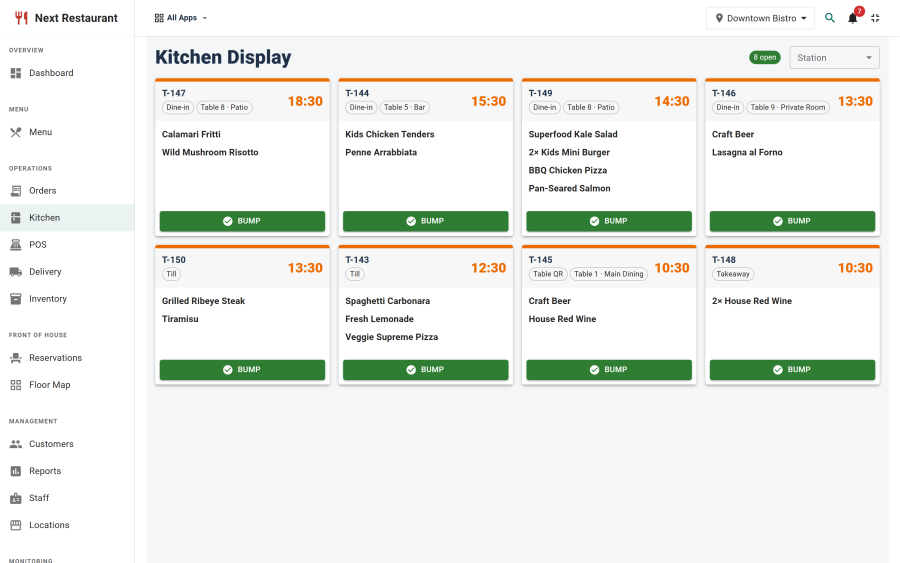
Each station has its own board. Tickets arrive in order, showing the order number, the table or order type, the lines routed to this station with their modifiers and notes, and an elapsed timer.
Timers are colour-coded so the pass can see at a glance which ticket is aging. A ticket that has sat too long stands out without anyone reading the clock.
Stations
A station is a kitchen destination — grill, fry, cold, pass, bar. Create them under Kitchen → Kitchen Stations.
| Field | Purpose |
|---|---|
| Name | What the board is titled |
| Location | Which venue the station belongs to |
| Status | An unpublished station receives no routing |
Every install starts with a default station, so the board works before you configure anything — until routing rules exist, everything goes there.
Routing rules
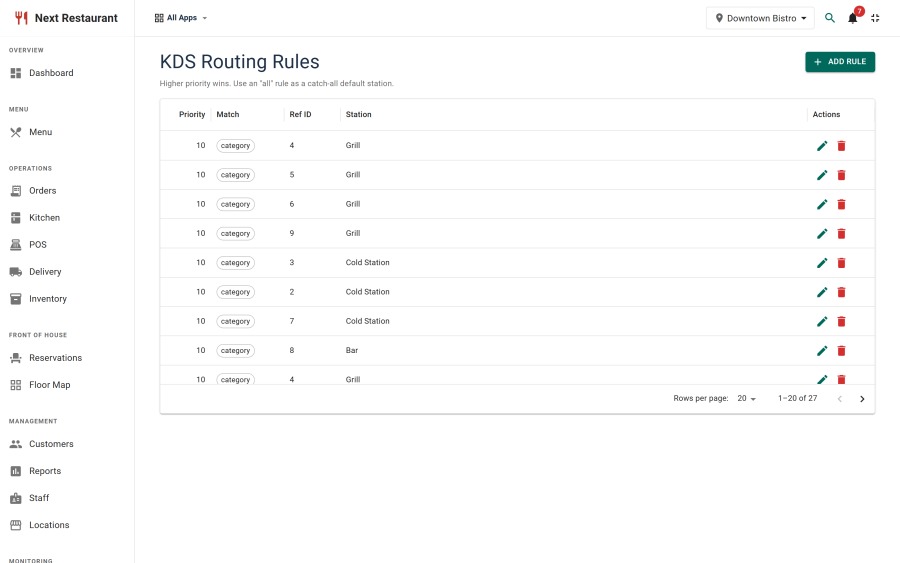
Rules decide which station each line lands on. Create them under Kitchen → KDS Routing.
A rule matches on:
| Match by | Use it for |
|---|---|
| Category | The broad case — all Desserts to the cold section |
| Item | The exception — one dish that goes to a different section than its category |
| Order type | Splitting by service — delivery lines to their own board |
Rules are evaluated in order, and a line that matches nothing lands on the default station. That fallback is deliberate: a newly added menu item is never silently unmade because nobody wrote a rule for it.
Working a ticket
Line-level bumping
Lines are bumped individually, not just whole tickets. A twenty-minute cook sitting on the same ticket as a two-minute side no longer holds the side at the pass — the fast line goes when it is ready, and the ticket clears when its last line does.
States
A line moves through queued → in progress → ready. The board reflects the state, and the pickup and waiter screens read the same states, so front of house knows what is up without shouting through the hatch.
Cancellations
When an order is cancelled or a line is voided after the kitchen has it, the affected station raises a cancellation banner. The banner stays until a cook acknowledges it, so a cancellation cannot be missed by someone who happened to be looking at the fryer.
The correction that caused it records whether the food was wasted or the ingredients restocked — see Order Corrections.
Where tickets come from
Every channel, without exception:
| Channel | How it arrives |
|---|---|
| Online ordering | On checkout |
| QR table ordering | When the guest places or adds to their order |
| POS | When the check is fired |
| Phone / counter | Raised by staff in the POS or the admin orders screen |
| Delivery | Same as online, with the delivery order type |
This is why routing rules can match on order type: a kitchen that wants delivery on its own board gets it with one rule, not a separate system.
Running it on a screen in the kitchen
The KDS is available as a staff terminal — a lean, chromeless view that runs on a tablet or a wall-mounted screen with no Joomla login. Provision the device once, restrict it to the kitchen role if you like, and it shows nothing but the board. See Staff Terminals.
Turning it off
The KDS is the kds module, which depends on orders. Switching it off under Apps
removes the boards and refuses their endpoints — for a kitchen that would rather keep its printer.
Orders still flow everywhere else.
See also
- Point of Sale — where checks are fired from
- Order Corrections — cancellations and remakes
- Staff Terminals — the kitchen screen
- Inventory — what a sold dish depletes