REST API
A small public REST surface for integrating what you run alongside Next Restaurant — a kiosk, a mobile app, a partner's ordering front end.
It is off by default. Public endpoints are reachable without an admin session, so they are opt-in rather than opt-out.
The surface is deliberately narrow: read the locations, read the live menu, place an order. It is not a remote-administration interface, and it is not a reporting interface.
Two ways in
There are two transports for the same three operations, the same token and the same order engine.
| REST (recommended) | Query-string (original) | |
|---|---|---|
| Base | /api/index.php/v1/nextrestaurant |
/index.php?option=com_nextrestaurant&format=json |
| Style | Resource paths and HTTP verbs | One path, operation chosen by task= |
| Types | Real arrays, objects and numbers | Some fields are JSON-encoded strings |
| OpenAPI | Fully described | Cannot be described — see below |
| Status | Current | Supported, frozen |
Start with REST. It is the surface the OpenAPI document describes, so you can generate a client, load it into Swagger UI or Postman, and have your tooling validate responses for you.
The query-string lane still works exactly as it always has and is not going away — but it cannot
be expressed in OpenAPI at all. The specification keys every operation on a path plus a method,
and query parameters play no part in that identity; locations and menu are both GET on
/index.php, so a document describing them would have two get operations on one path, which is
not expressible. That limitation is the reason the REST routes exist.
The two lanes are documented together below: each endpoint shows the REST form first, with the query-string equivalent underneath.
Enabling it
- Go to Apps and turn on the API module.
- Go to Integrations and press Generate token.
- Copy the token immediately — see below.
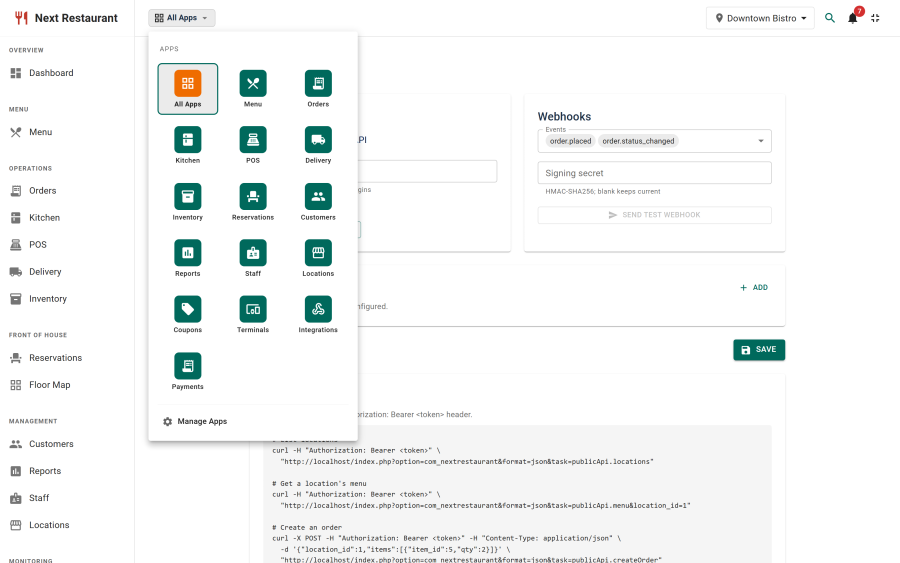
There are two switches and both must be on. The API module under Apps is the master shutoff; the Enable API checkbox under Integrations is the day-to-day one. Turning either off refuses every request, whoever holds the token.
Once the API is on, Integrations shows an API health panel that checks the setup for you — see API health below.
Authentication
Every request carries a bearer token:
Authorization: Bearer <your-api-token>X-Api-Token: <your-api-token> is accepted as an alternative for clients that cannot set an
Authorization header.
The token is shown exactly once, when you generate it. Only a SHA-256 hash is stored, so it cannot be recovered later — if you lose it, generate a new one. Generating invalidates the previous token immediately, which is also the recovery path if one leaks.
There is one token per site. It is not scoped per integration, so two consumers sharing a site share a token, and regenerating cuts both off.
API health
With the API switched on, Integrations → API health checks that clients can actually use it:
| Check | What it means |
|---|---|
| Authorization header | Whether your web server passes Authorization: Bearer through to Joomla |
| API token | Whether a token has been generated at all |
| REST routes | Whether the Web Services - Next Restaurant plugin is enabled; without it /api/index.php/v1/nextrestaurant/… answers 404 |
| HTTPS | Whether the site is served over HTTPS, so the token isn't sent in clear |
The first three stop every client, so they are also raised as a banner across the whole admin, for users who can manage settings, until they are fixed. Re-check runs the header test again immediately; it also re-runs by itself once a day.
When the web server drops the Authorization header
Some servers remove the Authorization header before PHP ever sees it. Every bearer request then
fails with 401 Invalid API token, exactly as if the token were wrong. It is a server setting, not
something the extension can work around:
| Server | Drops the header? |
|---|---|
| nginx + PHP-FPM | No |
| Apache + mod_php | No |
| Apache + PHP-FPM or mod_fcgid (FastCGI) | Yes, unless configured |
The API health panel shows the fix for your server. On Apache, any one of these works:
-
Rename
htaccess.txtto.htaccessin the site root. Joomla's own file already contains the fix (and you likely want it for SEF URLs anyway). -
Or add this line to the virtual host or
.htaccess(Apache 2.4.13 or later):CGIPassAuth On -
Or, on mod_fcgid, add
FcgidPassHeader Authorizationto the virtual host.
On nginx, if a custom configuration strips it, add to the PHP location block:
fastcgi_param HTTP_AUTHORIZATION $http_authorization;Until the server is fixed, clients can send the token as X-Api-Token: <your-api-token> instead —
custom headers are never stripped.
Conventions
Base URL.
REST          https://your-site.example/api/index.php/v1/nextrestaurant
Query-string  https://your-site.example/index.php?option=com_nextrestaurant&format=json&task=publicApi.<endpoint>
Response envelope. The two lanes wrap their payloads differently.
// REST — the resource under `data`, and nothing else
{ "data": { } }

// Query-string — Joomla's envelope, with `success` repeated inside
{ "success": true, "message": null, "messages": null, "data": { } }
Either way the payload you want is in data. Read data, not the outer object.
Errors carry a real HTTP status on both lanes. Do not parse the message to detect failure: check the status code, then read the code.
// REST — the same shape the Joomla API application uses for its own errors
{ "errors": [ { "title": "Unknown location", "code": "UNKNOWN_LOCATION" } ] }

// Query-string
{ "success": false, "message": "Unknown location", "data": { "success": false } }
Money and numbers. On REST everything numeric is a JSON number. On the query-string lane the
top-level grand_total is a number while the fields inside data.order are strings with two
decimals ("31.50") — parse defensively there.
Ignore fields you do not recognise. New fields are added over time; a consumer that rejects unknown keys will break on an upgrade it did not need to care about.
Endpoints
| Purpose | REST | Query-string |
|---|---|---|
| Published locations | GET /locations |
task=publicApi.locations |
| A location's live menu | GET /locations/{id}/menu |
task=publicApi.menu&location_id={id} |
| Place an order | POST /orders |
task=publicApi.createOrder |
Locations
REST          GET /api/index.php/v1/nextrestaurant/locations
Query-string  GET /index.php?option=com_nextrestaurant&format=json&task=publicApi.locations
curl -s "https://your-site.example/api/index.php/v1/nextrestaurant/locations" \
-H "Authorization: Bearer $NR_TOKEN"Returns every published location. Unpublished ones are never listed.
On REST, service_modes is an array, opening_hours an object and tax_rate a number:
{
  "data": [
    {
      "id": 1,
      "code": "MAIN",
      "title": "Downtown Bistro",
      "currency": "USD",
      "timezone": "America/Chicago",
      "service_modes": ["dine_in", "takeaway", "delivery", "qr"],
      "opening_hours": {
        "mon": { "open": "11:00", "close": "22:00" },
        "sat": { "open": "10:00", "close": "23:30" }
      },
      "tax_rate": 8.25
    }
  ]
}
The query-string lane returns the same data exactly as stored, which means two of those fields arrive as JSON-encoded strings and need a second decode:
{
  "success": true,
  "locations": [
    {
      "id": 1,
      "code": "MAIN",
      "title": "Downtown Bistro",
      "currency": "USD",
      "timezone": "America/Chicago",
      "service_modes": "[\"dine_in\",\"takeaway\",\"delivery\",\"qr\"]",
      "opening_hours": "{\"mon\":{\"open\":\"11:00\",\"close\":\"22:00\"}}",
      "tax_rate": "8.25",
      "state": 1
    }
  ]
}
opening_hours is keyed by mon–sun on both lanes; a day that is absent or empty means closed.
The query-string lane also carries a state field, which is always 1 because unpublished
locations are never returned.
The id from here is the location id every other endpoint needs.
Menu
REST          GET /api/index.php/v1/nextrestaurant/locations/{id}/menu
Query-string  GET /index.php?option=com_nextrestaurant&format=json&task=publicApi.menu&location_id={id}
curl -s "https://your-site.example/api/index.php/v1/nextrestaurant/locations/2/menu" \
-H "Authorization: Bearer $NR_TOKEN"| Parameter | Required | Meaning |
|---|---|---|
id (REST path) / location_id (query-string) |
Yes | A published location's id |
Both lanes return the same item structure. On REST it is {"data": {"location_id": …, "categories": [ … ]}}; on the query-string lane the same object sits inside Joomla's envelope.
The menu reflects live availability for that location: unpublished items, items switched off for that branch, and 86'd items are all absent, and the price is the branch's price where one overrides the base. An integration therefore cannot sell something you cannot make.
Items are grouped into categories, in the order you arranged them in the admin.
{
  "success": true,
  "location_id": 2,
  "categories": [
    {
      "id": 2,
      "title": "Starters",
      "items": [
        {
          "id": 1,
          "title": "Garlic Bread",
          "description": "Stone-baked sourdough with roasted garlic butter, melted mozzarella and parsley.",
          "price": 6.5,
          "has_variations": 0,
          "image": "images/nextrestaurant/items/1/gallery/cb901db407fa4277.jpg",
          "prep_time_minutes": 19,
          "calories": null,
          "spice_level": 0,
          "is_alcohol": 0,
          "variations": [],
          "modifier_groups": [],
          "allergens": [
            { "id": 1, "title": "Celery", "presence": "contains" }
          ]
        }
      ]
    },
    {
      "id": 5,
      "title": "Pizza",
      "items": [
        {
          "id": 16,
          "title": "Margherita Pizza",
          "description": "San Marzano tomato, fior di latte and fresh basil on a 48-hour dough.",
          "price": 13,
          "has_variations": 1,
          "image": "images/nextrestaurant/items/16/gallery/ca98f3a212f1aac0.jpg",
          "prep_time_minutes": 23,
          "calories": null,
          "spice_level": 0,
          "is_alcohol": 0,
          "variations": [
            { "id": 1, "title": "Regular", "price": 13, "is_default": 1 },
            { "id": 2, "title": "Large",   "price": 17, "is_default": 0 }
          ],
          "modifier_groups": [
            {
              "id": 2,
              "title": "Extra Toppings",
              "selection_type": "multiple",
              "is_required": 0,
              "min_select": 0,
              "max_select": 4,
              "free_quantity": 0,
              "modifiers": [
                { "id": 5, "title": "Extra Cheese", "price": 1.5,  "is_default": 0, "max_quantity": 1 },
                { "id": 6, "title": "Mushrooms",    "price": 1,    "is_default": 0, "max_quantity": 1 },
                { "id": 7, "title": "Olives",       "price": 1,    "is_default": 0, "max_quantity": 1 },
                { "id": 8, "title": "Jalapenos",    "price": 0.75, "is_default": 0, "max_quantity": 1 }
              ]
            }
          ],
          "allergens": [
            { "id": 5,  "title": "Fish", "presence": "contains" },
            { "id": 14, "title": "Sulphur dioxide / sulphites", "presence": "contains" }
          ]
        }
      ]
    }
  ]
}
Item fields
| Field | Meaning |
|---|---|
price |
The branch price for the item as ordered with no variation |
has_variations |
1 when the item is sold in sizes or versions |
image |
Path relative to the site root, or null. Prefix with your site URL to display it |
prep_time_minutes, calories, spice_level, is_alcohol |
Optional presentation data; any may be null or 0 |
variations |
Sizes/versions. Empty when the item has none |
modifier_groups |
Option groups attached to this item |
allergens |
Declared allergens; presence is contains or may_contain |
Variations
When variations is non-empty, pick one and send its id. The variation's price replaces the
item's price — it is not added to it. is_default marks the one to pre-select.
Submitting an item that has variations without a variation_id is accepted, and is charged at the
base price with no size recorded. That is almost never what a customer meant, so treat a missing
selection as a validation error in your own UI.
Modifier groups
| Field | Meaning |
|---|---|
selection_type |
single (choose one) or multiple (choose several) |
is_required |
1 when the customer must choose |
min_select / max_select |
How many modifiers may be chosen from this group |
free_quantity |
How many are included before the per-modifier price applies |
modifiers[].max_quantity |
How many times one modifier may be repeated |
min_select and max_select already include any per-item override, so use them as given.
Modifier prices are added to the line.
Create order
REST          POST /api/index.php/v1/nextrestaurant/orders      -> 201 Created
Query-string  POST /index.php?...&task=publicApi.createOrder    -> 200 OK
Content-Type: application/json
curl -s -X POST "https://your-site.example/api/index.php/v1/nextrestaurant/orders" \
-H "Authorization: Bearer $NR_TOKEN" \
-H "Content-Type: application/json" \
-d '{
"location_id": 2,
"channel": "web",
"service_mode": "takeaway",
"notes": "Ring the bell at the side door",
"customer": { "name": "Dana Whitfield", "phone": "+1 555 0142", "email": "[email protected]" },
"items": [
{ "item_id": 16, "variation_id": 2, "qty": 1, "notes": "Well done",
"modifiers": [ { "modifier_id": 5, "qty": 1 } ] },
{ "item_id": 1, "qty": 2 }
]
}'Request body
| Field | Required | Meaning |
|---|---|---|
location_id |
Yes | Where the order is placed |
items |
Yes | At least one line — see below |
channel |
No | web (default), phone, takeaway or delivery. Anything else falls back to web. Recorded on the order and visible in reports |
service_mode |
No | Free text stored with the order, e.g. takeaway, dine_in |
notes |
No | Order-level note, shown to the kitchen |
customer |
No | { name, phone, email } — all optional, stored with the order |
Each entry in items:
| Field | Required | Meaning |
|---|---|---|
item_id |
Yes | Menu item id from the menu endpoint |
qty |
Yes | Quantity |
variation_id |
When the item has variations | Chosen variation |
modifiers |
No | [{ "modifier_id": 5, "qty": 1 }, …] |
notes |
No | Line note, e.g. "no ice" |
A body wrapped as {"data": { … }} is also accepted, for clients that always send that envelope.
Response
The created record, with its priced lines:
{
  "success": true,
  "id": 580,
  "order_number": "ORD-000580",
  "grand_total": 34.1,
  "status": "placed",
  "order": {
    "id": 580,
    "order_number": "ORD-000580",
    "location_id": 2,
    "channel": "web",
    "status": "placed",
    "fulfillment_status": "in_kitchen",
    "subtotal": "31.50",
    "discount_total": "0.00",
    "tax_total": "2.60",
    "service_charge": "0.00",
    "delivery_fee": "0.00",
    "grand_total": "34.10",
    "currency": null,
    "notes": "Ring the bell at the side door",
    "placed_at": "2026-09-07 20:42:51",
    "items": [
      {
        "id": 1290,
        "item_id": 16,
        "variation_id": 2,
        "name_snapshot": "Margherita Pizza (Large)",
        "qty": "1.000",
        "unit_price": "17.00",
        "modifiers_total": "1.50",
        "line_total": "18.50",
        "notes": "Well done"
      },
      {
        "id": 1291,
        "item_id": 1,
        "variation_id": null,
        "name_snapshot": "Garlic Bread",
        "qty": "2.000",
        "unit_price": "6.50",
        "modifiers_total": "0.00",
        "line_total": "13.00",
        "notes": null
      }
    ]
  }
}
name_snapshot is what the kitchen and the receipt will show — it records the item as it was
priced, including the variation. placed_at is in the site's configured timezone.
Note:
order.currencyis oftennull. Take the currency from the location instead.
What the totals mean
Totals are recomputed on the server from your menu records. A submitted price is ignored, so a
tampered request buys nothing at the wrong price — and so your integration never has to replicate
your tax or pricing rules. In the example above: 17.00 + 1.50 for the pizza plus 6.50 × 2 for
the bread gives a 31.50 subtotal, and tax brings the grand_total to 34.10.
The order's status is always placed. It cannot be set by the caller.
What an API order becomes
An ordinary order. It routes to kitchen stations by your routing rules, depletes stock at whatever status you configured, settles into the payments ledger, and appears in reports with its channel recorded — exactly like an order from the storefront.
Orders arrive unpaid. The API records an order; it does not take payment. Collect at the counter, on delivery, or through your own checkout.
Errors
On REST, every failure is {"errors": [{"title": …, "code": …}]}:
| Status | code |
When |
|---|---|---|
400 |
INVALID_ORDER |
Missing input, or an item is unpublished, 86'd or unavailable there |
401 |
INVALID_TOKEN |
Token missing, wrong, or none has been generated |
403 |
API_DISABLED |
The Enable API checkbox is off under Integrations |
403 |
MODULE_DISABLED |
The API module is off under Apps |
404 |
UNKNOWN_LOCATION |
The location does not exist or is not published. Applies to the menu and to creating an order — omitting location_id entirely is the 400 above, not this |
404 |
404 |
No such route, or the wrong verb for it — this one comes from Joomla's router, so code is a number |
429 |
RATE_LIMITED |
Too many orders from one address |
500 |
ORDER_FAILED |
Something failed server-side |
On the query-string lane the same conditions produce Joomla's envelope instead:
| Status | Body |
|---|---|
400 |
{"success": false, "message": "location_id is required"} |
401 |
{"success": false, "message": "Invalid API token"} |
403 |
{"success": false, "message": "API is disabled"} |
403 |
{"success": false, "message": "This module is disabled.", "data": {"code": "MODULE_DISABLED"}} |
404 |
{"success": false, "message": "Unknown location"} |
404 |
{"success": false, "message": "Unknown task.", "data": {"code": "UNKNOWN_TASK"}} |
429 |
{"success": false, "message": "Too many orders …", "data": {"code": "RATE_LIMITED"}} |
500 |
{"success": false, "message": "The order could not be created."} |
The two 403s are different switches — check both Apps and Integrations when you see one.
A 500 is deliberately vague to the caller; the detail is written to the Joomla log
(administrator/logs/), which is where to look when an order will not go through.
Rate limits
Order creation is limited to 60 orders per IP address per 5 minutes. Beyond that you get 429
and no order is created — the response is safe to retry after a pause.
The read endpoints are not rate limited, but they are not free either: fetch the menu on a timer or on cache miss, not on every page view.
OpenAPI
The REST lane ships a machine-readable description in OpenAPI 3.1, and your own site serves it:
https://your-site.example/media/com_nextrestaurant/openapi.yamlThat is the copy installed with your version of the extension, so it describes the API that site actually exposes rather than whatever the current release documents. Load it into Swagger UI, Redoc, Postman or Insomnia, or generate a typed client:
# Interactive docs, no install
npx @redocly/cli preview-docs https://your-site.example/media/com_nextrestaurant/openapi.yaml

# A TypeScript client
npx openapi-typescript https://your-site.example/media/com_nextrestaurant/openapi.yaml -o api.d.ts
Point the host server variable at your site. Both authentication schemes are declared, so a
Swagger UI "Authorize" box accepts your token and the built-in Try it calls work against a live
site.
The document is verified against a running site on every test run — each documented response is validated against its schema — so it describes what the API returns rather than what it was intended to return.
Only the REST lane is described. The query-string lane cannot be, for the reason given at the top of this page.
CORS
Both lanes emit CORS headers so a browser-based front end on another origin can call them, and
both answer a preflight OPTIONS with 204:
Access-Control-Allow-Origin: *
Access-Control-Allow-Headers: Authorization, X-Api-Token, Content-Type, X-CSRF-Token
Access-Control-Allow-Methods: GET, POST, OPTIONS
The allowed origin defaults to *. Set Allowed CORS origins in Integrations to a comma-separated
list to narrow it. The same setting governs both lanes.
Error responses carry the headers too. Without that, a browser hands your JavaScript an opaque network failure with no status to read, and a wrong token looks exactly like the server being down.
Calling the API from browser JavaScript puts your token in the page, where any visitor can read it and place orders with it. Restricting the origin does not prevent that — CORS is enforced by browsers, not by your server, and a token lifted from a page can be replayed with
curl. Call the API from your own backend and let your front end talk to that.
A worked example
Placing an order end to end, in the order a kiosk would do it:
BASE="https://your-site.example/api/index.php/v1/nextrestaurant"
AUTH="Authorization: Bearer $NR_TOKEN"

# 1. Which branches exist?
curl -s "$BASE/locations" -H "$AUTH" | jq '.data[] | {id, title, currency}'

# 2. What can branch 2 sell right now?
curl -s "$BASE/locations/2/menu" -H "$AUTH" \
  | jq '.data.categories[].items[] | {id, title, price, has_variations}'

# 3. What are the options on item 16?
curl -s "$BASE/locations/2/menu" -H "$AUTH" \
  | jq '.data.categories[].items[] | select(.id == 16) | {variations, modifier_groups}'

# 4. Place the order (201 Created).
curl -s -X POST "$BASE/orders" -H "$AUTH" \
  -H "Content-Type: application/json" \
  -d '{"location_id":2,"items":[{"item_id":16,"variation_id":2,"qty":1}]}' \
  | jq '.data | {order_number, grand_total, status}'
Practical advice
- Cache the menu, briefly. It changes when staff 86 an item, so a 30–60 second cache keeps the kiosk responsive without selling something the kitchen ran out of ten minutes ago.
- Re-fetch the menu before submitting a long-lived basket, and re-check the ids you are about
to send. A
400 One of the items is no longer availableat checkout is the item having gone off sale while the customer was deciding. - Retrying is not free. There is no idempotency key, so a retried
createOrderthat actually succeeded the first time creates a second order. On a timeout, treat the outcome as unknown and reconcile rather than blindly retrying. - Use webhooks for "what happened next". The API has no endpoint to read an order back after
it is created, so keep the
order_numberfrom the response and subscribe to Webhooks for status changes. Polling is the wrong shape here, and there is nothing to poll.
What the API is not
Being explicit avoids disappointment:
- It is not an admin API. There is no endpoint to edit menu items, manage staff, or change settings. Administration happens in the admin.
- It is not a reporting API. Reports are read in the admin, or exported as CSV.
- It cannot read orders back. There is no order-status endpoint. Use webhooks.
- It does not take payment. Orders arrive unpaid.
- It does not replace webhooks. For "tell me when something happens", use Webhooks.
Security notes
- Treat the token as a credential. Anyone holding it can read your menu and place orders.
- Keep it server-side. See the CORS warning above.
- Use HTTPS. The token transits on every request.
- Regenerate on suspicion. One click, and the old token dies immediately.
- Turn the module off if you're not using it. An unused enabled API is a surface for no benefit.
- Timestamps are UTC.
placed_atand other instants are returned in UTC; convert them with the location'stimezone. See Timezones & venue time.
See also
- Webhooks — outbound events, and the only way to follow an order
- Apps & Modules — enabling the API module
- Online Ordering — what an API order becomes
- Menu — variations, modifier groups and allergens in the admin