Webhooks
Outbound events. When something happens in Next Restaurant, an HTTP POST is sent to the endpoints you configure — so another system can react without polling.
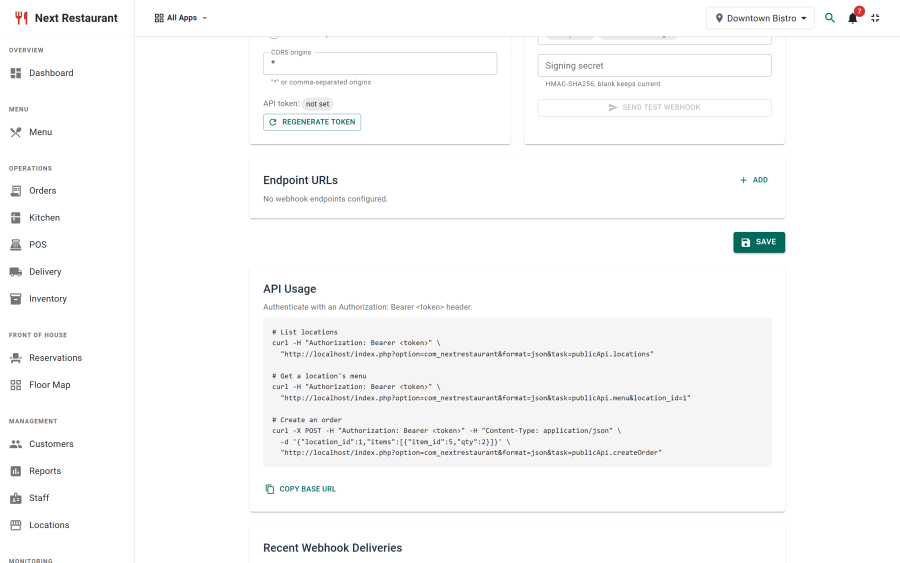
Configure them under Integrations.
Setting up
- Enable the API module under Apps.
- Go to Integrations.
- Add one or more endpoint URLs.
- Select which events to send.
- Press Generate secret to mint a signing secret, and copy it into your consumer. It is shown once.
- Use Test webhook to fire a
pingat every endpoint and confirm they receive it.
The events
| Event | Fires when |
|---|---|
order.placed |
A new order is created, on any channel |
order.updated |
An existing order changes |
order.status_changed |
An order moves to a new status |
order.cancelled |
An order is cancelled, with the reason |
ping |
You press Test webhook — for connectivity checks only |
Select only the events you actually consume. Every selected event is delivered to every configured endpoint. Selecting none means all of them, not none.
The payload
Each delivery is a POST with a JSON body of this shape:
{
  "id": "msg_4e9c1b7a2f08d3516ac4be9017d2f5a3",
  "type": "order.placed",
  "event": "order.placed",
  "data": { },
  "timestamp": "2026-08-28T19:30:00+00:00"
}| Field | Meaning |
|---|---|
id |
Unique id for this delivery. Same value as the webhook-id header. Dedupe on it. |
type |
The event name from the table above |
event |
The same name again, kept for integrations built before type existed |
data |
Identifiers for what changed — see below |
timestamp |
ISO 8601, when the event was dispatched |
type and event always carry the same value. type is the field name the
Standard Webhooks specification uses, so a
consumer built on an off-the-shelf library reads it without a mapping step; event
is not going anywhere.
What data contains
data is a small set of identifiers, not the whole order. It tells you what changed so you
can decide whether to care; it is not a substitute for your own record of the order.
| Event | data fields |
|---|---|
order.placed (storefront, QR or API) |
id, location_id, channel, source |
order.placed / order.updated (created or edited in the admin or POS) |
id, location_id, channel, status |
order.status_changed |
id, status |
order.cancelled |
id, status, reason, location_id |
ping |
message, at |
{
  "id": "msg_4e9c1b7a2f08d3516ac4be9017d2f5a3",
  "type": "order.placed",
  "event": "order.placed",
  "data": { "id": 580, "location_id": 2, "channel": "web", "source": "api" },
  "timestamp": "2026-09-07T20:42:51+00:00"
}
Two different ids, and they are not interchangeable. data.id is the internal order id
and the key to join on. The top-level id identifies the delivery — it is what you dedupe on,
and it changes every time even when the order does not.
Note that order.placed carries source when the order came from the storefront, QR ordering or
the REST API, and status when it was created in the back office — so read both defensively.
There is no endpoint to fetch an order by id. The REST API covers locations, menu and order creation only. If you need the full contents of an order later, store the response you got when you created it — webhooks tell you an order changed, not what is in it.
Write your consumer to ignore fields it doesn't recognise. New fields are added to payloads over time, and a consumer that rejects unknown keys will break on an upgrade it didn't need to care about.
Verifying deliveries are genuine
Set a signing secret in Integrations and verify it on your side before acting on a payload.
An endpoint URL is not a secret — it can be guessed, logged by a proxy, or leak from a config file. Without signature verification, anyone who learns the URL can post fabricated orders to your integration. With it, a forged request fails the check and is discarded.
Verify the signature before parsing or acting on the body, not after.
What every delivery carries
| Header | Example | Always sent? |
|---|---|---|
webhook-id |
msg_4e9c1b7a2f08d3516ac4be9017d2f5a3 |
Yes |
webhook-timestamp |
1788112371 (Unix seconds) |
Yes |
webhook-signature |
v1,g0hM9SsE+OTPJTGt/tmIKtSyZlE3uFJELVlNIOLJ1OE= |
Only when a secret is set |
X-NextRestaurant-Event |
order.placed |
Yes |
X-NextRestaurant-Signature |
sha256=6f2b… |
Only when a secret is set |
Two signature schemes go out on every signed delivery, over the same body with the same key. Verify either one — not both.
Standard Webhooks (use this for new integrations)
webhook-signature follows the Standard Webhooks
specification, so any library implementing it will verify our deliveries with no
custom code.
The signed content is the three parts joined by full stops:
{webhook-id}.{webhook-timestamp}.{raw body}The signature is the base64 of the HMAC-SHA256 of that string — base64, not hex, which is the one difference from the legacy header below.
$body = file_get_contents('php://input');
$id   = $_SERVER['HTTP_WEBHOOK_ID'] ?? '';
$ts   = $_SERVER['HTTP_WEBHOOK_TIMESTAMP'] ?? '';

// Reject anything stale BEFORE checking the signature. A signature stays valid
// forever, so without this a delivery someone captured can be replayed at you
// indefinitely and it will verify perfectly every time.
if (!$ts || abs(time() - (int) $ts) > 300) {
    http_response_code(400);
    exit;
}

$expected = 'v1,' . base64_encode(hash_hmac('sha256', "$id.$ts.$body", $YOUR_KEY, true));

// The header is a space-delimited list so a key rotation can send more than one.
// Split it and accept if any entry matches — do not compare the whole header.
$sent = explode(' ', $_SERVER['HTTP_WEBHOOK_SIGNATURE'] ?? '');
$ok   = false;

foreach ($sent as $candidate) {
    if (hash_equals($expected, $candidate)) {
        $ok = true;
    }
}

if (!$ok) {
    http_response_code(401);
    exit;
}
Your signing secret
Generate secret mints one in the form whsec_ followed by base64. For a whsec_
secret the HMAC key is the decoded bytes, not the string you can see — that is what
Standard Webhooks libraries expect, and they handle the decoding for you.
If your secret was typed in by hand rather than generated, it is used as-is: the raw bytes of the literal string. Nothing about existing secrets changed.
Rotating the secret invalidates signatures under both schemes, which is what rotation means. Update your consumer at the same time.
The original header
X-NextRestaurant-Signature is unchanged and stays supported. Its value is sha256=
followed by the hex HMAC-SHA256 of the raw body, keyed with your signing secret.
Compute it over the bytes as received — re-serialising the JSON first will change them
and the check will fail.
$body     = file_get_contents('php://input');
$expected = 'sha256=' . hash_hmac('sha256', $body, $YOUR_SECRET);

if (!hash_equals($expected, $_SERVER['HTTP_X_NEXTRESTAURANT_SIGNATURE'] ?? '')) {
    http_response_code(401);
    exit;
}
This scheme has no timestamp in what it signs, so it cannot tell a replay from a fresh delivery on its own. That is the reason to prefer the Standard Webhooks header.
With no secret set, deliveries go out unsigned
Both signature headers are simply absent — webhook-id and webhook-timestamp are
still sent — and a consumer that verifies will reject every delivery. This is the
state a new install ships in. Generate the secret before you write the verification,
and check the delivery log below to confirm what is actually being sent.
Delivery log
Integrations shows recent delivery attempts: when, which event, which endpoint, how it
responded, whether it was signed and under which schemes, and the delivery ID. It is
the first place to look when an integration "didn't get" something — usually the delivery went
out and the receiving end rejected it. A run of signed: no rows means the signing secret is
empty.
The delivery ID is the same value the consumer saw in webhook-id, so "did you receive this
one?" is a question with an answer on both sides.
Choosing endpoints
- The endpoint must be reachable from your server over HTTP(S). A URL on a private network your Joomla host can't reach will never receive anything.
- Use HTTPS. Payloads carry order data.
- Respond quickly. Acknowledge receipt and do the slow work asynchronously; a consumer that takes a long time to reply makes delivery unreliable.
- There are no retries. One attempt per endpoint, with a five-second timeout. If your endpoint is down, slow, or answers anything outside the 2xx range, that event is gone — it is not queued and it will not be sent again. The attempt is recorded in the delivery log and nothing else happens. Treat webhooks as a fast path, not as a guaranteed ledger, and reconcile from your own records if a gap would matter.
- Be idempotent. Dedupe on
webhook-id(or the body'sid, which is the same value). It is stable for one event across every endpoint it is sent to, so a consumer subscribed twice can tell the second copy is not a second event.
Webhooks versus the API
They solve different problems and are usually used together:
| Use | Reach for |
|---|---|
| "Tell me when an order is placed" | Webhooks |
| "Give me the current menu" | REST API |
| "Place an order from my kiosk" | REST API |
| "Keep my dashboard in sync" | Webhooks to invalidate, API to fetch |
Polling the API on a timer to detect new orders is the wrong shape — it is slower, heavier, and misses changes between polls.
Payment webhooks are different
The webhooks described here are outbound, from Next Restaurant to you.
Payment providers also send inbound webhooks — from PayPal to your site — to confirm settlements. Those are configured per gateway, not here. See Payment Gateways.
See also
- REST API — the inbound API
- Payment Gateways — inbound provider webhooks
- Apps & Modules — enabling the API module