Roles & Permissions
Who may do what. Roles grant per-action access across sixteen feature areas and are assigned to Joomla users, so the kitchen sees the kitchen and the manager sees the reports.
Configure this under Settings → Roles & Permissions.
The model
Three pieces:
| Piece | What it is |
|---|---|
| Feature | An area of the product — menu, orders, KDS, payments, reports… |
| Action | What you may do in it — view, create, edit, delete (or operate / manage) |
| Role | A named set of feature/action grants, assigned to Joomla users |
A permission is the intersection: this role may edit menu.
The sixteen features
| Feature | Actions | Covers |
|---|---|---|
| Menu Management | view / create / edit / delete | Items, categories, modifiers, allergens, galleries |
| Orders | view / create / edit / delete | The order pipeline |
| Kitchen Display (KDS) | view / create / edit / delete | Boards, stations, routing rules |
| Point of Sale | view / create / edit / delete | The POS, including operate |
| Reservations & Tables | view / create / edit / delete | Bookings, floors, areas, tables |
| QR Ordering | view / create / edit / delete | Guest table sessions |
| Payments | view / create / edit / delete | The transactions ledger and refunds |
| Delivery | view / create / edit / delete | Zones, drivers, dispatch |
| Customers | view / create / edit / delete | Customer records and reviews |
| Loyalty & Promotions | view / create / edit / delete | Coupons and gift cards |
| Staff | view / create / edit / delete | Staff records and the time clock |
| Reports & Analytics | view / manage (export) | Reporting and the audit log |
| Inventory & Stock | view / create / edit / delete | Stock, recipes, movements, waste |
| Locations | view / create / edit / delete | Venue records |
| Settings & Configuration | view / manage | Settings, apps, roles |
| Terminals & Devices | view / create / edit / delete | Terminal provisioning |
Reports and Settings use view and manage rather than full CRUD, because "create a report" isn't a thing — the meaningful distinction is reading the numbers versus exporting them, and reading the configuration versus changing it.
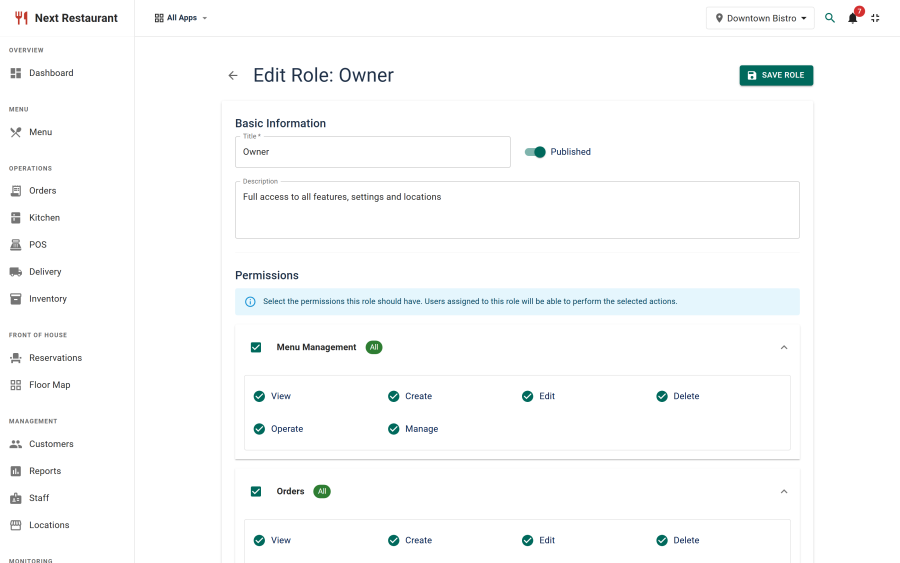
Creating a role
- Settings → Roles & Permissions → New.
- Name it after the job, not the person — "Kitchen", "Shift Manager", "Server".
- Tick the actions the role needs, feature by feature.
- Save, then assign users to it under Role Assignments.
Sensible starting points
| Role | Typical grants |
|---|---|
| Server | POS operate; orders view/create/edit; reservations view; menu view |
| Kitchen | KDS full; orders view; menu view; inventory view |
| Shift manager | The above, plus corrections, payments view, reports view |
| Manager | Everything except settings/roles |
| Owner / admin | Everything |
Start narrow and widen when someone hits a wall. It is much easier to grant one more action than to work out later which of a broad role's grants are actually being used.
How enforcement works
Permissions are enforced on the server, on every request — not by hiding buttons.
Hidden navigation is a convenience so people aren't shown doors they can't open. The actual control is that the endpoint checks the caller's role before doing anything, and refuses if the grant isn't there. A hand-crafted request from someone who knows the URL gets the same refusal as a click.
Controllers declare which feature they read from and which they write to, and the site dispatcher requires the caller to hold at least one viewable feature before it will route at all. The default is refusal: a controller that forgot to declare its features doesn't get an accidental pass.
Super Users
A Joomla Super User bypasses the role check. That is Joomla's model, not something Next Restaurant overrides.
It has a practical consequence when testing permissions: a Super User proves nothing. If you want to verify that the kitchen role can't reach the reports, test with an account that is not a Super User, and include a negative control — check that a permission you deliberately didn't grant is actually refused. Otherwise a passing test may only be showing you that Super Users can do everything, which was never in question.
Staff PINs and terminals
Staff working at terminals authenticate with a PIN rather than a Joomla login, but they are still subject to the same model — a terminal session carries the staff member's role, and the same feature grants apply.
Terminals add their own restrictions on top: a terminal can be limited to specific staff or roles, and bound to a single location. See Terminals.
Practical notes
- Name roles after jobs. Roles named after people become wrong the moment someone changes role.
- Grant view before edit. A role with edit but not view produces confusing screens.
- Payments and reports are separate on purpose. Someone reconciling the till needs the payments ledger without sales analytics; grant payments view and leave reports alone.
- Changing a role takes effect immediately for everyone assigned to it.
See also
- Apps & Modules — install-wide capability, versus per-person access
- Terminals — per-device restriction
- Staff Terminals — PIN authentication
- Reports — what the reports feature gates