Settings
Settings holds the cross-cutting configuration — how numbers, dates and money are formatted, how inventory behaves, what the interface calls things, and the per-area preferences for corrections, reservations, terminals and the POS.
Settings are global to the install. Venue-specific values (hours, tax rate, currency, service charge) live on the location instead.
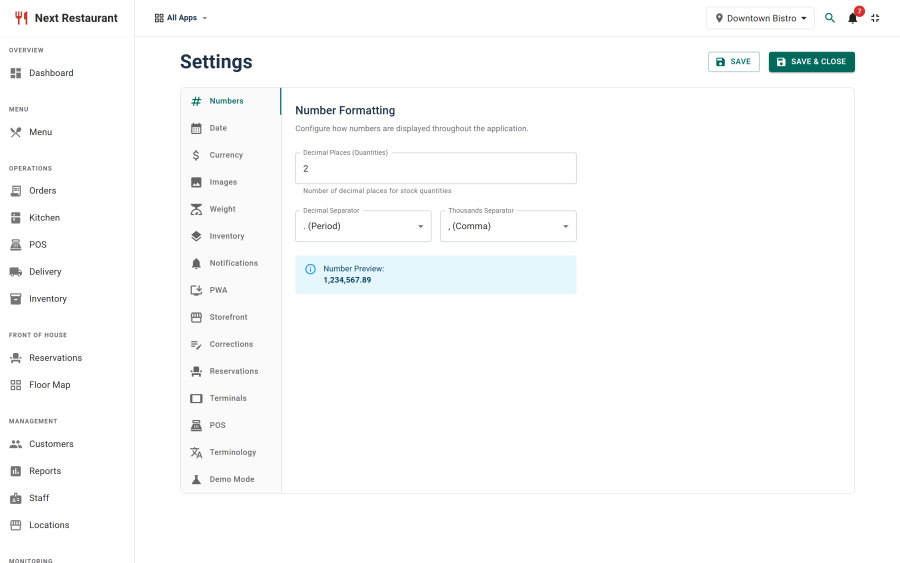
Numbers
How quantities are formatted throughout the interface.
| Setting | Effect |
|---|---|
| Decimal places (quantities) | Precision for stock quantities and recipe amounts |
| Decimal separator | . or , |
| Thousands separator | Grouping character |
Recipe quantities are the reason this is configurable: a kitchen working in grams wants no decimals, one working in kilograms wants three.
Date
| Setting | Effect |
|---|---|
| Date format | How dates render across the admin, receipts and emails |
| Timezone | The restaurant default clock; each location can set its own. Blank uses Joomla's timezone |
Every time is shown on the venue's clock, and reports count venue days. See Timezones & venue time.
Currency
| Setting | Effect |
|---|---|
| Currency | The default currency and its symbol |
| Currency position | Symbol before or after the amount |
| Currency decimal places | Usually 2; 0 for currencies without minor units |
| Default tax rate | The default applied to new locations |
| Service charge | The default percentage added to checks |
The format is global; the currency in use is per location, so a two-country install charges in each venue's own currency while formatting consistently.
Images
| Setting | Effect |
|---|---|
| Upload path | Where uploaded menu and gallery images are stored |
| Size and dimension limits | Bounds applied to uploads |
Menu photography is the biggest lever on how the storefront looks, so it's worth allowing enough resolution that cropped images stay sharp on a large screen.
Weight
The default unit system for stock items and recipes. Set it before you build your stock list — changing it later does not convert existing quantities.
Inventory
| Setting | Effect |
|---|---|
| Which channels deplete stock | By default every channel does |
| Low-stock behaviour | Whether alerts are raised against par levels |
| Auto-86 | Whether items are pulled from sale when a recipe ingredient hits zero |
Depleting on every channel is the default for a reason — stock that only depletes on some channels looks authoritative while being wrong.
Notifications
Which events send email, and who receives the low-stock digest. See Notifications.
PWA
The admin and the staff terminals are progressive web apps. This tab controls the installable app's name, icons and behaviour, so a terminal added to a tablet's home screen looks like the tool it is.
Storefront
Presentation settings for the public pages — layout choices for the menu showcase, gallery behaviour and theme options. See Storefront.
Corrections
| Setting | Effect |
|---|---|
| Corrections enabled | The master switch for the whole feature |
| Guest self-cancel | Whether QR guests may cancel their own order |
| Self-cancel window | How long after ordering a guest may cancel |
| PIN-gated types | Which correction types require a manager PIN |
| Reasons | The fixed list offered in the reason selector |
Setting up a short fixed list of reasons is worth the five minutes: free text produces an audit log nobody can aggregate. See Order Corrections.
Reservations
Booking behaviour — slot granularity, how far ahead guests may book, how long a table is held, and which statuses send notifications. See Reservations.
Terminals
Defaults for staff terminals — session behaviour, PIN policy and throttling. Per-device restriction lives on the terminal record itself. See Terminals.
POS
Point-of-sale preferences — tile display, light or dark tiles, and which actions require the manager PIN. See Point of Sale.
Terminology
Rename anything the interface calls something you don't. Call a check a bill, a server a waiter, a location a branch.
The overrides are stored as settings and merged into the interface strings at runtime, so they survive updates — no language files are edited and nothing is lost when the component is upgraded.
This is worth doing early. Staff learn the vocabulary the screens use, and changing it after three months of training is more disruptive than changing it on day one.
Security
Bot protection for public forms with Cloudflare Turnstile, switched on form by form, and the trusted proxies that let rate limits see real visitor addresses behind a tunnel or reverse proxy. See Security & bot protection.
Demo Mode
A seeded, read-only tour of the whole product. See Demo Mode.
See also
- Locations — per-venue hours, tax and currency
- Timezones & venue time — which clock every time is shown on
- Security & bot protection — Turnstile, rate limits and trusted proxies
- Apps & Modules — switching functional areas off
- Notifications — email behaviour
- Storefront — the public pages