Locations
A location is a venue. It is the first thing to create on a new install, because almost everything else is scoped to one — opening hours, tax, menu overrides, stock, staff, terminals and reservations all resolve against a location.
Creating a location
Locations → New.
| Field | Purpose |
|---|---|
| Name | Shown on the storefront, receipts and in location pickers |
| Address and contact | Public-facing details; the email also receives staff notifications |
| Timezone | The venue's clock: every time is shown on it and reports count its days. Blank uses the restaurant default |
| Currency | The currency prices are held and charged in |
| Tax rate | The default rate applied to order totals |
| Service charge | An optional percentage added to checks |
| Opening hours | Per day, with split shifts — see below |
| Status | An unpublished location stops accepting orders and bookings |
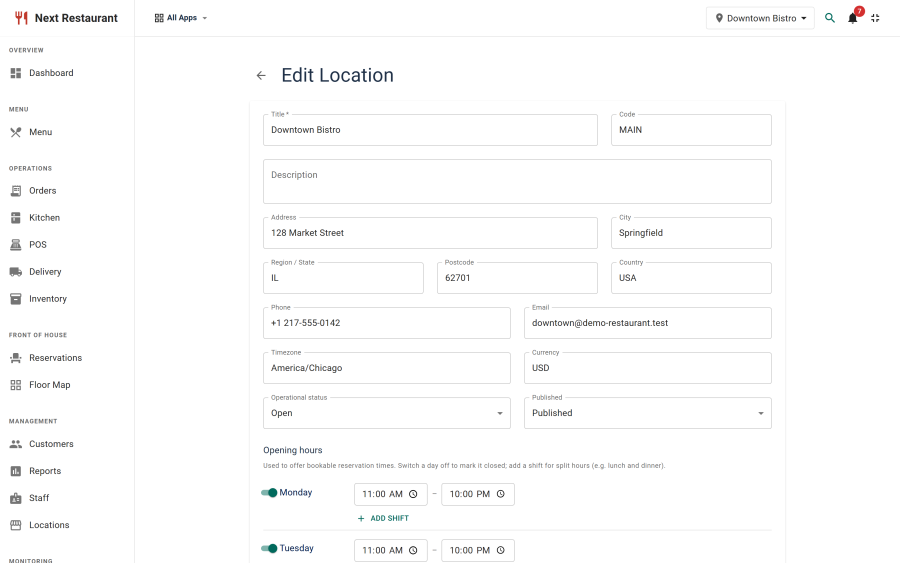
Opening hours
Hours are set per day of the week, and each day can hold more than one window.
Split shifts are the case worth getting right: a venue that serves 12:00–15:00 and 18:00–23:00 has two windows on that day, not one from 12:00 to 23:00. The reservation availability engine reads these directly, so entering it as one continuous window offers guests a 16:30 table you cannot seat.
Days with no hours produce no booking slots and no ordering availability — which is the correct behaviour for a closing day, and the most common cause of "the booking page shows nothing".
Multi-location
Create one record per venue. From there, several things can be scoped:
| Scoped by location | How |
|---|---|
| Menu price and availability | Per-location overrides on the menu item; the base record stays authoritative |
| Stock | Stock items and levels are tracked per location |
| Staff | Staff belong to a location |
| Terminals | A terminal is bound to a location and refused if it acts on another |
| Kitchen stations | Stations belong to a location |
| Delivery zones | Zones are defined per location |
| Reservations and tables | Floors, areas and tables belong to a location |
A dish that is £12 in the city branch and £10 at the retail park is one menu item with one override — not two items that will drift apart the first time someone edits only one of them.
What is not per location
Some things are deliberately global, because splitting them would create more problems than it solves:
- Roles and permissions — one permission model across the install, with location scoping applied through staff and terminal binding.
- Module toggles — a module is on or off for the install, not per venue.
- Currency formatting (symbol position, decimal places) — set once under Settings → Currency; the currency itself is per location.
- Terminology — one vocabulary across the install.
Practical notes
- Set the timezone before you take bookings. Times are stored as real moments, so changing the zone later re-displays everything on the new clock — and a booking taken for 19:30 on the wrong clock moves when you correct it. See Timezones & venue time.
- Tax and service charge are applied at order time. Changing them affects future orders, not historical ones — which is correct, but means a mid-day change produces a day with two rates in it.
- Unpublish rather than delete. Deleting a location with history attached is not the way to stop trading from it; unpublishing stops new orders and bookings while leaving the record intact.
See also
- Quick Start — creating your first location
- Reservations — how opening hours drive availability
- Menu — per-location price and availability overrides
- Settings — currency formatting, tax defaults and units