Next Restaurant
A complete restaurant management system that runs inside Joomla — menu, online and QR ordering, reservations, kitchen display, point of sale, delivery, inventory and payments, all from one admin and one data model.
What It Does
Most restaurants running on Joomla end up with four or five separate systems: a booking widget on the website, a third-party portal taking online orders for a commission, a POS on the counter that knows nothing about either, and a spreadsheet tracking stock. Each one owns a piece of the operation, none of them agree, and reconciling the day means adding up three different screens.
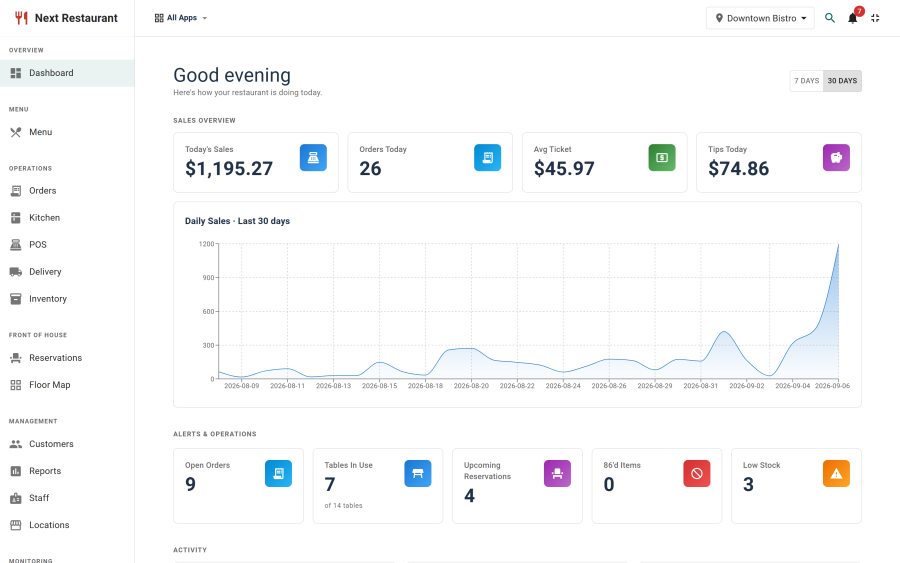
Next Restaurant collapses that into a single Joomla component. A React single-page admin runs the back of house — menu and modifiers, orders, kitchen display, point of sale, reservations on a drawable floor plan, delivery dispatch, recipe-driven inventory, a payments ledger and reporting. The public side ships as server-rendered storefront pages, enhanced with React islands: a menu showcase, an ordering flow with checkout, a booking page, a gift card balance lookup, reviews, and scan-to-order at the table.
The important part is that it is one order pipeline. A QR order placed at table 12, a delivery order from the website and a check rung up at the counter are the same record. They route to the same kitchen stations, deplete the same stock, settle into the same payments ledger, and land in the same end-of-day report.
Around that sit the controls a real venue needs: thirteen functional modules that can be switched off individually, a role-based permission model covering sixteen feature areas, multi-location support, and lean staff terminals that put the POS, kitchen, pickup, waiter, host and time-clock screens on tablets without giving anyone a Joomla login.
Key Concepts
| Term | Meaning |
|---|---|
| Location | A venue. Carries its own opening hours, contact details, currency behaviour, tax and service charge. Menu availability, pricing, stock, staff and terminals can all be scoped to one. |
| Module (app) | A toggleable functional area — orders, KDS, POS, reservations, delivery, inventory, customers, loyalty, reports, staff, terminals, corrections, API. Switching one off hides its nav and refuses its endpoints. Menu is core and always on. |
| Feature | A permission scope. Roles grant per-action access (view / create / edit / delete, or operate / manage) across sixteen features. Distinct from modules: a module is installed capability, a feature is who may use it. |
| Channel | How an order arrived — online, QR table, POS, phone, counter, delivery. One order type, many channels. |
| Modifier group | A reusable set of options attached to menu items (size, extras, cooking preference) with min/max selection rules and per-option price deltas. |
| Station & routing rule | A kitchen destination and the rule that sends a line to it — by category, item or order type. |
| Correction | A post-hoc change to an order: cancel, modify, remake, comp, discount or refund. Manager-PIN gated, audited, and resolved as either waste or restock. |
| Terminal | A provisioned device running one of the lean staff screens. Holds a device token; staff then authenticate with a PIN. Bindable to a location, and restrictable to specific staff or roles. |
| Payment provider | A driver in the payment registry — PayPal, or a manual type such as cash, card terminal or on-account. Stripe, Adyen, Square, SumUp, gift card and loyalty are registered but locked as Coming soon in 6.0.0. |
| Island | A React component mounted into a server-rendered storefront page. The public site is HTML first; islands add interaction where it's needed. |
| Demo mode | A read-only tour backed by seeded demo data. Every write is refused while it's on. |
Key Features
- Menu management — items, categories, variants, modifier groups, allergens, per-location overrides, image cropping and galleries. See Menu.
- Online ordering — a storefront ordering island with cart, pickup/delivery/dine-in and checkout. See Online Ordering.
- QR scan-to-order — per-table codes that let guests browse, order and pay with no app and no account. See QR Ordering.
- Point of sale — open checks, seats, splits, transfers, discounts, voids, comps, receipts, refunds and a cash drawer. See Point of Sale.
- Kitchen display — a live board with stations, routing rules, line-level bumping and cancellation alerts. See Kitchen Display.
- Reservations — an availability engine over opening hours and real capacity, with guest emails and a status state machine. See Reservations.
- Floor maps — a per-floor canvas editor with tables, chairs, areas, rotation and live occupancy. See Floor Map.
- Delivery — zones, fees, driver roster and a dispatch board. See Delivery.
- Inventory & recipes — stock items, recipe-driven depletion, a movement ledger, waste logging and auto-86. See Inventory.
- Payments — a provider registry: PayPal plus manual types, with a transactions ledger and refunds. Stripe, Adyen, Square, SumUp, gift card and loyalty are listed as Coming soon in 6.0.0. See Payments.
- Order corrections — cancel, modify, remake, comp, discount and refund behind a manager PIN, fully audited. See Order Corrections.
- Staff terminals — lean POS, KDS, pickup, waiter, host and clock-in screens on device token plus PIN. See Staff Terminals.
- Customers & loyalty — a customer record, reviews, coupons and gift cards. See Customers & Loyalty.
- Reports — sales summary, top items, payment breakdown, channel mix, staff hours and ingredient usage. See Reports.
- Roles & permissions — per-action grants across sixteen feature areas, assigned to Joomla users. See Roles & Permissions.
Requirements
| Requirement | Detail |
|---|---|
| Joomla | 4.x, 5.x, or 6.x |
| PHP | 8.1 or higher |
| Database | MySQL 5.7+ or MariaDB 10.4+ |
| HTTPS | Required in production — payments, QR sessions and terminal tokens all transit it |
| Browser | A current version of Chrome, Edge, Firefox or Safari for the admin and terminals |
| Card payments | A PayPal account, if you take cards online. Stripe, Adyen, Square and SumUp are not yet available |
Support
- Website: nextsoftware.dev
- Email: [email protected]
- Licence: GNU General Public License v2 or later