Order Corrections
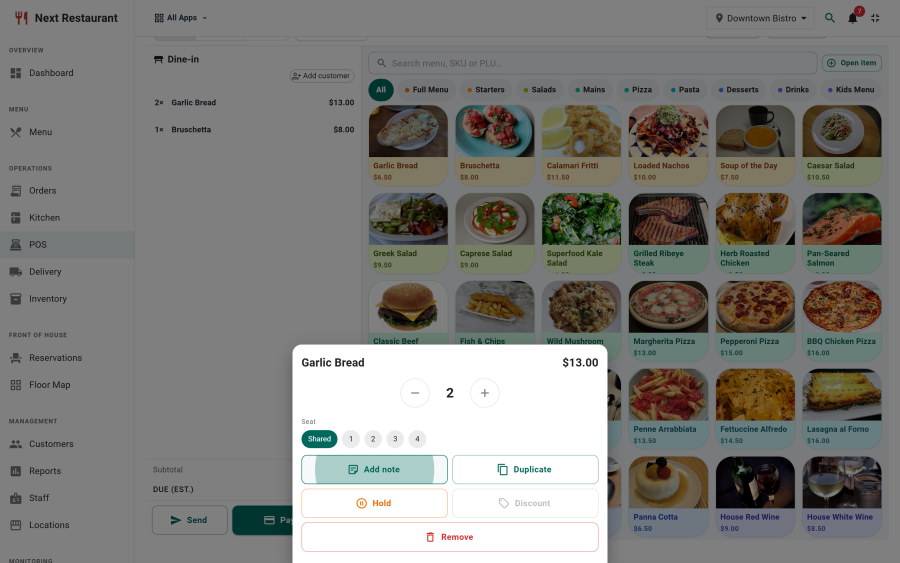
Things go wrong in service — a guest changes their mind, a plate goes out wrong, an order is placed on the wrong table. Corrections handle all of it in one audited system, instead of leaving staff to improvise with voids and cash adjustments.
The whole feature sits behind the corrections module, so a venue that doesn't want it can switch it off entirely.
The correction types
| Correction | What it does | Typical use |
|---|---|---|
| Cancel | Cancels the order or a line before or during preparation | Guest changed their mind |
| Walk-away | Closes an order nobody collected | Pickup order never claimed |
| Modify | Changes what was ordered | Wrong modifier chosen |
| Remake | Fires the item again, keeping the record of why | Plate went out wrong |
| Comp | Removes the charge, recording it as a comp | Service recovery |
| Discount | Reduces the charge by an amount or percentage | Goodwill gesture |
| Refund | Returns money already taken | Post-payment resolution |
The distinction between comp, discount and refund matters at the end of the month: a comp is a cost you absorbed, a discount is revenue you chose not to take, and a refund is money that went back out. Recording them as three different things is what makes the reports mean anything.
Manager PIN
Corrections require a manager PIN, verified on the server rather than in the browser. The prompt appears at the point of action, and the correction is written to the audit log with:
- what was corrected and by how much,
- the reason given,
- who performed it and which manager authorised it,
- when.
A server can run a busy section all night; only a manager can take money off a check, and every time they do it leaves a record.
Waste or restock
A correction on food the kitchen has already made asks the question that actually matters for stock: was it wasted, or did the ingredients go back?
| Answer | What happens |
|---|---|
| Waste | A waste movement is written; the ingredients leave stock and appear in the waste log |
| Restock | A restock movement is written; the ingredients return to stock |
A cancelled steak that was already on the grill is waste. A cancelled bottle of wine that was never opened is restock. Both answers write a movement, so the stock ledger stays honest either way. See Inventory.
The kitchen side
When a correction affects something the kitchen already has, the affected station raises a cancellation banner. It stays up until a cook acknowledges it — a correction cannot be quietly missed by whoever happened to be at the fryer.
Remakes fire the line again as a new line, so the board shows what still needs making rather than requiring anyone to remember. See Kitchen Display.
Guest self-cancel
Guests ordering by QR can cancel their own order, if you enable it. The rules are narrow by design:
- Only within the configured window after placing the order.
- Only while the kitchen has not started the item.
- Only their own order, in their own session.
Past that point, the guest asks a server and the correction goes through staff and a manager PIN like any other. See QR Ordering.
Refunds
A correction that returns money issues a refund back through the original payment provider where there is one, or records a manual refund where the settlement was cash or another manual type. Either way it lands in the refunds tab of the payments ledger with the correction's reason attached. See Payments.
Configuring it
Under Settings → Corrections:
- Whether corrections are enabled at all.
- Whether guests may self-cancel, and the length of the window.
- Which correction types require a manager PIN.
- Default reasons offered in the reason selector.
Consistent reasons are worth setting up properly — a free-text field produces a log nobody can aggregate, while a short fixed list produces one you can actually report on.
Reading the audit trail
Every correction is in Audit Log (under the reports module), filterable by type, user and date. That is where "we comped £340 last month — on what?" gets answered.
See also
- Point of Sale — where most corrections are performed
- Inventory — waste and restock movements
- Kitchen Display — cancellation banners and remakes
- Payments — refunds