Geo-Detection
The Geo-Detection tab lets you show the consent dialog only to visitors from regions that require it, while allowing others through automatically.
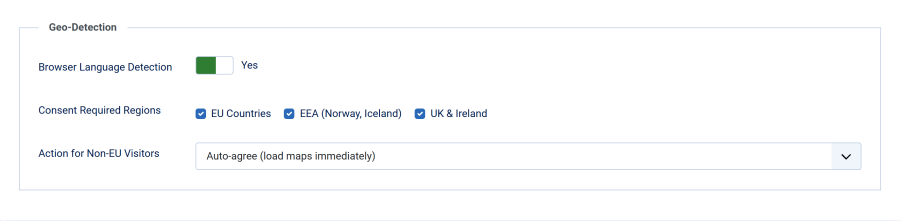
Browser Language Detection
| Setting | Details |
|---|---|
| Field | Browser Language Detection |
| Type | Toggle (Yes/No) |
| Default | No (disabled) |
When enabled, the plugin reads the visitor's Accept-Language HTTP header to infer their region. Visitors from consent-required regions see the dialog; others are handled according to the non-EU action setting.
Consent Required Regions
| Setting | Details |
|---|---|
| Field | Consent Required Regions |
| Type | Checkboxes |
| Default | All checked (EU, EEA, UK) |
| Visible when | Browser Language Detection is Yes |
Select which regions require the consent dialog:
| Region | Languages Detected | Countries |
|---|---|---|
| EU Countries | de, fr, it, es, pt, nl, pl, cs, sk, hu, ro, bg, hr, sl, lt, lv, et, fi, sv, da, el, ga, mt | The main languages of the 27 EU member states |
| EEA (Norway, Iceland) | no, nb, nn, is (Norwegian Bokmål and Nynorsk included) | Norway, Iceland |
| UK & Ireland | en-gb, en-ie | United Kingdom, Ireland |
Action for Non-EU Visitors
| Setting | Details |
|---|---|
| Field | Action for Non-EU Visitors |
| Type | Dropdown |
| Default | Auto-agree (load maps immediately) |
| Visible when | Browser Language Detection is Yes |
| Option | Behavior |
|---|---|
| Auto-agree (load maps immediately) | Silently sets the consent cookie to agree and shows maps immediately. The visitor never sees the consent dialog. (default) |
| Show consent box (let visitor decide) | Shows the consent dialog to these visitors as well. Useful if you want to offer the choice everywhere. |
| Skip plugin entirely | The plugin does nothing for non-EU visitors — no consent cookie, no stripping, no dialog. Use this only if another mechanism handles map consent for non-EU traffic. |
How It Works
- When a visitor loads a page, the plugin checks the
Accept-Languageheader - The header contains language tags like
en-US,en;q=0.9,de;q=0.8 - The plugin checks each tag against the configured consent regions
- If any tag matches a consent region, the visitor sees the consent dialog
- If no tags match, the non-EU action is applied
Important Notes
- Safe default: If no
Accept-Languageheader is present (e.g., bots, API clients), the consent dialog is shown as a precaution - English is special: The bare language code
endoes not trigger consent — onlyen-gbanden-iedo. This prevents showing the dialog toen-usvisitors when only the UK region is selected - Not IP-based: This detection uses browser language preferences, not IP geolocation. A German user traveling in the US will still see the consent dialog because their browser language is
de - No external API calls: The detection is entirely server-side using the HTTP header — no third-party geolocation services are contacted
Limitations
Browser language detection is an approximation. It reflects the visitor's language settings, not their physical location. For most sites this is a reasonable trade-off that avoids the privacy concerns and costs of IP-based geolocation. Some EU languages, such as Catalan, Basque, Galician and Luxembourgish, are not in the list, so those visitors count as outside the EU. When in doubt, disable geo-detection to show the consent dialog to all visitors.