Shortcode
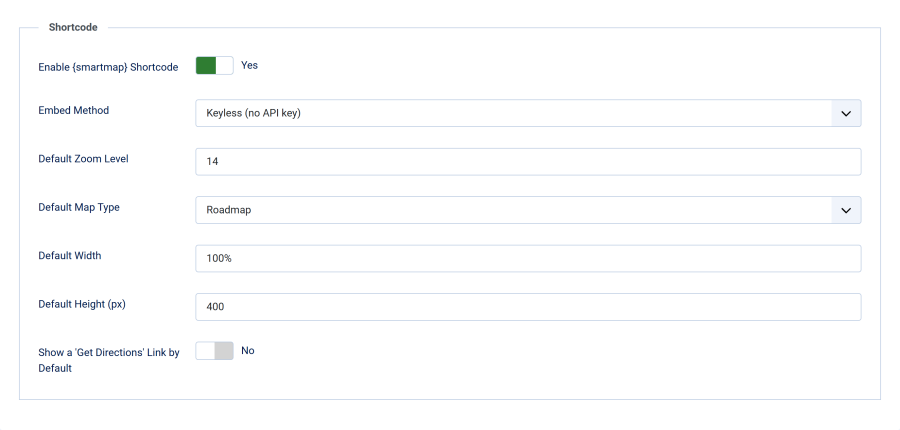
The Shortcode tab configures the {smartmap} shortcode — a way to create a GDPR-compliant Google Map from a plain address, without pasting any embed code. Shortcode maps are wrapped in the same consent placeholder as detected maps, so they are compliant by construction.
For the shortcode syntax and attribute reference, see The {smartmap} Shortcode. This page documents the admin settings that provide the defaults.
Enable {smartmap} Shortcode
| Setting | Details |
|---|---|
| Field | Enable {smartmap} Shortcode |
| Type | Toggle (Yes/No) |
| Default | Yes |
When enabled, the plugin scans rendered content for {smartmap ...} tags and expands each into a consent-wrapped map. Turn it off if you don't use the shortcode — detection of existing maps is unaffected either way. With the shortcode off, {smartmap} text stays on the page as typed.
Shortcodes are deliberately not expanded inside the page <head> (title, meta description), <textarea> fields, <script> and <style> blocks, tag attributes, or on front-end edit forms (layout=edit). This way editing an article on the frontend never saves map HTML over your shortcode.
Embed Method
| Setting | Details |
|---|---|
| Field | Embed Method |
| Type | Dropdown — Keyless (no API key) / Google Maps Embed API (API key) |
| Default | Keyless (no API key) |
Choose how shortcode maps are embedded. This is an explicit choice — the API-key field and the API map-type field below appear only when you pick the Embed API.
| Keyless (no API key) | Google Maps Embed API | |
|---|---|---|
| Setup | Zero — works immediately | Requires a Google Cloud project + Embed API key |
| Map types | All four (roadmap, satellite, terrain, hybrid) | Roadmap & satellite only |
| Best for | Quick maps, low traffic | Production sites, higher volume |
Google Maps API Key
| Setting | Details |
|---|---|
| Field | Google Maps API Key |
| Type | Text |
| Default | Empty |
| Visible when | Embed Method = Google Maps Embed API |
Paste your Embed API key here. If you choose the Embed API but leave this blank, the shortcode safely falls back to the keyless embed, so a map is never broken. In keyless mode a saved key is ignored.
If the plugin settings have never been saved with an embed method (for example, settings copied in from elsewhere), the plugin uses the Embed API when a key is present and keyless otherwise.
Either way, the map loads from Google only after the visitor consents — the embed method changes how the URL is built, not when the map loads.
Default Map Settings
These values are used by every {smartmap} unless the individual shortcode overrides them with an attribute.
| Setting | Type | Default | Range / Options |
|---|---|---|---|
| Default Zoom Level | Number | 14 | 1 (world) – 21 (building) |
| Default Map Type | Dropdown | Roadmap | Keyless mode: Roadmap, Satellite, Terrain, Hybrid. Embed API mode: Roadmap, Satellite (a separate field is shown per method) |
| Default Width | Text | 100% |
Any CSS width (e.g. 100%, 600px) |
| Default Height (px) | Number | 400 | 100 – 2000 |
| Show a 'Get Directions' Link by Default | Toggle | No | Yes / No |
The Default Map Type field swaps automatically with the Embed Method: keyless shows all four map types, the Embed API shows only the two its
/placeendpoint supports. A per-shortcodemaptypeattribute still accepts all four — in Embed API mode, terrain falls back to roadmap and hybrid to satellite.
When Show a 'Get Directions' Link by Default is on, each shortcode map includes a link that opens Google Maps directions to the address in a new tab. Override it per map with directions="1" or directions="0".
Minimal Example
With the shortcode enabled, drop this into an article, module, or custom-HTML module:
{smartmap address="Brandenburg Gate, Berlin"}It renders as a consent placeholder; once the visitor accepts, the map appears at the default zoom, type, width, and height configured here. Override any default per map:
{smartmap address="Eiffel Tower, Paris" zoom="17" maptype="satellite" height="500"}See The {smartmap} Shortcode for the full attribute list and more examples.