How Consent Works
This page explains the step-by-step consent process, what gets blocked before consent, and the security measures protecting the flow.
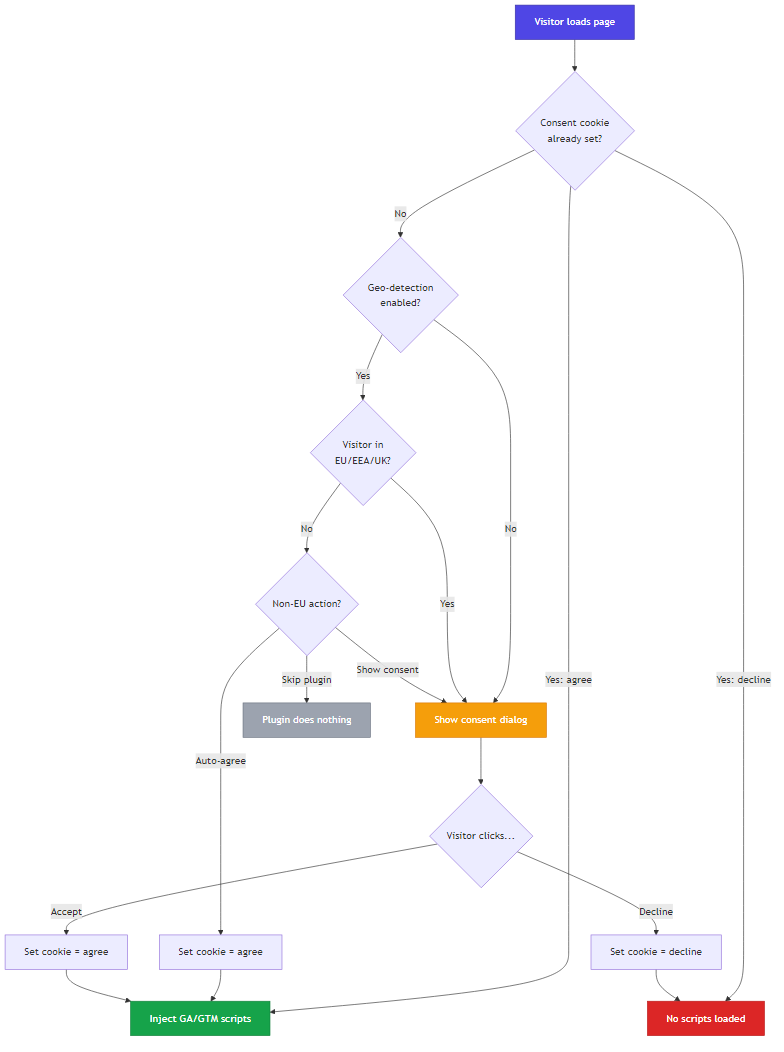
Consent Flow
What Gets Blocked
Before the visitor makes a consent decision, the plugin ensures zero tracking:
- No GA/GTM scripts are injected into the page (managed mode)
- Existing GA/GTM scripts in the template are stripped from the HTML output (legacy mode)
- No cookies are set by Google
- No data is sent to Google's servers
- No external requests are made to Google's CDN (unless local script hosting triggers a server-side download)
After Consent
Accept
- The consent cookie
slga-consentis set toagree - On the next page load (and all subsequent loads while the cookie is valid), the GA4 or GTM tracking script is injected
- Google Analytics begins recording visitor data normally
Decline
- The consent cookie
slga-consentis set todecline - No tracking scripts are injected on any subsequent page load
- In legacy mode, existing GA/GTM scripts in the template are actively stripped from the HTML
Security Features
CSRF Protection
Every consent form submission includes a Joomla CSRF token. The plugin validates this token before setting the consent cookie. This prevents cross-site request forgery attacks that could set consent on behalf of a visitor.
Secure Cookie Flags
The consent cookie is set with:
- HttpOnly — Cannot be read or modified by JavaScript, preventing XSS-based cookie theft
- Secure — Only transmitted over HTTPS (when your site forces HTTPS)
- SameSite=Lax — The cookie is not sent with cross-site requests, preventing CSRF via third-party sites
Input Validation
- The consent value is strictly validated to only accept
agreeordecline - The tracking ID is HTML-escaped before injection to prevent XSS
- All user-facing text (headline, consent text, button labels) is escaped with
htmlspecialchars
Revoking Consent
There is no built-in revoke button. Visitors can revoke consent by:
- Clearing their browser cookies (the
slga-consentcookie specifically, or all cookies) - Waiting for the cookie to expire (if set to a day-based lifetime)
Once the cookie is gone, the consent dialog appears again on the next visit.