Content & Text
The Content tab lets you customize the text and icon displayed in the consent dialog.
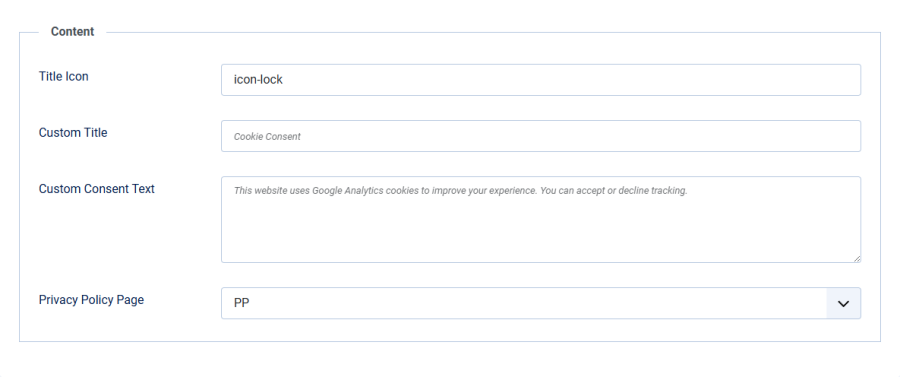
Title Icon
| Setting | Details |
|---|---|
| Field | Title Icon |
| Type | Text (CSS class) |
| Default | icon-lock |
Enter a Joomla icon CSS class to display next to the consent box title. Common choices:
icon-lock— padlock (default)icon-shield— shieldicon-info— information circleicon-eye— eye / visibility
The icon is displayed as a <span> element with aria-hidden="true" so it does not interfere with screen readers.
Custom Title
| Setting | Details |
|---|---|
| Field | Custom Title |
| Type | Text |
| Default | Empty (uses language string) |
When filled in, this text replaces the default title. When left empty, the plugin uses the language string PLG_SYSTEM_SMARTLOCALGOOGLEANALYTICS_HEADLINE, which defaults to "Cookie Consent".
Custom Consent Text
| Setting | Details |
|---|---|
| Field | Custom Consent Text |
| Type | Textarea |
| Default | Empty (uses language string) |
When filled in, this text replaces the default consent message. When left empty, the plugin uses the language string PLG_SYSTEM_SMARTLOCALGOOGLEANALYTICS_NOTIFICATION, which defaults to:
"This website uses Google Analytics cookies to improve your experience. You can accept or decline tracking."
This lets you personalize the wording without editing language files.
Privacy Policy Page
| Setting | Details |
|---|---|
| Field | Privacy Policy Page |
| Type | Menu Item selector |
| Default | None |
Select any Joomla menu item to link as your privacy policy page. When set, a link appears in the consent dialog body with the text "Read our privacy policy."
The link opens in a new tab (target="_blank") so visitors can read the policy without losing their place.
Important: If no menu item is selected, the privacy policy link is not displayed. It is strongly recommended to link your privacy policy for GDPR compliance.