Page Rules
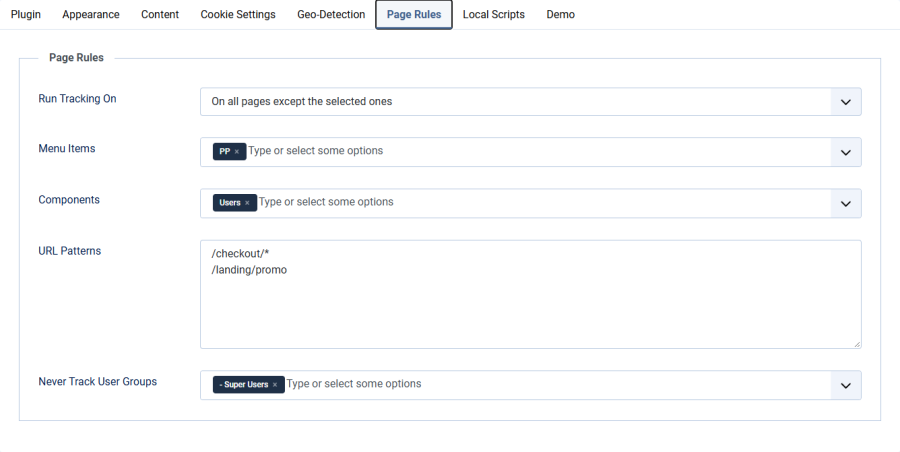
The Page Rules tab lets you decide where Google Analytics / Tag Manager may run: on every page, only on selected pages, or everywhere except selected pages. You can also switch tracking off for whole user groups, such as your own staff.
Available from version 6.1.0.
What Happens on a Page Without Tracking
On a page where the rules switch tracking off:
- No GA4 or GTM code is loaded, even for visitors who already accepted
- The consent dialog is not shown and its CSS/JavaScript is not loaded
- No consent cookie is set or changed
A visitor who has not decided yet sees the consent dialog on the first tracked page they open. A decision they made earlier stays valid.
Run Tracking On
| Setting | Details |
|---|---|
| Field | Run Tracking On |
| Type | Dropdown |
| Default | All pages |
| Option | Behavior |
|---|---|
| All pages | Tracking runs everywhere. The selection fields below are hidden. (default) |
| Only on the selected pages | Tracking runs only on pages that match the selection. |
| On all pages except the selected ones | Tracking runs everywhere except on pages that match the selection. |
A page is selected when it matches any of the three fields below. You do not have to fill in all of them.
With Only on the selected pages and nothing selected, tracking runs nowhere.
Menu Items
| Setting | Details |
|---|---|
| Field | Menu Items |
| Type | Multi-select |
| Visible when | Run Tracking On is not All pages |
Pages shown under the chosen menu items are selected. A page without its own menu item, for example an article opened from a blog list, belongs to the menu item it is displayed under. Child menu items are not included automatically; select each one you need, or use a URL pattern.
The Home menu item is the exception: it only selects the home page itself. Joomla treats Home as the active menu item on every page that has no menu item of its own (a login page reached through /component/users/login, for example), so excluding Home does not exclude those pages. To cover pages listed on the home page, add a URL pattern.
Components
| Setting | Details |
|---|---|
| Field | Components |
| Type | Multi-select |
| Visible when | Run Tracking On is not All pages |
Every page rendered by the chosen components is selected. Typical uses:
- Users — login, registration, profile and password reset pages
- A shop component — cart and checkout
- Contacts — contact forms
URL Patterns
| Setting | Details |
|---|---|
| Field | URL Patterns |
| Type | Text area, one pattern per line |
| Visible when | Run Tracking On is not All pages |
Each line is compared with the page path, which is the part of the address after your site address. Use * for any characters.
| Pattern | Matches | Does not match |
|---|---|---|
/checkout |
/checkout |
/checkout/payment |
/checkout/* |
/checkout/payment, /checkout/a/b |
/checkout |
/checkout* |
/checkout, /checkout/payment, /checkout-done |
/shop/checkout |
*/thank-you |
/shop/thank-you, /en/order/thank-you |
/thank-you/details |
/ |
the home page address only | every other page |
Matching rules:
- Upper and lower case are ignored
- The query string (everything after
?) is ignored - A trailing slash is ignored:
/checkout/and/checkoutare the same - If your addresses contain
index.php(URL rewriting off), leave it out: write/checkout, not/index.php/checkout - If your site is installed in a subfolder, leave the folder out as well
- On multilingual sites the language code is part of the path:
/en/checkout, or*/checkoutfor all languages
Never Track User Groups
| Setting | Details |
|---|---|
| Field | Never Track User Groups |
| Type | Multi-select |
| Default | None |
Logged-in users who belong to one of these groups are never tracked and never see the consent dialog, on any page. This works independently of Run Tracking On, including when it is set to All pages.
- Child groups are included: selecting Registered also covers Author, Editor and Publisher
- Selecting Super Users or Manager keeps your own team's visits out of the statistics
- Do not select Public: every visitor belongs to it, so tracking would be switched off for everyone
The user must be logged in on the website itself. Being logged in to the administrator area alone is a separate session and does not count.
Examples
Keep checkout and account pages clean
- Run Tracking On: On all pages except the selected ones
- Components: Users
- URL Patterns:
/checkout*
Track one campaign landing page only
- Run Tracking On: Only on the selected pages
- Menu Items: your landing page
Ignore staff visits
- Never Track User Groups: Super Users, Manager
Important Notes
- Legacy mode: when the tracking ID is empty and the GA/GTM code comes from your template, the plugin removes that code on pages without tracking. Visitors who already accepted are not tracked there either.
- Demo Mode has priority: while Demo Mode is on, page rules are ignored and the demo banner follows the Demo tab settings.
- Page caching: page rules depend only on the page, so cached pages stay correct. Joomla's page cache does not serve logged-in users, so the user group rule is not affected either.