Local Script Hosting
The Local Scripts tab controls whether Google's tracking JavaScript is downloaded to your server and served locally.
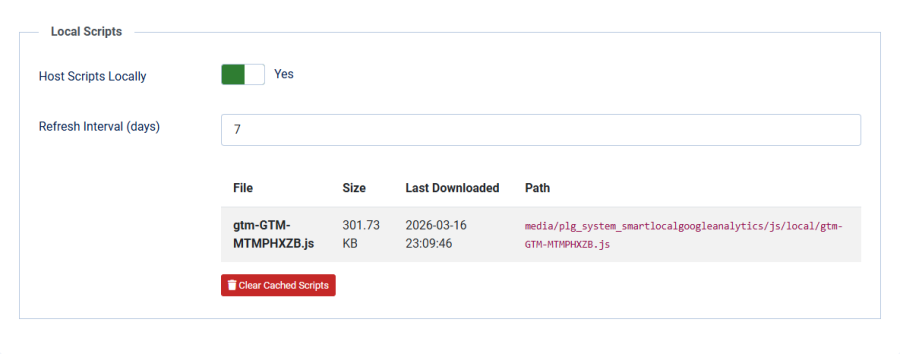
Host Scripts Locally
| Setting | Details |
|---|---|
| Field | Host Scripts Locally |
| Type | Toggle (Yes/No) |
| Default | No (disabled) |
When enabled, the plugin downloads the GA4 or GTM JavaScript file from Google's servers and saves it to your website. Subsequent page loads serve the script from your domain instead of from Google's CDN.
Benefits
- Privacy: The visitor's browser makes no direct requests to Google's servers during page load
- Speed: One fewer external DNS lookup and connection — the script loads from your local server
- Control: The script is cached on your server and only refreshed on your schedule
Requirements
- The tracking ID must be entered (managed mode only — local hosting does not work with legacy mode)
- Your server must be able to make outbound HTTPS requests to
www.googletagmanager.com - The directory
media/plg_system_smartlocalgoogleanalytics/js/local/must be writable
Refresh Interval (Days)
| Setting | Details |
|---|---|
| Field | Refresh Interval (days) |
| Type | Number |
| Default | 7 |
| Range | 1–30 |
| Visible when | Host Scripts Locally is Yes |
Controls how often the local copy is refreshed from Google's servers. The plugin checks the file's age on each page load where consent has been given. If the file is older than the refresh interval, it is re-downloaded.
| Interval | Trade-off |
|---|---|
| 1 day | Always up to date, more server requests to Google |
| 7 days | Good balance of freshness and efficiency (default) |
| 30 days | Minimum server requests, but script updates are delayed |
Cached Scripts Status
When local hosting is enabled, the admin panel shows a status table listing all cached script files:
| Column | Description |
|---|---|
| File | The script filename (e.g., gtag-G-XXXXXXXXXX.js) |
| Size | File size |
| Last Downloaded | When the file was last downloaded from Google |
| Path | The local file path on your server |
If no scripts have been cached yet, a message indicates that scripts will be downloaded on the next page visit after a visitor consents.
Clear Cached Scripts
A Clear Cached Scripts button is available to delete all locally cached JavaScript files. After clearing:
- The cached scripts are removed from disk
- Scripts will be re-downloaded from Google on the next page load where consent is given
- This is useful after changing your tracking ID or troubleshooting script issues
The clear action requires admin authentication and validates a CSRF token for security.
How It Works
- A visitor loads a page and has already consented (or auto-agree applies)
- The plugin checks if a local copy exists at
media/plg_system_smartlocalgoogleanalytics/js/local/ - If the file exists and is fresher than the refresh interval, the local URL is used
- If the file is missing or stale, the plugin downloads a fresh copy from Google server-side
- The tracking snippet in the page
<head>points to the local file instead of Google's CDN - For GA4 IDs, the file is named
gtag-G-XXXXXXXXXX.js - For GTM IDs, the file is named
gtm-GTM-XXXXXXX.js