Content & Text
The Content tab lets you customize the text and icon displayed in the consent dialog.
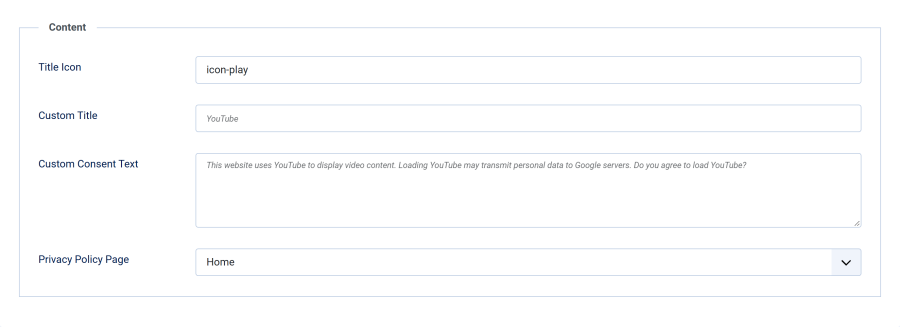
Title Icon
| Setting | Details |
|---|---|
| Field | Title Icon |
| Type | Text (CSS class) |
| Default | icon-play |
Enter a Joomla icon CSS class to display next to the consent box title. Common choices:
icon-play— play triangle (default)icon-youtube— YouTube glyph (if your icon set provides it)icon-lock— padlockicon-eye— eye / visibility
The icon is displayed as a <span> element with aria-hidden="true" so it does not interfere with screen readers.
Custom Title
| Setting | Details |
|---|---|
| Field | Custom Title |
| Type | Text |
| Default | Empty (uses language string) |
When filled in, this text replaces the default title. When left empty, the plugin uses the language string PLG_SYSTEM_SMARTLOCALYOUTUBE_HEADLINE.
Custom Consent Text
| Setting | Details |
|---|---|
| Field | Custom Consent Text |
| Type | Textarea |
| Default | Empty (uses language string) |
When filled in, this text replaces the default consent message. When left empty, the plugin uses the language string PLG_SYSTEM_SMARTLOCALYOUTUBE_NOTIFICATION, which explains that the page wants to load content from YouTube and that accepting may set cookies and transmit data to Google.
This lets you personalize the wording without editing language files.
Privacy Policy Page
| Setting | Details |
|---|---|
| Field | Privacy Policy Page |
| Type | Menu Item selector |
| Default | None |
Select any Joomla menu item to link as your privacy policy page. When set, a link appears in the consent dialog body so visitors can read your policy before deciding.
Important: If no menu item is selected, the privacy policy link is not displayed. It is strongly recommended to link your privacy policy for GDPR compliance — especially because YouTube embeds transmit data to Google once consent is given.