Geo-Detection
The Geo-Detection tab lets you show the consent dialog only to visitors from regions that require it, while allowing others through automatically.
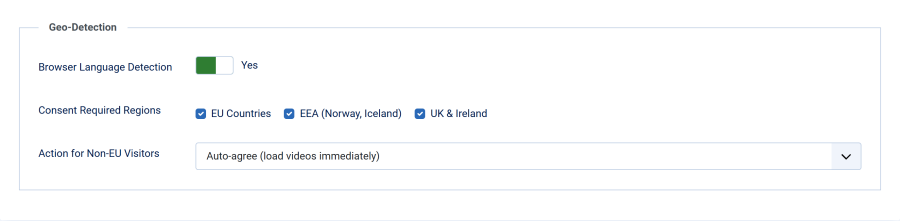
Browser Language Detection
| Setting | Details |
|---|---|
| Field | Browser Language Detection |
| Type | Toggle (Yes/No) |
| Default | No (disabled) |
When enabled, the plugin reads the visitor's Accept-Language HTTP header to infer their region. Visitors from consent-required regions see the dialog; others are handled according to the non-EU action setting.
Consent Required Regions
| Setting | Details |
|---|---|
| Field | Consent Required Regions |
| Type | Checkboxes |
| Default | All checked (EU, EEA, UK) |
| Visible when | Browser Language Detection is Yes |
Select which regions require the consent dialog:
| Region | Languages Detected | Countries |
|---|---|---|
| EU Countries | de, fr, it, es, pt, nl, pl, cs, sk, hu, ro, bg, hr, sl, lt, lv, et, fi, sv, da, el, ga, mt | The main languages of the 27 EU member states |
| EEA (Norway, Iceland) | no, nb, nn, is | Norway (including the Bokmål nb and Nynorsk nn tags that browsers usually send), Iceland |
| UK & Ireland | en-gb, en-ie | United Kingdom, Ireland |
Action for Non-EU Visitors
| Setting | Details |
|---|---|
| Field | Action for Non-EU Visitors |
| Type | Dropdown |
| Default | Auto-agree |
| Visible when | Browser Language Detection is Yes |
| Option | Behavior |
|---|---|
| Auto-agree (load videos immediately) | Silently sets the consent cookie to agree and shows the videos immediately. The visitor never sees the consent dialog. (default) |
| Show consent box (let visitor decide) | Shows the consent dialog to all visitors regardless of region. Useful if you want to offer the choice everywhere. |
| Skip plugin entirely | The plugin does nothing for these visitors — no consent cookie, no blocking, no dialog. Use this only if another mechanism handles video consent for that traffic. |
How It Works
- When a visitor loads a page, the plugin checks the
Accept-Languageheader - The header contains language tags like
en-US,en;q=0.9,de;q=0.8 - The plugin checks each tag against the configured consent regions
- If any tag matches a consent region, the visitor sees the consent dialog
- If no tags match, the non-EU action is applied
Important Notes
-
Safe default: If no
Accept-Languageheader is present (e.g., bots, API clients), the consent dialog is shown as a precaution -
English is special: The bare language code
endoes not trigger consent — onlyen-gbanden-iedo. This prevents showing the dialog toen-usvisitors when only the UK region is selected -
Not IP-based: This detection uses browser language preferences, not IP geolocation. A German user traveling in the US will still see the consent dialog because their browser language is
de -
No external API calls: The detection is entirely server-side using the HTTP header — no third-party geolocation services are contacted
-
Some EU languages are not in the list: regional languages such as Catalan (
ca), Basque (eu), Galician (gl) and Luxembourgish (lb) are not in the list. A visitor whose browser sends only such a language is treated as outside the EU -
Default is auto-accept: with geo-detection on, visitors outside your consent regions get videos without being asked, unless you choose Show consent box (let visitor decide)
Limitations
Browser language detection is an approximation. It reflects the visitor's language settings, not their physical location. For most sites this is a reasonable trade-off that avoids the privacy concerns and costs of IP-based geolocation. When in doubt, disable geo-detection to show the consent dialog to all visitors.