Expert Mode
The Expert Mode tab is for templates and extensions whose YouTube markup the 7 built-in patterns don't catch. It adds a custom regex pattern and a debug view.
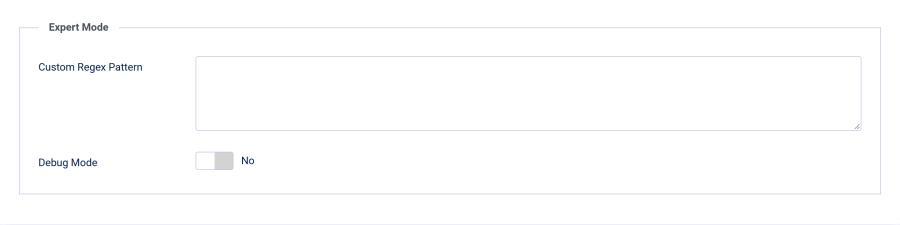
Custom Regex Pattern
| Setting | Details |
|---|---|
| Field | Custom Regex Pattern |
| Type | Textarea |
| Default | Empty |
Paste a PHP regular expression (including delimiters and flags) that matches the HTML your video widget produces. The plugin runs it alongside the built-in patterns and blocks every match: it is removed for the overlay positions, and replaced by a placeholder in Inline (replace video) mode.
/<div class="my-video-wrapper"[^>]*>.*?<\/div>/isRules for a safe pattern:
- Include delimiters — start and end with
/(or another delimiter) - Add the
isflags —i(case-insensitive) ands(dotall, so.matches newlines) - Be non-greedy — use
.*?rather than.*so one match doesn't swallow the rest of the page - Escape metacharacters — forward slashes (
\/), dots (\.), etc. - Mind nested markup —
<div>.*?</div>stops at the first inner</div>. If the widget nests elements, match the element that actually loads YouTube (the<iframe>or<script>) instead of the whole wrapper
A malformed pattern fails silently: it matches nothing and your site keeps working.
Debug Mode
| Setting | Details |
|---|---|
| Field | Debug Mode |
| Type | Toggle (Yes/No) |
| Default | No |
When enabled, the plugin adds a box near the bottom of the page that lists every pattern (built-in or custom) that matched on the current page and how many times.
The debug box is shown only to logged-in Super Users. Ordinary visitors never see it, so you can check a live page by logging in on the front end. It still adds work to every page, so turn it off when you are done.
Use it to:
- Confirm the plugin is catching your videos
- Discover which built-in pattern already covers an embed
- Verify a new custom pattern matches before relying on it
Workflow for an Undetected Video
- Log in on the front end as a Super User, enable Debug Mode and load the page with the video — note whether any pattern matched
- If nothing matched, open the page source and copy the exact HTML wrapping the video
- Build a regex against that HTML following the rules above
- Paste it into Custom Regex Pattern, save, and reload — the debug box should now report a match
- Turn off Debug Mode