Profiles & access control
A profile is a named permission set. It answers four questions: which folders, which operations, within what limits, and who it applies to.
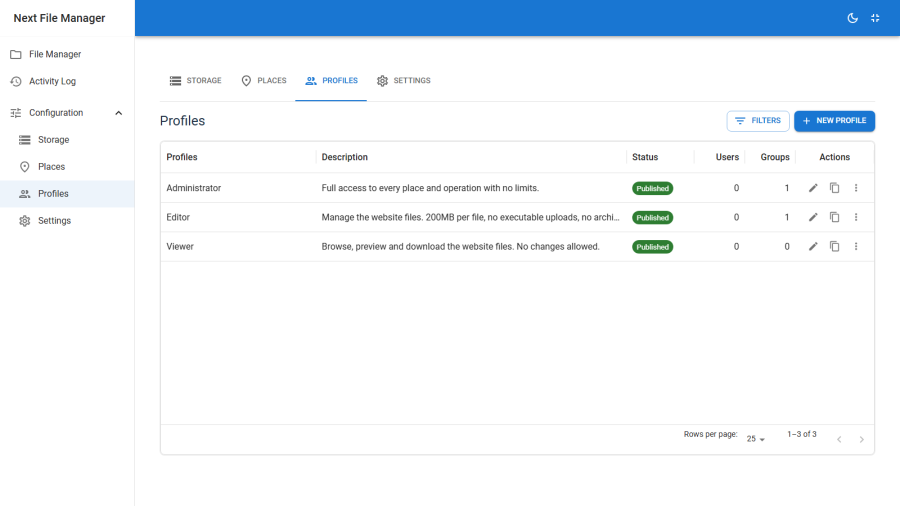
Deny by default
A user below Super User with no profile gets nothing — no places, no commands, no listing. There is no implicit read access to fall back on.
Super Users bypass profiles entirely: every published place, every command, no limits.
Creating a profile
Configuration → Profiles → New.
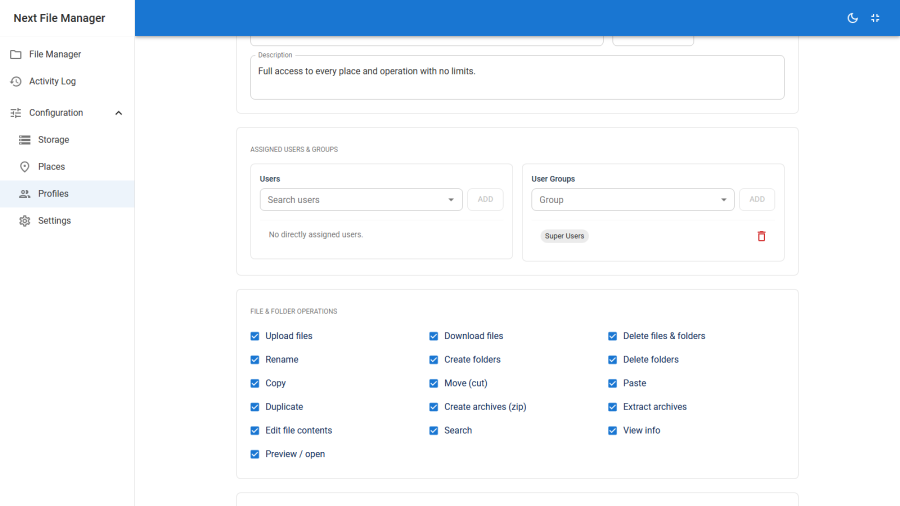
Details
Title and an optional description, plus published and ordering. An unpublished profile grants nothing, which makes unpublishing a clean way to suspend a whole class of access.
File & folder operations
Sixteen independent toggles:
| Command | Grants |
|---|---|
upload |
Uploading files |
download |
Downloading files |
rm |
Deleting files and folders |
rename |
Renaming |
mkdir |
Creating folders |
rmdir |
Deleting folders |
copy |
Copying |
cut |
Moving (cut) |
paste |
Pasting a cut or copied selection |
duplicate |
Duplicating in place |
archive |
Creating ZIP archives |
extract |
Extracting archives |
edit |
Editing file contents |
search |
Recursive search |
info |
Viewing the info panel |
preview |
Preview and open |
Commands you do not grant are absent from the interface, and refused on the server.
Note that some of these pair up in practice. copy without paste lets someone fill a clipboard they cannot empty; cut without paste is the same. Grant them together unless you specifically want copy-to-download-only behaviour.
Roots
Each root is one grant, and a profile can hold several:
| Part | Meaning |
|---|---|
| Place | Which place — see Places |
| Subfolder | Optional path within it. Blank means the whole place |
| Write | Off = browse, preview and download only. On = mutations allowed |
The user's world is the union of their roots. They see each root as a top-level entry and cannot navigate above it: every request canonicalises the requested path and confirms it still sits inside a granted root, after symlinks are resolved and with case folded on filesystems that ignore it. A ../ never escapes.
A profile with commands but no roots permits operations on nothing. This is the most common cause of "access denied on everything" — see Troubleshooting.
Limits
| Limit | Notes |
|---|---|
| Max file size (MB) | 0 means unlimited for this profile. The global ceiling in Settings still applies |
| Allowed extensions | If non-empty, only these may be uploaded |
| Denied extensions | Always blocked, and this list wins over the allowed list |
Both lists normalise case and a leading dot, so .JPG, JPG and jpg are one entry.
Keep a denied list even when you have an allowed list. The denied list is the one that holds if someone later widens the allowed list without thinking about .php.
Features
Manage settings lets a non-Super-User open and change the global settings page.
The protection-related settings — the protected-paths list, the allow-editing-protected switch, and demo mode — stay Super-User-only regardless. Granting settings management does not hand over the protection model, because the protection model is what the rest of access control rests on.
Assignments
Add Joomla users, Joomla user groups, or both.
How a user's profile is resolved
For a given user, in order:
- A direct user assignment wins. If any published profile is assigned to that user by id, it is used.
- Otherwise, group assignments. Among published profiles assigned to any group the user belongs to, the lowest profile id wins.
- Otherwise, nothing. The deny-by-default matrix.
Direct-beats-group is the lever that makes group assignment practical: put an entire group on a restrictive profile, then lift one person out by assigning them a broader profile directly.
Resolution is cached per request, so a user's permissions are computed once regardless of how many operations a page performs.
Enforcement
The interface hides what a profile does not grant. That is convenience, not enforcement.
On every request, the server independently re-checks:
- the acting user's resolved profile and the command being asked for
- that the resolved path is inside a granted root, and that the root is writable if the operation mutates
- the protection rules, which no profile can override
- the driver's declared capabilities
A hand-crafted request gets exactly the same answer as a hidden button. The front-end site app runs the same checks as the admin — see Site front end.
Worked examples
An upload-only contributor. Commands: upload, download, mkdir, rename, info, preview. One root: place client-uploads, subfolder acme, write on. Limits: 20 MB, allowed jpg,jpeg,png,pdf,docx, denied php,phtml,phar,htaccess. Assigned to that user directly.
A read-only auditor. Commands: download, search, info, preview. Roots: every place, blank subfolder, write off. No limits needed — they cannot upload. Assigned to a group.
A developer on one site tree. Commands: everything except rm and rmdir. One root: place site, subfolder templates, write on. Denied extensions left empty. Assigned to a group.