Next File Manager
A Joomla-native file manager for the whole site — not just images/. Browse the server, SFTP, FTP, WebDAV and S3 from one interface, grant access through profiles, and keep a record of every change.
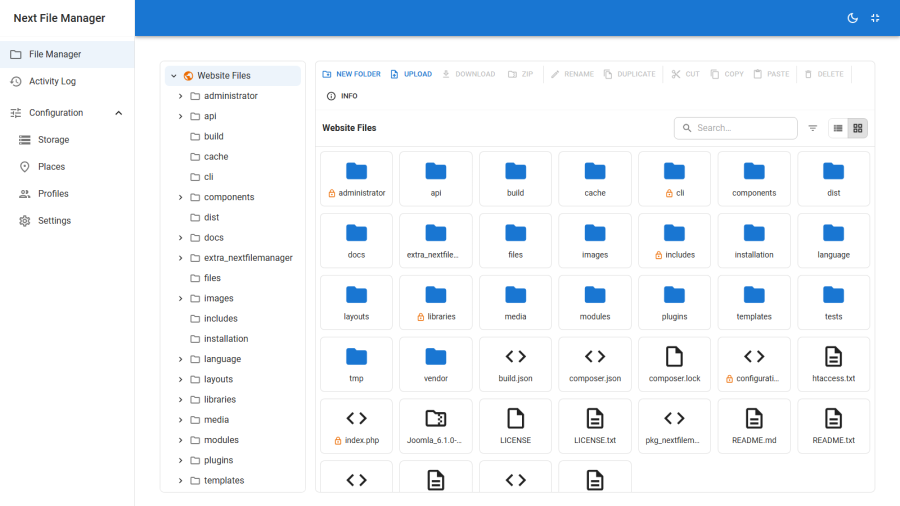
What It Does
Joomla's Media Manager is scoped to one folder and one filesystem. Anything outside it — a template override, a backup archive, a client's upload folder, a file on another host — means reaching for an FTP client or a hosting control panel. Those tools know nothing about Joomla's users: access is a shared credential, the scope is the whole account, and nothing is written down about who did what.
Next File Manager brings the job into the Joomla admin as a single-page application, then wraps it in Joomla's own user-and-group model. Operators open Components → Next File Manager and are immediately browsing the Joomla install. Additional drives — a folder elsewhere on the server, an SFTP or FTP/FTPS host, a WebDAV or Nextcloud share, an S3-compatible bucket — are attached as storage, and the folders on them worth naming become places.
Access below Super User is granted with profiles. A profile names the places and subfolders a user may see, which of sixteen file operations they may run, how large their uploads may be and which extensions are permitted. Assign it to a Joomla user or to a whole user group. A user with no profile gets nothing.
Underneath all of it, a protection layer that a misconfigured profile cannot switch off: configuration.php, .env files and private keys are unreadable below Super User by any route — including inside a ZIP — and the administrator/, libraries/, cli/ and includes/ trees are write-protected until a Super User explicitly unlocks a path.
Key Concepts
| Term | Meaning |
|---|---|
| Storage | How to reach a filesystem: a driver (server folder, SFTP, FTP/FTPS, WebDAV, S3) plus its credentials and base. Not browsable on its own. One storage is built in and always follows the live Joomla root. |
| Place | A named folder on a storage, and the unit a profile grants. One storage can hold many places — which is how a single SFTP account exposes several folders without its password being entered twice. The built-in site place resolves to the Joomla install. |
| Profile | A named permission set: granted roots, sixteen togglable file operations, upload limits and feature gates. |
| Root | One grant inside a profile — a place, an optional subfolder within it, and a read-only or writable flag. The user sees that subtree and nothing above it. |
| Assignment | A link from a profile to a Joomla user or user group. A direct user assignment wins over a group one. |
| Command | A single grantable operation: upload, download, rm, rename, mkdir, rmdir, copy, cut, paste, duplicate, archive, extract, edit, search, info, preview. |
| Protected path | A pattern that blocks writes to a path and everything under it. Ships with safe defaults; editable by Super Users. |
| Secret file | A file whose contents are confidential (configuration.php, .env, *.key, *.pem, .htpasswd). Never readable, downloadable, previewable or copyable below Super User. |
| Lock | A per-path override recorded against an item — either an explicit lock, or a Super-User unlock that lifts protection for that one item. |
| Capability | What a driver can actually do (true directories, byte-range reads, rename, and so on). The interface hides operations the protocol does not support. |
Key Features
- File browser — grid and list views, a lazy-loading folder tree, breadcrumbs, drag-to-move, a full context menu and an info panel. See File browser.
- Uploads & downloads — drop-anywhere upload with a progress queue, per-profile size and extension rules, single-file and multi-select ZIP download. See Uploads & downloads.
- Editing & preview — a CodeMirror editor with PHP, JS, CSS, HTML, JSON, SQL, XML and Markdown modes, plus a lightbox for images and media. See Editing & preview.
- Archives — create ZIPs from a selection and extract them in place, with Zip-Slip traversal blocked on every entry. See Archives.
- Search — recursive search across the folder tree you have access to, with results you can act on directly. See Search.
- Activity log — every mutation recorded with user, action, place and path, in a filterable grid. See Activity log.
- Storage — five drivers, encrypted credentials, capability negotiation and a live connection test. See Storage.
- Places — name the folders on a storage that profiles are allowed to grant. See Places.
- Profiles & access control — scoped roots, sixteen command toggles, upload limits, and user or group assignment. See Profiles & access control.
- Protection — protected-path patterns, unreadable secret files and per-path locks. See Protection.
- Site front end — publish the same app through a menu item for logged-in front-end users. See Site front end.
Requirements
| Requirement | Detail |
|---|---|
| Joomla | 4.x, 5.x or 6.x |
| PHP | 8.1 or higher |
PHP zip |
Required for archive create and extract |
PHP ftp |
Required only for the FTP/FTPS driver; the driver reports its absence rather than failing |
| phpseclib | Ships with Joomla; required by the SFTP driver |
PHP curl |
Recommended for the WebDAV and S3 drivers |
| HTTPS | Strongly recommended — file contents and credentials transit every request |
Support
- Website: nextsoftware.dev
- Email: [email protected]
- Licence: GNU General Public License v2 or later