Places
A place is a named folder on a storage, and it is the unit that profiles grant.
Storage says how to reach a filesystem. A place says which folder on it has a name and access rules of its own. One storage can carry many places.
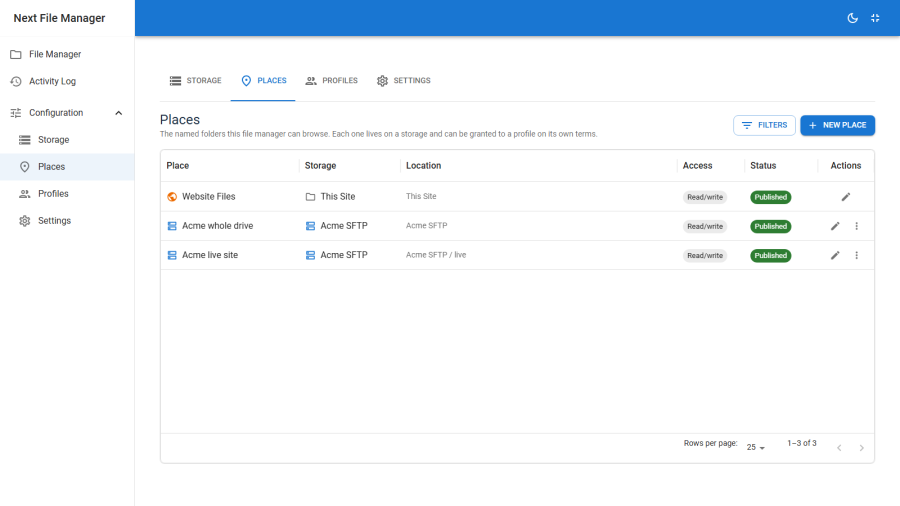
Why the split exists
Consider an SFTP account that can see three folders you care about: a client's uploads, a deployment target, and a log directory. Each needs different access — one contributor may write to the uploads folder, a developer may read the logs, nobody should touch the deployment target casually.
Without the split you would create three storages, entering the same password three times, and any credential rotation would mean three edits.
With it you create one storage and three places on it. The password lives in one row. The three places carry their own labels and are granted independently.
The built-in place
Exactly one place ships built in: site, which sits on the built-in site storage and resolves to the Joomla install itself. It cannot be deleted.
Its key is the string site, and that string is durable — per-path locks recorded against it depend on it, so it never changes.
Creating a place
Configuration → Places → New.
| Field | Notes |
|---|---|
| Storage | Which storage this place sits on |
| Label | What users see in the place switcher — "Client uploads", "Backups", "Media library" |
| Path | The folder within that storage. Blank means the storage's base itself |
| Published | Unpublished places are invisible everywhere, including to profiles that grant them |
| Ordering | Position in the place switcher |
Save, publish, and it appears in the browser immediately for anyone whose profile grants it.
Stable keys
Each place has a place key — a stable identifier separate from its label — and profiles reference that, never the label or the path.
The consequence is worth stating explicitly:
- Renaming a place does not break any grant. Users see the new label; their access is unchanged.
- Changing a place's path does not break any grant either — but it does silently move what those users can see. A profile granting "Client uploads" now points somewhere else. This is the one edit to make deliberately.
- Repointing the storage underneath likewise keeps every grant intact against a different filesystem.
Places and roots
A place is not the whole grant. A profile's root is a place plus an optional subfolder plus a read-only or writable flag:
place: client-uploads
path:  acme
write: yes
So one place can serve many contributors, each scoped to their own subfolder within it, without a place per contributor. Create places for the folders worth naming; use profile roots for the per-user carve-up.
See Profiles & access control.
Deleting and unpublishing
Unpublishing hides a place from the browser and from every profile that grants it. Nothing is destroyed, and republishing restores access exactly. This is the right move when you want to suspend access.
Deleting removes the place, and any profile root that referenced it becomes a grant to nothing. It does not touch the files — a place is a name and a path, not the contents.
Check which profiles reference a place before deleting it.
Practical notes
- A place per audience, not per folder. If three people all work in the same tree, that is one place and three profile roots.
- Blank path is fine. A place with no path is the storage's base — the usual shape when a storage exists to expose exactly one folder.
- Places do not nest. A place on
uploadsand another onuploads/acmeare two independent places, and protection and locks are evaluated per place. Prefer one place plus profile subfolders.