Storage
Storage is how to reach a filesystem: a driver, the credentials it needs, and the base everything on it hangs off.
A storage is not itself browsable. The folders on it that profiles can grant are places. That split is what lets one SFTP account expose several folders under different names and access rules without its password being entered more than once.
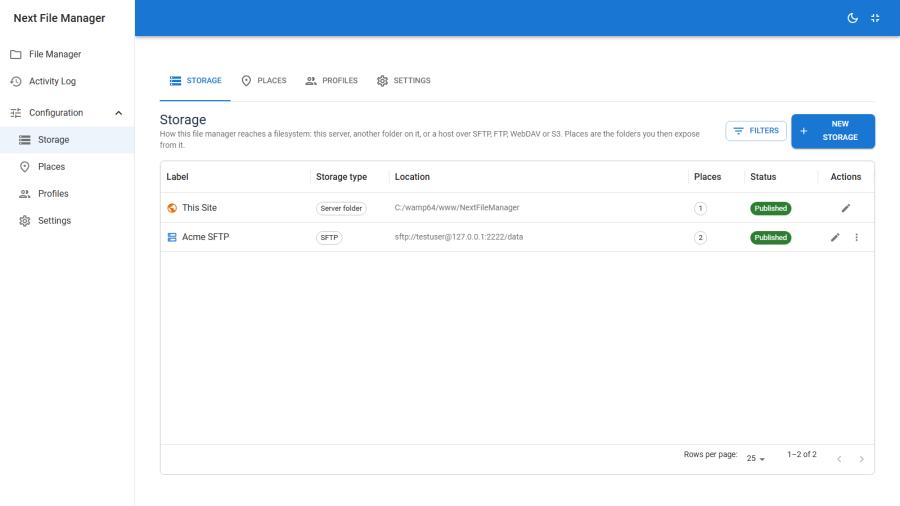
The built-in storage
Exactly one storage ships built in: the site storage, whose base always follows the live Joomla root. It cannot be deleted, and it does not need credentials. If you move the site, it follows.
Everything else you add yourself under Configuration → Storage → New.
The five drivers
Server folder
A directory on this server, addressed by its absolute path.
| Field | Notes |
|---|---|
| Absolute folder path | Must already exist and be readable by the web user, e.g. C:/sites/backups or /var/www/shared |
Places on this storage address folders beneath that path. Use it to reach a folder outside the Joomla root — a backups directory, a shared upload area, a sibling site.
SFTP (SSH)
A folder on another server over SSH. The most capable remote option, and the one to prefer when you have the choice.
| Field | Notes |
|---|---|
| Host, Port | Port defaults to 22 |
| Username | Required |
| Password | Leave blank if you are using a key |
| Private key | Paste a full OpenSSH private key, header and footer lines included |
| Key passphrase | If the key has one |
| Remote folder | The base path on that host, e.g. /var/www/html |
| Host key fingerprint | Optional but recommended. Test Connection fills it in for you |
| Timeout | Seconds; defaults to 20 |
Requires the phpseclib library that ships with Joomla. If it is missing, the type is greyed out with that reason shown.
FTP / FTPS
A classic FTP account, optionally over explicit TLS.
| Field | Notes |
|---|---|
| Host, Port | Port defaults to 21 |
| Username, Password | Required |
| Remote folder | The base path |
| Use FTPS (explicit TLS) | Off by default. Plain FTP sends credentials in clear text — turn this on wherever the server supports it |
| Passive mode | On by default. Leave it on unless the server specifically requires active mode |
| UTF-8 filenames | On by default |
| Timeout | Seconds; defaults to 30 |
Requires PHP's ftp extension. Without it the type is greyed out with that reason shown.
WebDAV / Nextcloud
Any WebDAV share, including Nextcloud and ownCloud.
| Field | Notes |
|---|---|
| Server URL | The full DAV endpoint. For Nextcloud: https://cloud.example.com/remote.php/dav/files/USERNAME/ |
| Username, Password | Use an app password where the server offers one |
| Folder within the share | Optional, to scope the storage to a subfolder |
| Timeout | Seconds; defaults to 30 |
See Nextcloud & WebDAV for the endpoint forms and app-password setup.
S3-compatible storage
Amazon S3, MinIO, Wasabi, Cloudflare R2 and DigitalOcean Spaces.
| Field | Notes |
|---|---|
| Bucket, Region | Region defaults to us-east-1 |
| Access key ID, Secret access key | Required |
| Endpoint URL | Leave blank for Amazon S3. Required for MinIO, R2, Wasabi and Spaces |
| Key prefix | Restricts this drive to one folder within the bucket |
| Force path-style addressing | Needed by MinIO and most self-hosted S3 servers |
See S3-compatible storage for per-provider settings and the directory caveat.
Credentials
Passwords, secret keys and private keys are encrypted at rest in the storage row, keyed off your Joomla site secret. The plain-text value is never written to disk.
They are also never sent back to the browser. The storage editor receives only a flag saying whether a secret is set — which is why:
- A blank secret field means "keep what is stored." Editing a storage's label cannot wipe its password.
- Clearing a secret is a separate, explicit action. You have to ask for it deliberately.
Test Connection
Always test before saving. The check connects with exactly the settings in the form and reports what happened.
For SFTP it does one extra thing: it retrieves the host key fingerprint and fills the field in. Pinning it means a later man-in-the-middle presenting a different key is refused rather than silently trusted.
Capabilities
Different protocols can do genuinely different things. Rather than let an unsupported operation fail deep inside an adapter with a protocol-specific error, each driver declares what it supports up front. The interface hides what will not work, and the server refuses it anyway if a request slips through.
| Capability | What it means when absent |
|---|---|
| Range read | Byte ranges cannot be fetched, so media has to buffer from the start instead of scrubbing |
| True directories | Folders are not real objects. An "empty folder" is a zero-byte marker that vanishes when the marker goes — the object-store case |
| Server-side rename | A rename becomes a copy followed by a delete, which is slower and not atomic |
| Recursive search | Walking the whole tree is too expensive to offer as a search |
| Directory size | A folder's total size cannot be computed, or is reported as a capped estimate |
| Chmod | POSIX permission bits cannot be read or written |
| Symlinks | The filesystem has no symlinks — which also means there is no symlink escape to guard against |
| Mtime write | Modification times can be read but not set |
Broadly: the server-folder driver supports everything; SFTP supports most of it; FTP and WebDAV sit in the middle; S3 lacks true directories and POSIX permissions. If an operation you expected is missing from a menu, the drive is usually the reason — see Troubleshooting.
Editing and deleting storage
Editing a storage repoints every place on it at once. Because profiles reference places by a stable key rather than by path, repointing a storage does not break existing grants — the same users keep access to the same named place, now backed by a different filesystem. That is powerful and worth being careful with.
Deleting a storage removes the places on it, and therefore the grants that referenced them. Check which profiles use its places first.
Unpublishing a storage is the reversible option: its places disappear from the browser without anything being destroyed.