Uploads & downloads
Getting files in and out — with per-profile rules that are checked twice.
Uploading
Drop files anywhere on the file manager window, or use the upload action in the toolbar. A queue appears showing each file, its progress and its outcome.
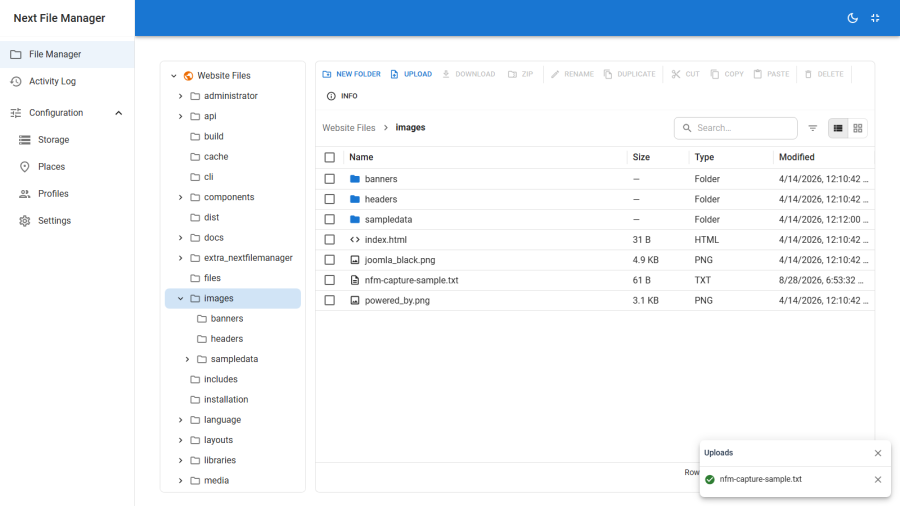
Uploads go to the folder you are currently browsing. That folder must be inside a root your profile marks writable, and it must not be protected.
The three limits
An upload has to clear all three, and the smallest wins:
| Limit | Where it is set | Notes |
|---|---|---|
| Profile max file size | Profile → Limits | 0 means unlimited for this profile — the global ceiling still applies |
| Global max upload | Configuration → Settings | Caps every profile. A profile cannot exceed it |
| PHP's own limits | php.ini |
upload_max_filesize, post_max_size, max_file_uploads. Enforced by PHP before Joomla sees the request; the component cannot raise them |
Extension rules
Two lists on the profile, evaluated in this order:
- Denied extensions — always blocked. This list wins over everything.
- Allowed extensions — if it is non-empty, anything not on it is refused.
An empty allowed list means "any extension not explicitly denied". Both lists are normalised, so .JPG, JPG and jpg are the same entry.
The browser checks these before starting a transfer, so you get an immediate rejection rather than a wasted upload. The server checks them again on arrival — the client-side check is a courtesy, not the enforcement.
Downloading
A single file — right-click and choose Download, or use the toolbar with one file selected.
Several items — select them and choose Download as ZIP. You receive one archive containing the selection, folders included.
Downloading requires the download command. It does not require a writable root — read-only grants can still download.
What cannot be downloaded
Secret files — configuration.php and its backups, .env and .env.*, *.key, *.pem, .htpasswd — return an error rather than content below Super User. This holds for every route: direct download, preview, copy, and inside a ZIP. A user who cannot download configuration.php directly cannot obtain it by selecting its folder and asking for an archive either.
See Protection.
Copying and moving
Within a drive — copy, cut and paste behave as you would expect, with a confirmation when a paste would overwrite something.
Across drives — copying or moving between two different places works, including between two different storage types. The transfer is streamed: bytes move from the source driver to the destination driver in chunks rather than being buffered in PHP's memory. A file larger than memory_limit still goes through.
Cross-drive transfers are inevitably slower than same-drive ones, because the data makes a round trip through your server. Moving 2 GB from one S3 bucket to an SFTP host means 2 GB in and 2 GB out.
Practical notes
- Large uploads on shared hosting usually hit
max_execution_timebefore they hit any of the component's limits. Raise it, or split the upload. - Remote drives have a timeout field on the storage record. The 30-second default is fine for browsing and small files, and routinely too short for large transfers over FTP or WebDAV.
- Uploads are logged. Each one appears in the Activity log with the user, the place and the path.