Display
The Display section decides which days are listed and how days, dates and times are written.
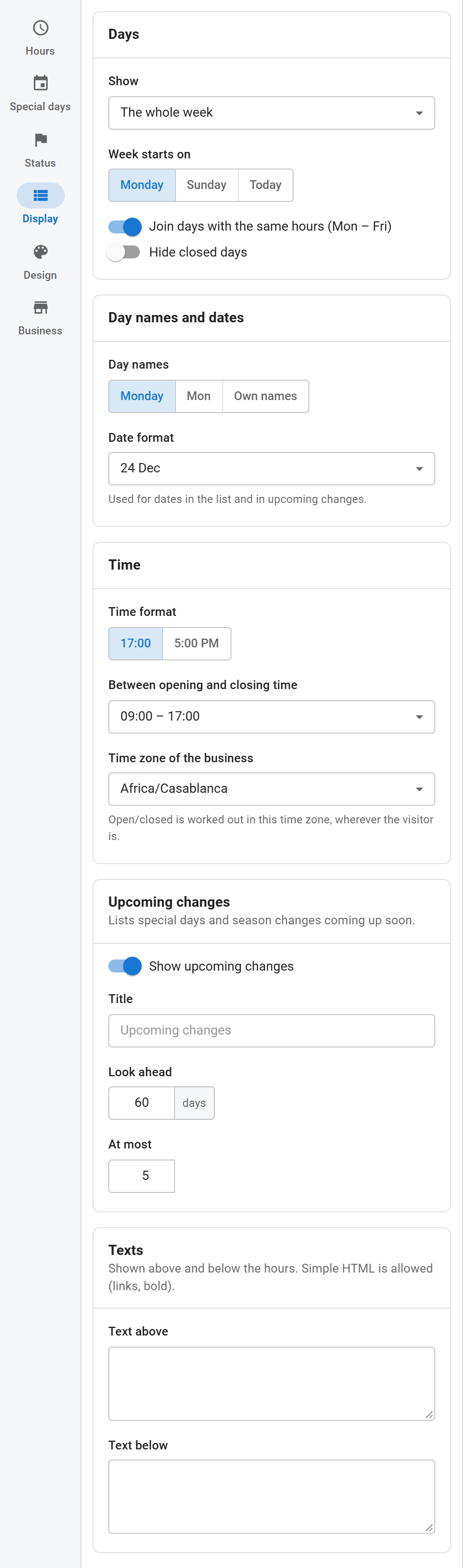
Days
- Show: the whole week, Monday to Friday, the next 7 days (with dates and special days applied) or today only.
- Week starts on: Monday, Sunday or today (whole week only).
- Join days with the same hours: writes "Monday – Friday" once instead of five equal rows.
- Hide closed days
- Show the date next to each day: for the next 7 days and today only.
Day names and dates
- Day names: full (Monday), short (Mon) or your own names for each day.
- Date format: used for dates in the list and in upcoming changes. The list shows examples such as "24 Dec" or "2026-12-24"; Own format takes PHP date letters, for example
D j M.
Day and month names follow the site language.
Time
- Time format: 24-hour (17:00) or 12-hour (5:00 PM).
- Between opening and closing time: the separator, such as "09:00 – 17:00" or "09:00 to 17:00".
- Time zone of the business: open or closed is worked out in this zone, wherever the visitor is. The default is the site time zone.
Upcoming changes
A short list under the hours with special days and season starts that are coming up.
- Show upcoming changes
- Title: defaults to "Upcoming changes" in the visitor's language.
- Look ahead: how many days ahead to look (1 – 365, default 30).
- At most: how many entries to list (1 – 20, default 5).
Texts
A Text above and a Text below the hours, for example "Call ahead for large orders". Simple HTML is allowed: links, bold and italic.