Best Open Source Exam Software in 2027: 6 Tools Compared

If you want to run exams and tests on your own server, with your own questions and your own results data, open source software is the obvious place to start. There are plenty of options, but they're built for very different jobs. Some are full learning platforms with a quiz module. Some are pure testing engines. One is a Joomla extension.
This guide compares six of them on the things that matter when you choose: question types, how exams are delivered, grading, certificates, integrations, and how hard each one is to host.
A note before we start: we make Next Exams, the first tool on this list. We've tried to be fair to the others. Every claim about them comes from their official documentation, release notes or source code, and the links are at the end so you can check them yourself.
Quick picks
- Next Exams: best for running exams on your own website, especially a Joomla site, without setting up a separate learning platform.
- Moodle Quiz: best if you also need courses, lessons and a gradebook, and want the biggest community and plugin ecosystem.
- TAO: best for testing organisations that work with the QTI standard and need large, formal test delivery.
- ILIAS: best for universities that want a full LMS with a strong, mature test module.
- OpenOLAT: best for institutions that want QTI 2.1 tests and a locked-down exam mode inside an LMS.
- TCExam: best for a lightweight, standalone exam server, including paper exams with scanned answer sheets.
Comparison at a glance
| Tool | What it is | Licence | Cost | Runs on |
|---|---|---|---|---|
| Next Exams | Exam and assessment extension for Joomla | GPL v2 or later | Paid open source | A Joomla website (PHP) |
| Moodle | Learning platform with a Quiz activity | GPL v3 | Free | PHP with MySQL, MariaDB or PostgreSQL |
| TAO Community Edition | Dedicated assessment platform | AGPL v3 | Free | Containers (Docker Compose, Kubernetes) or a VM |
| ILIAS | Learning platform with a Test & Assessment module | GPL v3 | Free | PHP with MySQL or MariaDB |
| OpenOLAT | Learning platform with QTI 2.1 tests | Apache 2.0 | Free | Java (Tomcat) with PostgreSQL or MySQL |
| TCExam | Standalone computer-based assessment system | AGPL v3 | Free | PHP with MySQL, MariaDB, PostgreSQL or Oracle |
"Free" means free to download. Hosting, setup and support cost time or money with every tool on the list. Moodle, ILIAS and OpenOLAT also have paid hosting and support partners if you don't want to run them yourself.
How we compared them
We looked at the same five things for each tool:
- Authoring: question types, question banks and random selection.
- Delivery: timing, navigation, lockdown options and what happens when a connection drops.
- Grading and results: automatic and manual marking, feedback, certificates and statistics.
- Integrations: LTI for launching from another platform, QTI for moving questions, and APIs.
- Running it: licence, technology and how much work hosting takes.
The screenshots of the other tools come from their official websites and documentation. Each caption says where.
1. Next Exams
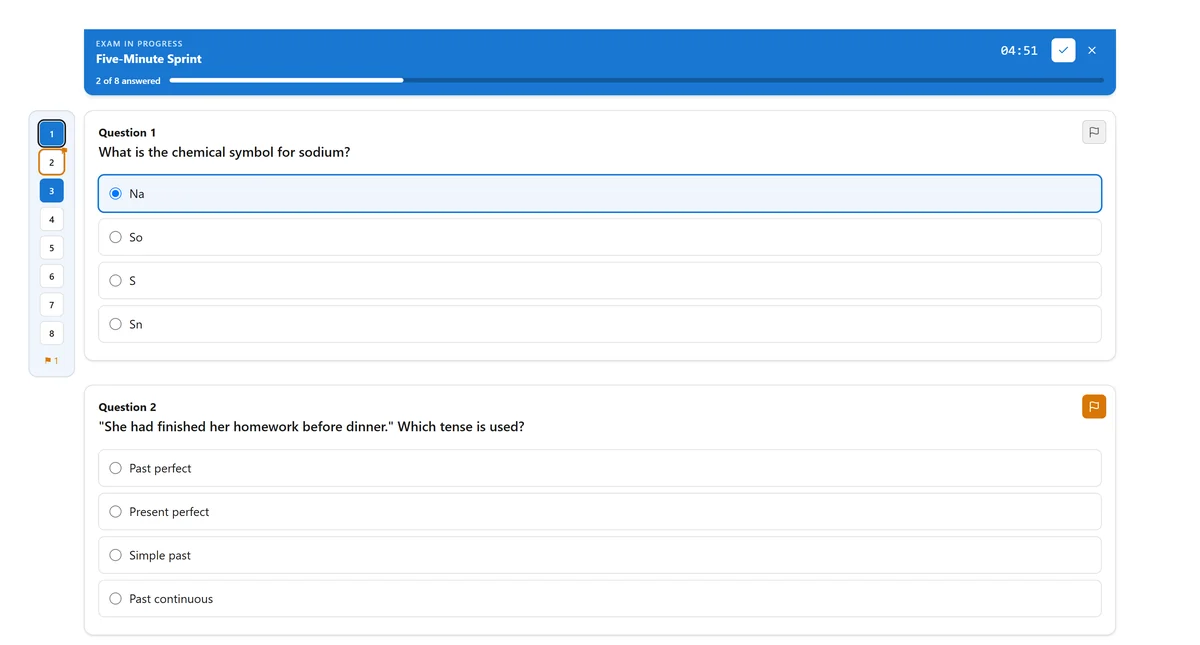
Next Exams is a complete exam and assessment system that runs inside a Joomla website. You build a question bank, put exams together from fixed questions or random pools, and publish them on your own site. People take the exam on your pages, under your domain, with your branding.
It's paid open source: the code is GPL, and you pay for the download, updates and support. That's the main practical difference from the rest of this list.
What it does well
- Sixteen question types. Single and multiple choice, true/false, short answer, essay, ordering, matching, extended matching, cloze and speaking, plus six visual types: image choice, range slider, hotspot, image marking, graph and puzzle. Fourteen of them grade themselves, with partial credit.
- Long, structured exams. You can split an exam into timed parts with a reading passage beside the questions, a listening recording with a play limit, and spoken answers recorded in the browser. That covers exams in the style of IELTS and OET, with scaled scores such as "350 out of 500, grade B".
- An exam runner that doesn't lose work. The clock and the score live on the server, answers autosave, a learner can pause and come back, and the exam still submits with JavaScript switched off.
- Certificates you can verify. A visual certificate designer, automatic issue on a pass, and a QR code on each certificate that leads to a public check page.
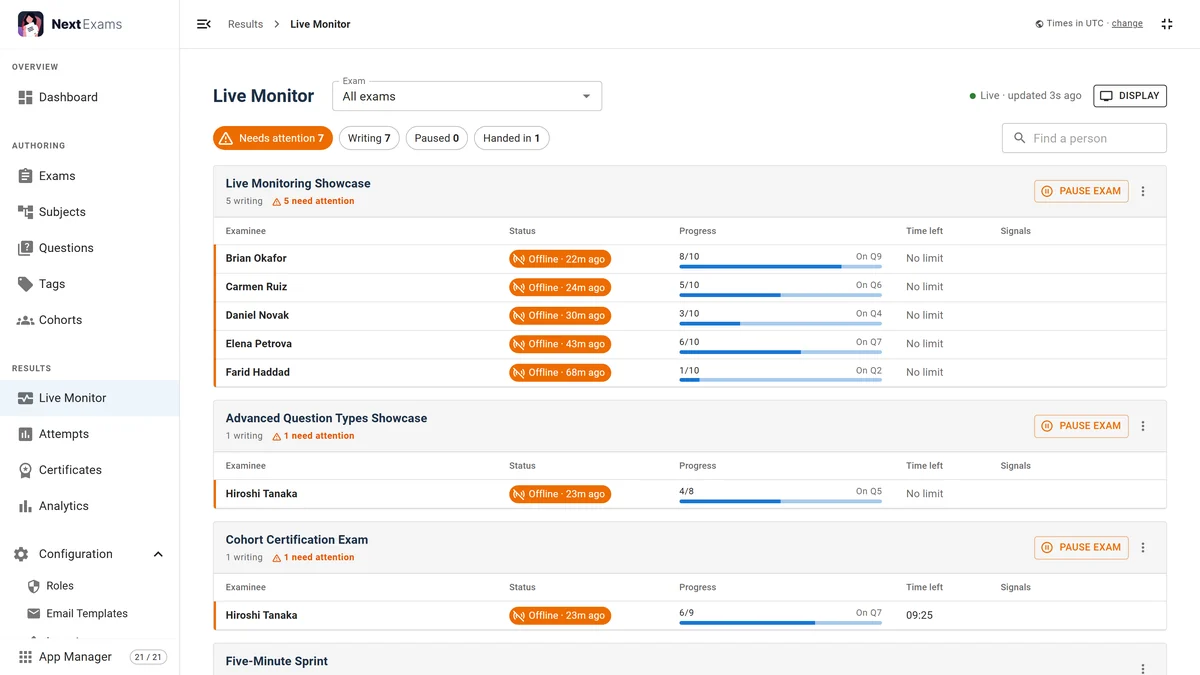
- Live invigilation. A monitor board shows who is writing, who has gone offline and who has run out of time. Invigilators can be invited by link or PIN without a site account, and can add time or pause someone in one click.
- Item analysis. Difficulty and discrimination for every question, so you can see which questions aren't telling good candidates from weak ones.
- Integrations. LTI 1.3 with Deep Linking and grade passback, a REST API with an OpenAPI description, and signed webhooks. Questions import from CSV, Aiken, GIFT, Moodle XML and QTI 2.1.
Limits
- It needs Joomla (see the requirements). If your site runs on something else, you'd install Joomla for it or launch it from your LMS over LTI.
- It isn't a course platform. There are no lessons or course pages, just exams, results and certificates.
- No webcam proctoring and no lockdown-browser integration. It records signals such as tab switches and pastes for a person to review, and stops there on purpose.
- It costs money, unlike the five tools below.
Choose it if you want exams on your own website and don't want to run a full LMS to get them. You can try the live demo (pick a person and start an exam), read the documentation, or watch the first tutorial on YouTube.
2. Moodle Quiz
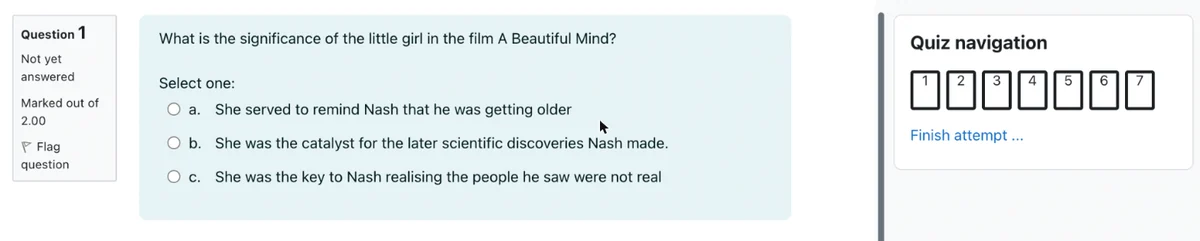
Moodle is the most widely used open source learning platform. Quiz is one of its core activities, so you get exams as part of a full course system with users, enrolments, a gradebook and reports.
What it does well
- A large set of built-in question types, including calculated, drag-and-drop, embedded answers (cloze) and essay, and many more available as plugins.
- Question banks with random questions drawn from categories. Banks can be shared, so questions are easy to reuse across courses.
- Safe Exam Browser support in the quiz settings, so you can require the lockdown browser for an exam.
- Statistics reports with facility and discrimination indexes for each question.
- LTI support, both to launch external tools and to publish Moodle activities to other platforms.
- The biggest community: documentation, forums, plugins and hosting partners in most countries.
Limits
- It's a whole LMS. If you only want exams, you still install, update and secure a large platform.
- Certificates aren't part of core Moodle. You add them with a plugin.
- No native QTI import or export in core. Moving questions in or out usually goes through Moodle XML or GIFT.
Choose it if exams are one part of teaching whole courses, and you have someone to look after the server.
3. TAO
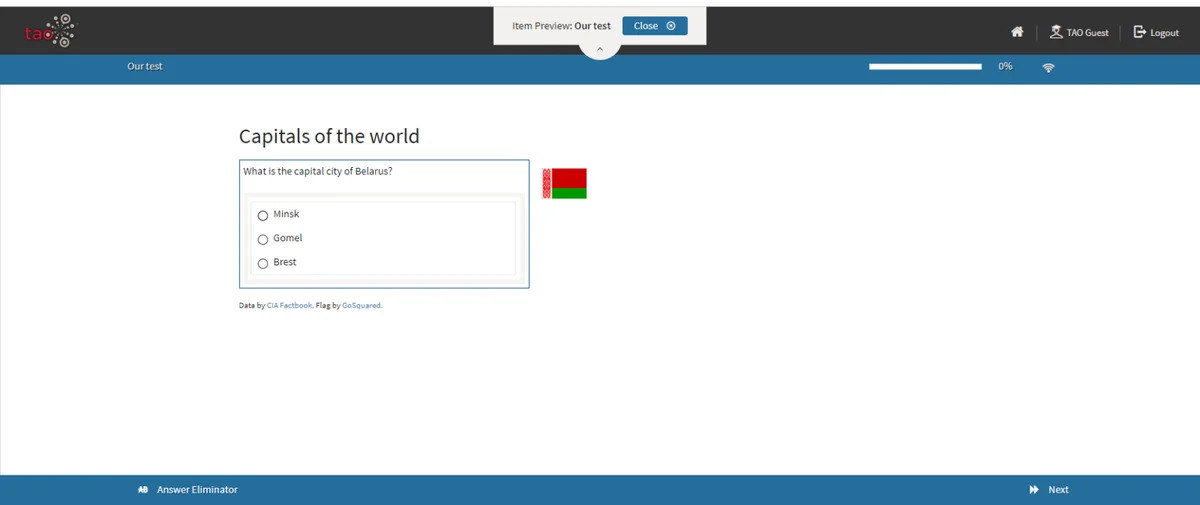
TAO is a dedicated assessment platform from Open Assessment Technologies. It's built around the QTI standard and is used for large national and international tests. Its free Community Edition comes with delivery, manual scoring, analytics and administration as separate modules.
What it does well
- Standards first: items and tests are QTI, and the platform also supports LTI, xAPI and WCAG accessibility.
- Built for formal testing, with test sessions, on-site proctoring, a separate grader for manual scoring and an analytics module.
- Test-taker tools such as a review panel, calculators, a scratchpad, text-to-speech and an answer eliminator.
- Recent releases added password-protected sessions, an option to stop early submission and a paper-based testing workflow.
Limits
- It's the hardest tool on this list to run. The Community Edition ships as containers (Docker Compose or Kubernetes), and you need someone comfortable with that.
- No certificates and no course features. It's a testing engine.
- The AGPL licence means that if you change the code and offer it over a network, you must share your changes.
Choose it if you deliver formal, high-volume assessments, and QTI interoperability matters more to you than ease of setup.
4. ILIAS
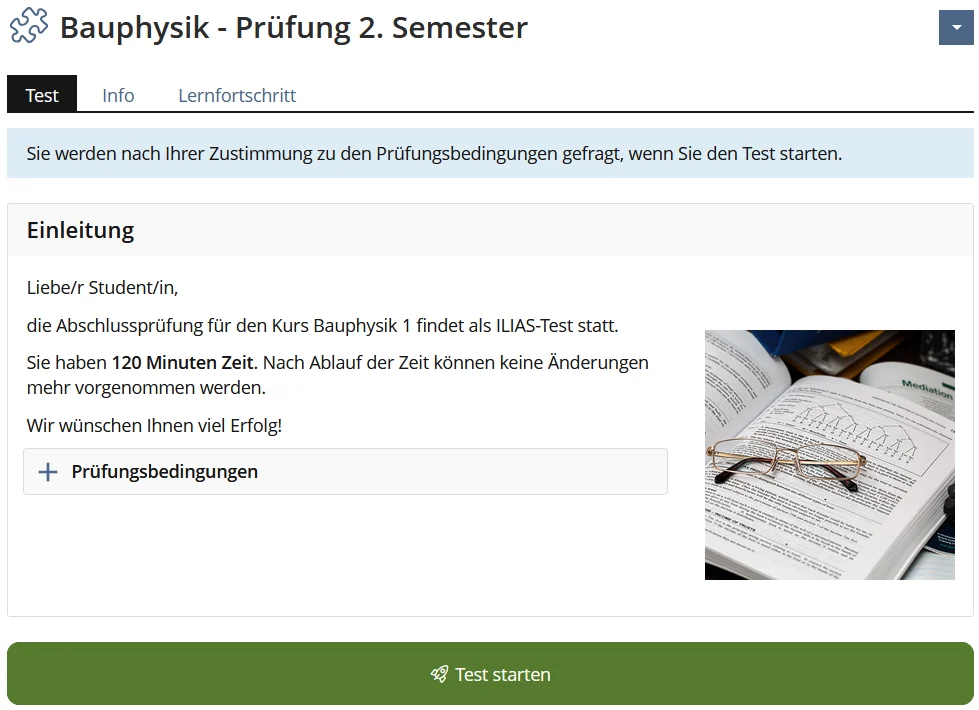
ILIAS is a German open source learning platform, widely used by universities in Germany, Austria and Switzerland. Its Test & Assessment module is one of the most complete exam tools you'll find inside an LMS.
What it does well
- Around 15 question types, including KPRIM, error text, long menu, formula, imagemap and essay.
- Question pools and random tests, so each participant can get a different set of questions.
- Detailed result pages that show each question, the participant's answer and the points.
- Certificates and LTI are part of the platform. Safe Exam Browser works through a community plugin.
- Long-term support: several major versions are maintained at the same time.
Limits
- Like Moodle, it's a full LMS, with the hosting and admin work that comes with one.
- The community is mostly German-speaking, so some documentation and forum discussion is in German.
Choose it if you're a university or school that wants an LMS where exams are a first-class feature.
5. OpenOLAT
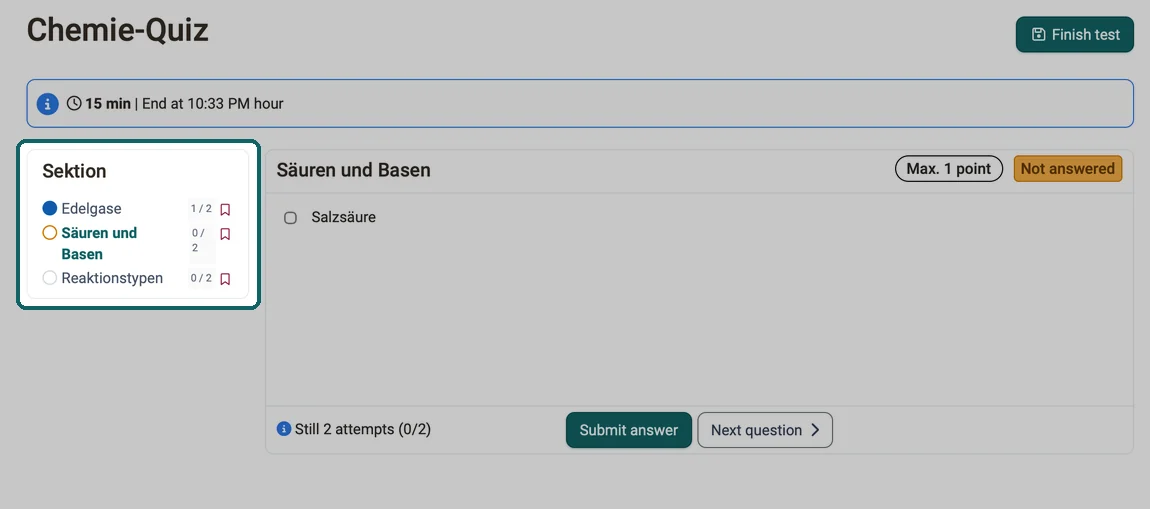
OpenOLAT is a Swiss learning platform written in Java. Its test engine stores everything in QTI 2.1, which makes it one of the few LMSs where QTI is the native format rather than an export option.
What it does well
- Sixteen question types: thirteen closed types scored automatically (including Kprim, hotspot, hottext, drag and drop and several gap types) plus essay, file upload and drawing.
- QTI 2.1 tests that you can import and export without conversion.
- Safe Exam Browser support, with custom SEB configuration templates per exam.
- Recent releases added PDF export of free-text answers and clearer status display during a test.
- A permissive Apache 2.0 licence.
Limits
- Java hosting is less common than PHP hosting, so you'll likely need a VPS or a hosting partner.
- It's a full LMS. You get courses whether you need them or not.
Choose it if you want QTI-native tests and exam features inside a well-maintained LMS.
6. TCExam
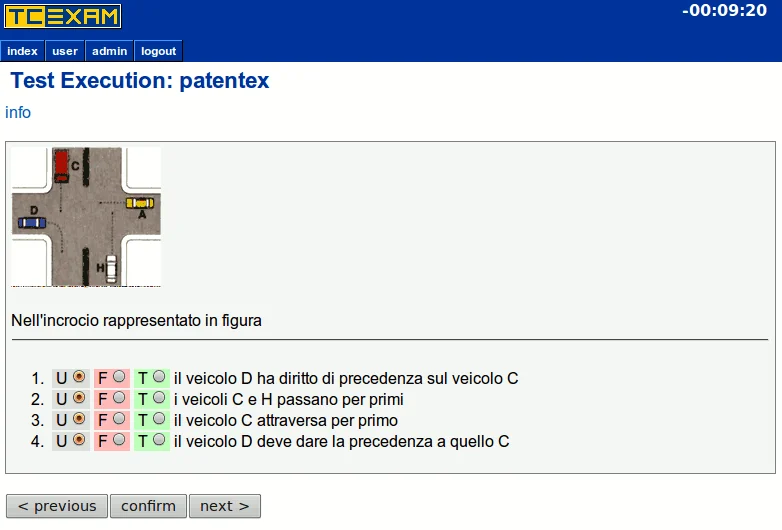
TCExam is a standalone exam system that has been around since 2004 and is still actively developed. It does one job: create, run and score tests.
What it does well
- Light to host: a plain PHP application on a standard LAMP server, with an official Docker setup for trying it out.
- A unique test for each person, with questions and answers picked and ordered at random from modules and topics.
- Paper exams: it prints PDF tests with answer sheets, and scanned sheets are imported and scored automatically (OMR).
- 26 interface languages, right-to-left support, and LDAP, RADIUS and CAS sign-in.
- Results and statistics with export to TSV, XML and PDF.
Limits
- Four question types: single choice, multiple choice, ordering and free text.
- No certificates, LTI or QTI.
- The interface is plain next to the others.
Choose it if you want a small, dependable exam server, or you need to mix online and paper tests.
Feature by feature
| Feature | Next Exams | Moodle Quiz | TAO CE | ILIAS | OpenOLAT | TCExam |
|---|---|---|---|---|---|---|
| Question types | 16 | About 15 in core, more as plugins | QTI interactions | About 15 | 16 | 4 |
| Random questions from a bank | Yes | Yes | Yes | Yes | Yes | Yes |
| Time limit | Yes, per exam and per part | Yes | Yes | Yes | Yes | Yes |
| Manual marking of essays | Yes, with rubrics | Yes | Yes (TAO Grader) | Yes | Yes | Yes |
| Listening and speaking questions | Yes | With plugins | Depends on QTI items | No | No | No |
| Certificates | Yes, with QR check | With a plugin | No | Yes | Yes | No |
| Safe Exam Browser | No | Yes | Own proctoring tools | With a plugin | Yes | No |
| Live invigilation board | Yes | No | Yes (proctoring) | No | No | No |
| Question statistics | Yes | Yes | Yes (TAO Insights) | Yes | Yes | Yes |
| LTI | LTI 1.3 | Yes | Yes | Yes | LTI 1.3 | No |
| QTI | QTI 2.1 import and export | Not in core | Native | Import and export | Native (QTI 2.1) | No |
| Paper exams with scanned sheets | No | No | Paper-based workflow | No | No | Yes (OMR) |
| Courses and lessons | No | Yes | No | Yes | Yes | No |
"No" means not built in. Several gaps in the LMS columns can be filled with plugins, and the LMSs do much more outside exams than this table shows.
Which one should you choose?
- You have a website and want to run exams on it: Next Exams. It keeps exams, results and certificates on your own site, with no second platform to run.
- You teach full courses and exams are one part of that: Moodle, or ILIAS if you're a university in a German-speaking country.
- You work with QTI content from publishers or exam boards: TAO, or OpenOLAT if you also want an LMS.
- You need a lockdown browser: Moodle or OpenOLAT, which support Safe Exam Browser out of the box. ILIAS supports it with a plugin.
- You run language exams with reading, listening and speaking parts: Next Exams, which can start from IELTS- and OET-style blueprints.
- You want something small, or you still give paper tests: TCExam.
FAQ
What is the best free open source exam software?
It depends on the job. Moodle is the safest choice if you also need courses. TAO is the strongest pure testing platform. TCExam is the simplest to host. All three are free to download.
Is Next Exams free?
No. Next Exams is open source under the GPL, but it's sold as a paid product. The price includes the download, updates and support. You can try the demo first, and the product page lists the plans.
Can I run online exams without an LMS?
Yes. Next Exams runs on a Joomla website, and TCExam and TAO run on their own. Moodle, ILIAS and OpenOLAT are full learning platforms.
What is QTI, and do I need it?
QTI is a standard file format for questions and tests, so you can move them between systems. It matters if you share content with other organisations or buy item banks from publishers. If you write all your own questions, it matters less. Next Exams, ILIAS, OpenOLAT and TAO can all import QTI.
Can I move my questions out of Moodle?
Usually, yes. Moodle exports questions as Moodle XML or GIFT, and many tools can read one of those. Next Exams imports both, plus Aiken, CSV and QTI 2.1, and shows a preview before it creates anything.
Which tools support Safe Exam Browser?
Moodle and OpenOLAT have Safe Exam Browser settings built in, and ILIAS adds them with a plugin. TAO has its own proctoring and session tools. Next Exams and TCExam don't integrate with a lockdown browser.
Sources
- Next Exams documentation and changelog
- Moodle Docs: Quiz activity and Safe Exam Browser
- Moodle source code on GitHub
- TAO: launch of the next-generation Community Edition and TAO release notes
- TAO Community Edition installation and licence
- ILIAS website and ILIAS source code on GitHub
- OpenOLAT documentation: test question types and release notes
- TCExam features, question types and source code
Features were checked in November 2026. If you spot something that has changed, tell us and we'll update the article.