Audit Policy
Controls what Next DB records in the audit trail, how long entries are kept, and who may manage those settings.
The two-tier model
Next DB uses a two-tier audit policy:
-
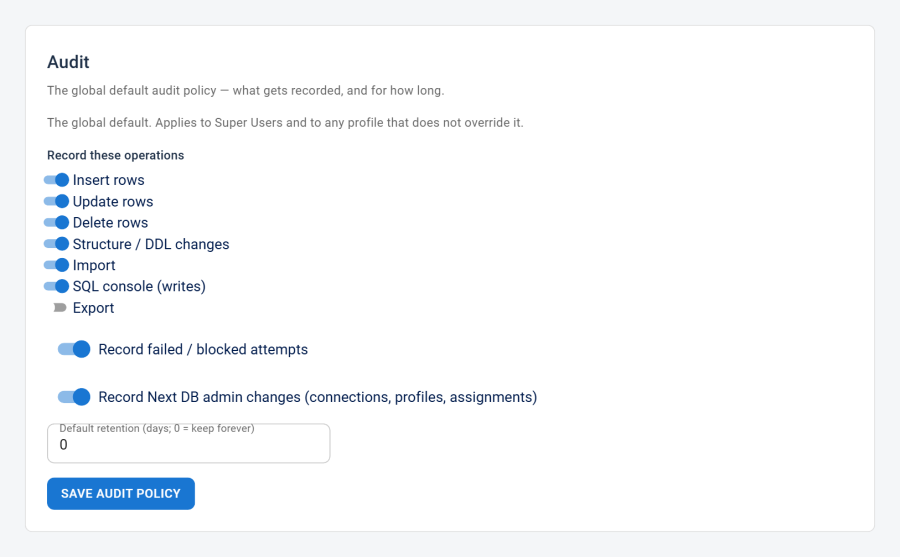
Global default policy — configured on the Settings → Audit page and seeded with sensible defaults on installation. It applies to Super Users and to any profile that does not override it. Changing the global policy therefore affects every user who has not explicitly opted out of it.
-
Per-profile override — a profile can override the global recording rules for its users (the "Override global policy" option). Only the recorded operations, Record failures, and (optionally) retention can be overridden per profile. Logging of Next DB admin changes is always controlled globally.
Global default policy fields
These are the fields editable on the Settings → Audit page.
| Field | What it does | Values / default | Notes |
|---|---|---|---|
| Recorded operations | Which editor operations are recorded | See the table below | Individual toggles per operation |
| Record failures | Record failed or blocked attempts | On / off; default on | Captures permission denials, query errors, and import failures |
| Record configuration changes | Log changes to Next DB's own configuration | On / off; default on | Covers connection, profile, and assignment saves and deletes; global-only — cannot be overridden per profile |
| Retention (days) | How long to keep each entry | A whole number, 0 or more; default 0 |
0 means entries are kept forever; otherwise each entry is removed this many days after it's recorded |
Seeded defaults
The defaults are set once on install (and left untouched on upgrade so your edits survive):
| Operation | Default |
|---|---|
| Insert rows | on |
| Update rows | on |
| Delete rows | on |
| Structure changes | on |
| Import | on |
| SQL console (writes) | on |
| Export | off |
| Record failures | on |
| Record configuration changes | on |
| Retention (days) | 0 (keep forever) |
Recordable operations
The operations that the audit trail can record. Browsing (reads) is never recorded, and the SQL console option covers write statements run in the console.
| Operation | What it covers |
|---|---|
| Insert rows | Inserting new rows |
| Update rows | Editing existing rows |
| Delete rows | Deleting rows |
| Structure changes | Columns, indexes, foreign keys, create/drop/rename/truncate |
| Import | Importing .sql scripts and CSV |
| SQL console (writes) | Write statements run in the SQL console |
| Export | SQL dump and CSV exports |
Note: Logging of Next DB admin changes (connection, profile, and assignment saves and deletes) is a separate, global-only setting — it is not in the operations list above and cannot be controlled per profile.
Per-profile audit settings
A profile's audit settings govern two things: whether its users may view the audit log, and an optional override of the global recording policy.
| Field | What it does | Values / default | Notes |
|---|---|---|---|
| Can view audit log | Whether users of this profile may view the audit log | On / off; default off | Super Users always have view access regardless of this field |
| Override global policy | Turn on the per-profile recording settings below | On / off; default off | When off, the fields below are saved but inactive — the global policy applies |
| Recorded operations | Per-operation recording for this profile | Same operations as the global list; all off by default | Active only when Override is on |
| Record failures | Record failed/blocked attempts for this profile | On / off; default off | Active only when Override is on |
| Retention mode | Use the global retention or a custom one | Global / Custom; default Global | When Global, the global retention is used even if Override is on |
| Retention (days) | How long to keep entries for this profile's users | A whole number, 0 or more; default 0 |
Active only when Override is on and Retention mode is Custom |
Logging of Next DB admin changes is never inherited from a profile. Those changes are always controlled globally — they are Super-User-only actions and should always be under global control.
Retention
Each entry gets its own expiry when it's recorded. Changing the retention later only affects new entries; existing ones keep their original expiry. "Keep forever" entries are removed only by a manual purge.
Pruning paths
Expired entries can be removed in three ways.
1. Automatic cleanup on audit log view
Whenever someone opens the Audit log, expired entries are cleaned up automatically. No special permission is needed beyond being able to view the log.
2. Manual purge
The Purge action on the Audit log page lets an authorised user delete entries immediately. Two modes are available:
- All — deletes every entry, regardless of expiry.
- Before date — deletes entries created before a date you choose.
Purge requires the Purge Audit Log permission; users without it don't see the button.
3. Scheduled task
Next DB includes a Joomla scheduled-task plugin that prunes the log on a schedule you set. On a low-traffic or unattended site the Audit log page may rarely be opened, so this task keeps the log pruned without any manual action.
How to add the scheduled task:
- Go to System → Manage → Plugins and confirm that Task — Next DB Audit Prune is published (it is enabled during package installation).
- Go to System → Scheduled Tasks and click New.
- In the task-type list, select Next DB: Prune audit log.
- Set your preferred schedule (for example, once daily at 03:00).
- In the task parameters, set Maximum log age (days):
0(default) — the task only removes entries that have passed their own expiry. "Keep forever" entries are not touched.- Any positive number — in addition to the per-entry expiry, the task also deletes every entry older than that many days. This acts as a hard ceiling on log age.
- Save the task.
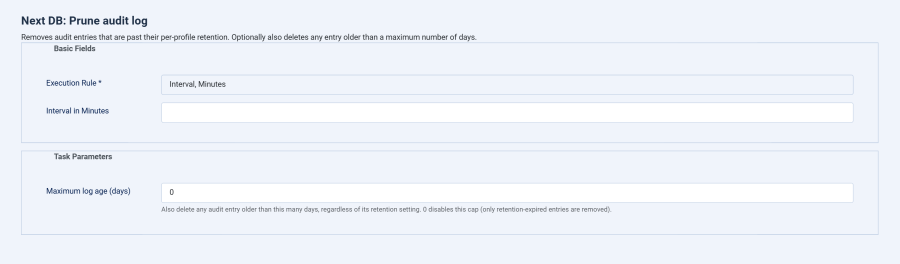
The task removes expired entries (and, if you set a maximum age, anything older than that) and records how many it removed in Joomla's scheduled-task log.
Where to configure
| What | Where | Required permission |
|---|---|---|
| Global default policy (recorded operations, failures, configuration changes, retention) | Next DB → Settings → Audit | Manage Audit Policy permission, or Super User |
| Per-profile audit override and view access | Next DB → Configuration → Profiles → [edit profile] → Audit section | Edit Profiles permission, or Super User |
| Manual purge of the audit log | Next DB → Audit → Purge | Purge Audit Log permission, or Super User |
| Scheduled pruning task | Joomla → System → Scheduled Tasks | Joomla Super User (scheduling is a Joomla-level feature) |