Security
Next DB is a powerful database administration tool, so it ships with several safeguards that protect your Joomla site and your attached databases. This page explains what those safeguards do and how they appear to you: core-table protection, SQLite path validation, import size limits, what the audit log hides, cleaned-up error messages, and the baseline protections that apply to every action.
Core-table protection
Next DB blocks all changes to tables that must never be altered through a database editor — the tables Joomla depends on to run, and each database engine's internal system tables. You can still browse and read these tables; you just can't change their data or structure from the editor.
Always on for the Joomla site database
Protection is permanently enabled for the Joomla site database, and there is no switch to turn it off. Corrupting the tables that hold logins, access levels, or installed extensions would break your whole site, so Next DB prevents that even by accident.
On by default for attached connections
For other stored connections, the Protect core tables toggle in the connection edit form keeps the same safeguards in place (it is on by default). See Connections — Protect core tables.
Who is affected
Everyone, including Super Users. This is a data-integrity safeguard, not a permission setting, so no profile or user-group can switch it off.
What is protected
- Critical Joomla tables — the tables behind users and access control, installed extensions and templates, sessions, and the update system — are protected so the CMS can't be broken from the editor. You can still edit ordinary content and component tables as normal.
- Next DB's own configuration tables — the tables that store your connections, profiles, assignments, settings and audit trail — are protected so Next DB's own access control and audit can't be disabled from within the editor.
- The database's internal system tables — each engine's own behind-the-scenes tables — are also protected, because no normal editing task needs to write to them.
What is blocked and what is allowed
| Action | Protected table | Other tables |
|---|---|---|
| Browse / read | Allowed | Allowed |
| Insert / update / delete | Blocked | Depends on your profile |
| Structure changes | Blocked | Depends on your profile |
| SQL console — writes and structure changes | Blocked | Depends on your SQL console access |
| SQL console — read-only queries | Allowed | Depends on your SQL console access |
What you see when something is blocked
When a row or structure change is blocked, Next DB refuses the change and shows:
This table is protected and cannot be modified. It is a Joomla core table or a database system object on a protected connection.
When the SQL console blocks a statement, Next DB shows:
This statement targets a protected Joomla core or system table and was refused. Disable core-table protection on this connection to allow it.
A note on the SQL console
For ordinary editing (browse, insert, update, delete, structure) the protection is exact. In the SQL console, where you can run any statement you like, the check is a strong best-effort safety net rather than an absolute guarantee — a deliberately disguised statement could slip past it. Read-only queries are always allowed. For the strongest possible protection of arbitrary SQL, ask your DBA to restrict the privileges of the database account Next DB connects with, so the database itself refuses the change.
Note: A planned option to enforce permissions at the database-grant level is not active in this version.
SQLite path validation
SQLite is unusual: a SQLite database is a single file on the server, so its "address" is a file path. To keep that safe, Next DB validates every SQLite path you enter, both when you save a connection and when it connects. The rules are simple:
- The path may not contain
..(no stepping up out of a folder). - The path may not contain null bytes.
- When a base directory is configured (see below), the file must live inside that directory. If it doesn't, Next DB shows: SQLite databases must live inside the configured base directory.
Configuring the SQLite base directory
Go to Next DB → Settings → Security and set the SQLite base directory field to an absolute path on the server.
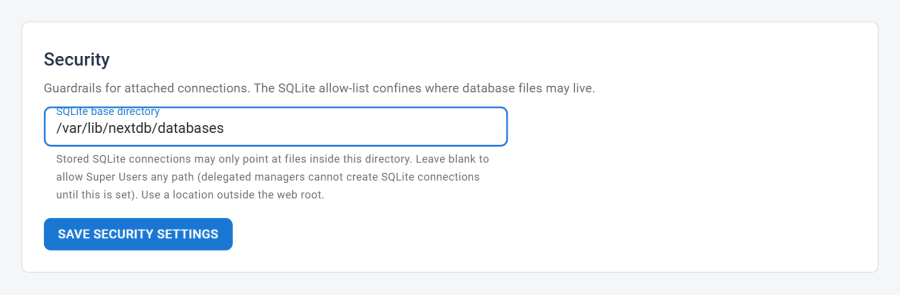
Tip: Choose a path outside the web root (for example, a dedicated folder above
public_htmlon shared hosting). SQLite files placed under the web root could be downloaded by anyone who guesses the URL.
Who can create SQLite connections
When no base directory is configured, only a Super User can create or test SQLite connections. Once a Super User sets a base directory, any operator allowed to create connections can add SQLite connections too — but every file is confined to that directory. The base directory is what makes delegating SQLite connections safe.
Import size limit
Imports and uploads are limited to 32 MB to protect the server; larger files are rejected. The largest thing Next DB normally accepts is a SQL or CSV import file, and anything beyond this limit is almost always either a mistake or an attempt to overload the server.
What the audit log hides
The audit trail records what happened so you can investigate later — but it should never become a second place where secrets are stored. So Next DB automatically hides sensitive values before they are written to the log:
- Passwords are automatically stripped from recorded SQL before it's saved.
- In before/after snapshots of changed rows, values in columns that look sensitive (names containing password, secret, token, key, and similar) are masked. The log still shows which row changed and that the sensitive column was touched — it just doesn't copy the value itself.
Cleaned-up connection error messages
If a connection test fails, the underlying error from the database can contain the hostname, username and even the password. Next DB removes any of those details from the error before showing it to you. This applies both when you test connection settings and on the dashboard's connection-health tiles.
Baseline protections
The safeguards above sit on top of a set of protections that apply to every action you take in Next DB:
| Protection | What it means for you |
|---|---|
| Cross-site request protection | Every change is verified to have come from your own Next DB session, so another site can't trick your browser into making changes on your behalf. |
| Safe handling of your input | Everything Next DB generates (browsing, inserting, editing, deleting, structure changes) keeps your input separate from the command itself, so it can't be used to inject malicious SQL. |
| Correct name handling | Table and column names are always quoted correctly for the engine you're on, so unusual names can't be misread as commands. |
| Encrypted stored passwords | Connection passwords are strongly encrypted at rest. See Connections — Password encryption. |
| Passwords never shown back | Saved passwords are never returned to the browser; the connection screen only indicates whether a password is set. |
| Admin login required | Every action requires an active Joomla administrator session. Guests and unauthenticated requests are turned away. |
See also
- Connections — Protect core tables toggle; SQLite path field; password encryption; cleaned-up test errors
- Profiles and Access Control — per-connection operation gates; SQL console access; management permission grants
- Settings — SQLite base directory and other component-level configuration
- Audit Trail — what is recorded, the retention policy, and how to review the log