App Manager
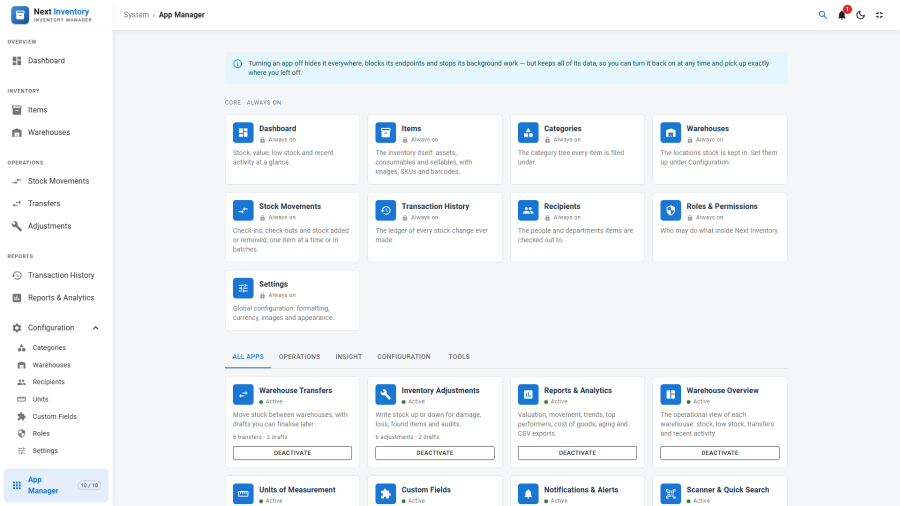
Next Inventory does more than most sites need. The App Manager turns whole areas of the component on and off from one card grid, so a warehouse that only counts stock is not cluttered with transfers, adjustments, custom fields or a notification bell it never uses.
Open it from the App Manager entry pinned to the bottom of the sidebar (or the grid icon in the top bar when the component runs inside the Joomla template). It sits outside the Configuration group on purpose — see The page that switches things back on.
What an app is
An app is one switchable capability. There are nineteen, in five categories.
| Category | Apps |
|---|---|
| Core | Dashboard · Items · Categories · Warehouses · Stock Movements · Transaction History · Recipients · Roles & Permissions · Settings |
| Operations | Warehouse Transfers · Inventory Adjustments |
| Insight | Reports & Analytics · Warehouse Overview |
| Configuration | Units of Measurement · Custom Fields · Notifications & Alerts |
| Tools | Scanner & Quick Search · Progressive Web App · Demo Data |
The nine core apps cannot be switched off. They have no toggle and no underlying setting, so a core app cannot be disabled even by a hand-crafted request. Everything the component fundamentally is — items, categories, warehouses, the stock ledger, recipients, roles and settings — stays.
Eight of the other ten are on by default. Two are not:
- Progressive Web App is the same switch as the PWA option that existed before 6.1.0, so it keeps whatever you had already chosen — which is off, unless you had turned it on.
- Demo Data ships off. It seeds sample records and makes everyone except Super Users read-only, so it is something you opt into deliberately, never something an update decides for you.
Everything else is on after an update, so updating changes nothing until you choose otherwise.
Warehouse Overview is the operational Warehouses page — the per-site card grid and the Overview / Inventory / Transfers / Adjustments / Activity tabs. The warehouse records themselves, and their editing under Configuration → Warehouses, are core and always available.
What disabling does
Disabling is hide and hard-block:
| Layer | Effect |
|---|---|
| Navigation | The nav item, its routes and any dashboard link to it disappear. A bookmark to a disabled page lands on the Dashboard. |
| Endpoints | Requests to that app's tasks are refused with an APP_DISABLED code — in the administrator and on the site alike. |
| Background work | Notifications stop being generated, emailed or pushed while the Notifications app is off. |
| Related screens | The warehouse Transfers / Adjustments tabs, the unit picker on the item form, custom-field panels and filters, the quick-search box and the notification bell all go with their app. |
The site-side gate runs before the login check, so an anonymous caller learns that an app is disabled rather than being invited to log in to it.
What disabling never does
Data is never touched. Turning an app off deletes nothing, and turning it back on restores the capability exactly as it was, with every record intact. That is why the confirmation dialog warns you about what will stop working rather than what will be deleted — and why it shows the usage counts, so you know what you are switching off.
A few things carry on deliberately:
- The ledger is core. Transfers and adjustments already recorded stay in Transaction History, on the Dashboard's recent activity and in every stock quantity. Disabling an app never rewrites stock.
- Items keep their unit. With Units off, the unit picker leaves the item form, but every item keeps the unit it already has and stock changes keep converting between units.
- Custom-field values are kept, just hidden. Forms, lists and filters stop showing custom fields; nothing stored is removed, and saving an item while the app is off leaves its custom-field values untouched.
- The Dashboard keeps its statistics when Reports & Analytics is off. Only the Reports page, the cost-of-goods and aging analysis and the CSV exports go.
Status
Each card shows one of three states:
| State | Meaning |
|---|---|
| Active | Running normally |
| Inactive | You switched it off |
| Paused | Something it depends on is off |
Core cards show Always on instead.
Failing open
Every resolution path fails open, on purpose:
- A missing setting falls back to the app's built-in default.
- An unrecognised app key is treated as enabled.
- A settings table that cannot be read does not disable the product.
The reasoning is that an update, a half-applied migration or a database hiccup should never black out a working inventory. The failure mode of this feature is "too much is available", not "nothing works". A site updating from an earlier version sees every app already on.
The page that switches things back on
The App Manager itself has no app gate. Switching every app off must never hide the page that switches them back on, so it is reachable whatever else is disabled. It sits outside the Configuration group in the navigation for the same reason.
Saving
Saving reloads the page. The enabled map is read once when the application boots, and the application navigates without re-fetching the page, so a reload is the only reliable way to apply the change everywhere at once. Only the apps you changed are sent, so two administrators editing at the same time cannot overwrite each other's choices.
Access control
| Action | Required permission |
|---|---|
| View app status | configuration — manage_settings |
| Enable or disable an app | configuration — manage_settings |
This is the same permission as the Settings page, so no role needs a new grant after updating.
Two things cannot be toggled regardless of permission: core apps, and the Demo Data app while a demo dataset is installed — disabling it would block the very action that removes the demo data.